Support Forum

Permalinks not updating

WM William MacQuinn
William MacQuinn
Member

When we first launched it we did not change the default permalink settings in WordPress, big mistake on our part.  We relaunched the site with a new URL and changed the permalinks to %postname%.  Only issues now is simple-press still has the current permalink set to /?page_id-88.

I clicked update forum permalink already.  I deleted .htaccess file. Any other suggestions?

28 Answers

New Answer

YS Yellow Swordfish
Yellow Swordfish
Member

Well this should work just fine:

  1. WordPress admin > Settings > Permalinks – click ‘save changes’ whether you change them or not. This will flush the WP rewrite rules.
  2. Forum admin > Integration > Page and Permalink – ensure the correvt oage is selected at top. If not select and update panel.
  3. CLick update forum permalinks.
  4. Empty browser cache and try things with fresh page loads.

If that does not work then are you using any sort of caching plugin?

WM William MacQuinn
William MacQuinn
Member

Thanks for the quick reply.

Tried all that, same thing.  The main forum page loads. When I try to click into a forum it sill has the old permalink saved and just kicks me back to the main page. No caching plugins.

YS Yellow Swordfish
Yellow Swordfish
Member

Ah… going back to the main page is a different issue. Do you have the Yoast SEO plugin active? Or – any redirection plugins?

WM William MacQuinn
William MacQuinn
Member

There is a member access plugin, but not the others.

I am happy to send you a PM with logins if that may help, just let me know.

YS Yellow Swordfish
Yellow Swordfish
Member

If – as originally surmised – the permalinks were not ‘taking’ then when clicking on a link to a forum or topic, you would get a 404 page – i.e., not found.

When instead, it just winds back to the front, main page, then that means the URL is being tampered with by something. The two options mentioned can both do this (and both be set to stop it happening). 

So – any other plugins you have that may be having some sort of effect on the urls? Aby htaccess rules other than the standard WP rules?

WM William MacQuinn
William MacQuinn
Member

I will start disabling plugins one by one to see if I can figure out which one is doing it.

I will let you know, thanks again.

WM William MacQuinn
William MacQuinn
Member

I have this working now. I had a plugin that hid the dashboard but once I deactivated it, things started working weird.  

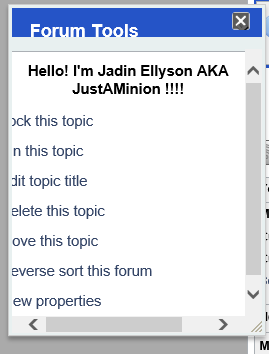
Now I have found an issue with the forum tools pop out being cut off.  The first couple letters will not display.  I tried to resize the window.  Any suggestions?


Capture3.PNG
WM William MacQuinn
William MacQuinn
Member

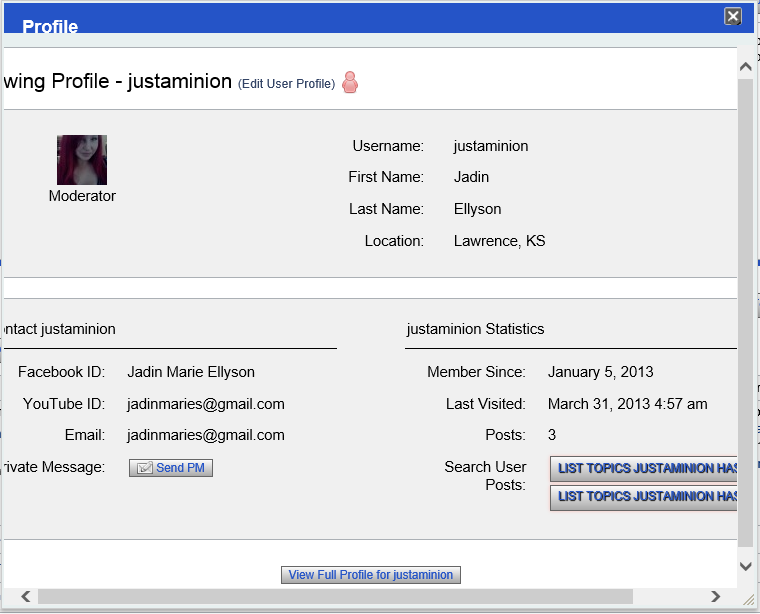
Actually, all pop out windows are cut off on the left side.

IK Ike
Ike
Member

So the original issue is fixed?

Have you got a link to your forum so we can take a look?

WM William MacQuinn
William MacQuinn
Member

Yes, the original issue is fixed.

The forum is at www.tm-mafia.com/forum

Thanks

IK Ike
Ike
Member

Thats good news.

As for the popup box problem, I think the only one I can bring up as a guest is the ‘view edit history’ on a post. But that popup seems to be displaying fine. The only difference I can see between the standard ui-dialog box and the one on your theme is that you have yours set to position: absolute, which I believe we overwrite with position: fixed, but it shouldn’t change the size.

Is this happening on all popup boxes? including the edit post popup? or am I looking at one of the only ones that works OK? Still it shouldn’t matter as they all use the ui-dialog class.

I would suggest clearing browser cache if you have deactivated a plugin that was having an adverse effect, and if that doesn’t resolve it, try clearing the combined css/js cache in forum > toolbox > housekeeping

WM William MacQuinn
William MacQuinn
Member

I deleted browser cache, cleared the css cache.

It happens with the edit post, with the profile pop up as well.Capture4.PNG

YS Yellow Swordfish
Yellow Swordfish
Member

The edit history popup and the ‘about’ popup display just fine for me as well – that’s using Chrome on a Mac.

What browser and OS are you using that gives this result?