Support Forum

Pop-ups don't display properly

26 Answers

New Answer

NL Noelle Leahy
Noelle Leahy
Member

Hi. The sp-resources and forum-themes directories both have 775 permissions. Sorry, I don’t understand what I need to do in the second paragraph. Where do I check uid and gid, what do I check in wp-content and the custom theme directory? The latter 2 have permissions also 775. Thanks in advance.

MP Mr Papa
Mr Papa
Member

you can check the ownership using most ftp clients (though how varies between them) or via ssh with an ls -la command…

NL Noelle Leahy
Noelle Leahy
Member

Thanks but what folders or files am I checking exactly? Is it wp-admin/users.php? The file permission on that is 644.

MP Mr Papa
Mr Papa
Member

Not permissions, but ownership.. What user and group owns the directory?

NL Noelle Leahy
Noelle Leahy
Member

I have no idea of how to check, sorry. Can you help me out?

MP Mr Papa
Mr Papa
Member

I explained two ways… with ssh using ls -la…  or with your ftp client…  one I have is ownership, other is properties on a directory…  so dont know what you do for ftp…  if you have a file manager in server control panel like cpanel, you can use that too…

NL Noelle Leahy
Noelle Leahy
Member

Ok thanks, my problem though is that I don’t know what exactly “ownership” is, or how to check it. Am I checking something on the database, or am I checking file/folder properties or what? I know how to check file/folder permissions but as you say, this is different. Could you be more specific please? You’ve probably guessed that i’m not a developer. Which directory am I checking and what exactly am I looking for? Thanks a lot in advance.

MP Mr Papa
Mr Papa
Member

its not a developer thing, but a server hosting thing…  do you know what ssh or ftp is?  hard to explain past that…

you could also ask your host…  on the wp-content and wp-content/sp-resources and wp-content/sp-resources/forum-themes find out who ones the directories…  namely, uid and gid…

NL Noelle Leahy
Noelle Leahy
Member

OK, my apologies, I have you now, thanks. Looking at owner/group by ftp, I am the owner as my hosting username is listed under each of the 3 directories. So it seems I have permission to create the child theme. Due to time constraints, i’ll just make the change to the core default.php file and set a reminder to change when the plugin is updated. Thanks for your help.

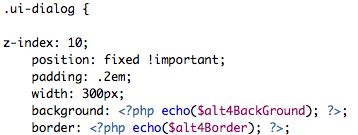
Just another quick q on adding the z-index value as below, does it matter if the text is not aligned exactly with the text below it? You can see the misalignment on the attachment in that the z-index value is aligned with the .ui dialog line above it, but the other code is indented. Does this matter? Also, do I need to have a space between the .ui dialog { and the z-index value as shown by a previous poster on this thread? Thanks in advance.

Screen-shot-2014-05-19-at-13.44.24.png
MP Mr Papa
Mr Papa
Member

no, alignment and spacing generally dont matter..  but it does look like in your code you are missing the closing brace }  but could just be the snippet you picked…

NL Noelle Leahy
Noelle Leahy
Member

Yes, it was just the snippet I picked. Worked perfectly, thanks, will just need to remember to change it when the theme is upgraded. Thanks for all your help!