Support Forum

Post attachment thumbnail opens for Admin but not Member

25 Answers

New Answer

DN David Norman
David Norman
Member

I have deactivated both the Lightbox plugins and still got the same result.

Did some quick research in WP theme managementsmile, then also temporarily switched WP to the default 20-14 theme and still got the same result.

I guess the next step is to deactivate all plugins except SP then reactivate one by one as you suggest. I have backed up my site, though do you advise that I shouldn’t be able to break anything or permanentlt change some important settings by doing this deactivating-check-reactivating proceedure on my live site? My developer’s test site does not have all the WP or SP plugins installed that my live site does, and she is away for 2 weeks anyway. I’m happy to proceed myself if risk is minimal.

MP Mr Papa
Mr Papa
Member

yes, it should be safe to deactivate – I do it all the time… in weird circumstances the activation order can have effects, but that is not common…

worst case, if you have a db backup, you can always go back…  first step is deactivate all and check it out…  if still a problem, just reactivate all..  if it works, activate one at at time checking until it breaks… clear the browser after each step…

YS Yellow Swordfish
Yellow Swordfish
Member

My developer’s test site does not have all the WP or SP plugins installed that my live site does

Is this a duplicate of your site and if yes – does it behave on this test site? If so then start with the plugins she doesn’t have installed… That’s an obvious thing to do but figured I would suggest it :)

DN David Norman
David Norman
Member

The test site is no longer a duplicate of the live site and since the TinyMCE editor issue investigation, not all the SP or WP plugins have been restored to it. There are no attachments in the test site SP Forum posts for me to review and I don’t have the full admin view to the test site to add one (attachments currently aren’t enabled). As my developer is on vacation, I will deactivate-check-reactivate all plugins on the live site.

DN David Norman
David Norman
Member

Deactivated all and it works as expected for Member login. Now going through reactivating-checking process :)

MP Mr Papa
Mr Papa
Member

that’s a start!  now to find the conflict…  keep at it!

DN David Norman
David Norman
Member

Found it ! smile

The issue only happens when the ‘Google Analytics for WordPress’ is activated. I found it on the way through reactivating and then checked it again at the end of the step-by-step process. I checked the result in Firefox and Chrome. I now have all my ususal plugins active except that one and the attachment thumbnail opens the popup fine for both Admin and Member logins. As soon as I reactivate it and reload the post page it doesn’t pop up.

I’m very grateful for your help. What do you suggest now?

Problem-Plugin.jpg
MP Mr Papa
Mr Papa
Member

I am not sure why that is a problem… I know others who are using it… can you go through the options you have selected for it?  perhaps something with links or images?

DN David Norman
David Norman
Member

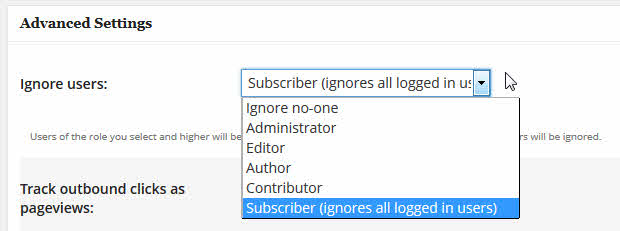
I couldn’t see anything that my level of expertise would see as a problem. However I changed the lowest denominator in the ‘Ignore Users’ setting from Contributor to Subscriber and the popup now works fine for forum Member role (see capture) in Firefox and Chrome.

I don’t think tracking my registered members’ traffic in Google Analytics is something I want to do anyway.

Thanks for all your help and advice with this issue and the other TinyMCE problem we had a while back. Both my developer and I have nothing but glowing priase for the level of support you and YS provide. It is nothing short of astounding. I can’t recommend SimplePress highly enough.smile

Cheers all round,
David
GA4WP-Settings.jpg

YS Yellow Swordfish
Yellow Swordfish
Member

Steve may have a comment to make on the settings here. It’s a most curious issue and not, at first site, an obvious contention. The good news is that you are working and thanks for the endorsement – we appreciate it.