
Support Forum

Post awaiting moderation, but link says 'need moderation: 0"

PM Patricia Miller
Patricia Miller
Member

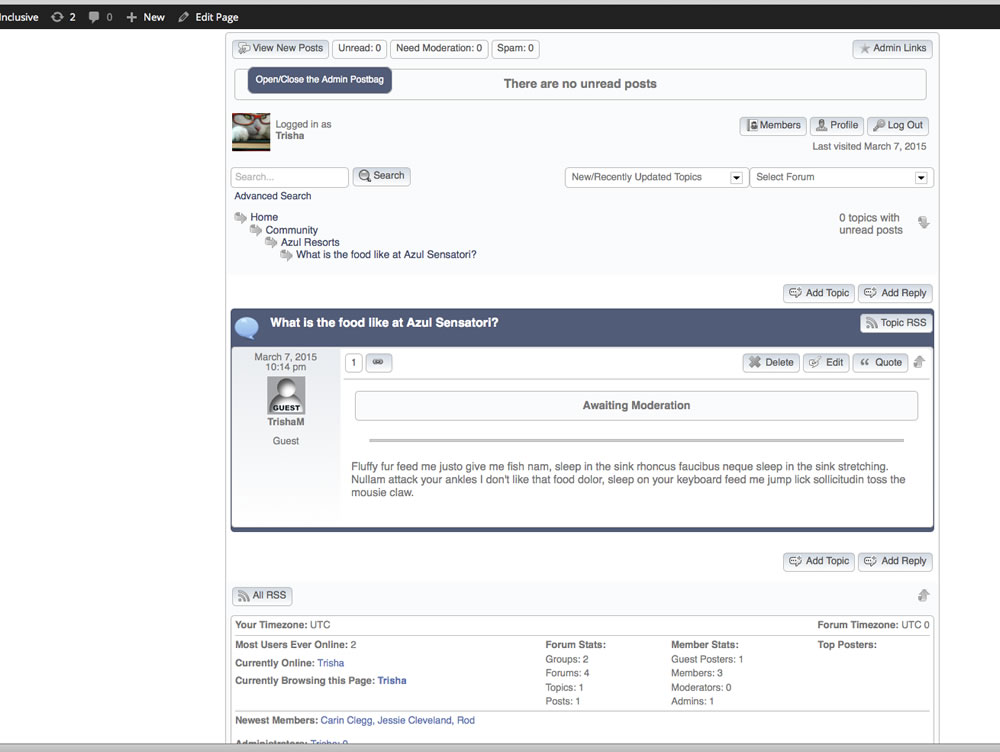
Screen-Shot-2015-03-10-at-11.18.jpgI have spent the last two days searching for a way to moderate a post that clearly says “awaiting moderation”….this is new SP install on a sandbox site under development, and the post is a test post made by a dummy user, but the process to moderate it is confounding me.

I’ve installed and activated the Admin Bar plugin, but nothing shows up in the admin bar at the top of my site (just the usual WP stuff, nothing at all related to SP), and nothing in the “postbag” on the Dashboard – the module there just says “no new posts”…..and I did go to (my) Admin Options under Admins and ensured that “Display the Simple:Press Admin Bar” IS checked.

I’m using the default Theme, and attaching a screenshot to show that while you can see the “awaiting moderation” message that is on the post, above the link says “Need Moderation 0”.  You can also see that there is no SP related messages in the Admin Bar, although there should be.

How do I moderate/approve this post?

3 Answers

New Answer

YS Yellow Swordfish
Yellow Swordfish
Member

Because of the way the SP plugin admin bar works then it will not pick up on posts already awaiting reading or moderation as it creates a special list (called the ‘postbag’). However – with it installed it is the easiest way to look at, review, approve and even reply to posts when you are the forum admin,

There are two other methods for approving a post in moderation.

  1. Go to the forum admin > Admins > Global Admin Options and you will find two settings there that allow an Admin and/or Moderator to simply approve a post by replying to it or by posting to the same topic. 
  2. Use the forum tools explained here in an FAQ: https://simple-press.com/documentation/codex/faq/problem-with-post-edit-buttonow-to/problem-with-post-edit-buttonow-to-delete-a-topic-or-post-and-other-tools/

Myself – use a combination of the admin bar and option 1. Hope this helps.

PM Patricia Miller
Patricia Miller
Member

Thanks!  I did have those settings enabled, and did wind up approving the post that way (by replying), but I was looking for a way to approve without needing an Admin to reply – we’d rather that users help each other and only have moderators involved if questions go unanswered (or not properly answered).

I will consider this closed and will only post back if I have other issues….thanks again for the very prompt response. :-)