Support Forum

Private messages disappearing

TH Thorsten
Thorsten
Member

We’ve had several reports now on our forum that private messages are being lost. I myself experienced it twice, having received a PM notification but no message in my inbox. It’s sporadic at best. So far there have been only a handful of reports. However, we never had this issue before and have been using PMs ever since the beginning.

Users also report that the message count is correct so the messages were captured as sent or received, but the corresponding messages are missing. Example: the feed shows 6 messages but only 5 are there.

I am not quite sure how to go about troubleshooting. We have no problems with our forums whatsoever, so no topics or posts disappearing or not being saved. So I don’t believe this to be a connection issue. Any feedback would be much appreciated.

30 Answers

New Answer

MP Mr Papa
Mr Papa
Member

Not sure how a pm would disappear and no other reports… but lets start with the db… is it possible, its part of a thread? and you are not seeing it or it didnt bubble to the top?

can you check the sfpmrecipients table and for your user_id, see how many are listed… does this match the number of message shown?

TH Thorsten
Thorsten
Member

It’s tricky because I am not affected at the moment, but others are.

One of our students just contacted me on my Tech Support forum and stated she lost a message she’d sent to another student. She said it’s part of a thread that shows 6 messages, but only 5 pull. At least two other people reported that behavior as well.

So I just went in to sfpmrecipients and checked her user ID. I see a thread that matches what she posted. It shows 6 messages. Next I went under sfpmmessages and checked for her ID there. There are 6 messages for that particular thread. I can tell she’s resent one message, apparently the one she reported lost. However, I do see the ‘lost’ message as well because they have identical content.

I’ve asked a few more details from that user and am awaiting response. So far it looks like all messages are accounted for but not all are being pulled.

Also, how can I tell that a message was received by the intended recipient? Or is this all part of pulling the thread?

TH Thorsten
Thorsten
Member

Not sure if this is related but I am seeing a few of the following warnings in my server log:

mod_fcgid: stderr: PHP Warning:  Cannot modify header information – headers already sent by

They are all triggered by Simple:Press, some of them for private messages:

[Sun Nov 17 05:26:04 2013] [warn] [client 173.245.54.135] mod_fcgid: stderr: PHP Warning:  Cannot modify header information – headers already sent by (output started at xxxxxx/public_html/ecourses/wp-includes/plugin.php:429), referer: http://decor8blog.com/ecourses/forum/private-messaging/thread/615/

Here’s what’s in the S:P error_log:

November 17, 2013
11:26 am
32 php file: s/simple-press/sp-startup/site/sp-ahah-handler.php
line: 21
function: header
Warning | Cannot modify header information – headers already sent by (output started at xxxxxx/public_html/ecourses/wp-includes/plugin.php:507)


TH Thorsten
Thorsten
Member

Quick update: I checked another user who has responded now. She, too, stated that her message to another student had disappeared form her inbox, also a reply hence in a thread. I checked the backend and see that all messages are there. So none are actually lost. But it seems some aren’t showing up in the message threads. I’m still waiting on further confirmation from these students.

MP Mr Papa
Mr Papa
Member

for the thread id in question, please post a view of the users thread view (view of messages in thread) and from the db, in the sfpmmessages, all of the messages for the thread…

anything odd about the thread?  cc, bcc? forwarded?

TH Thorsten
Thorsten
Member

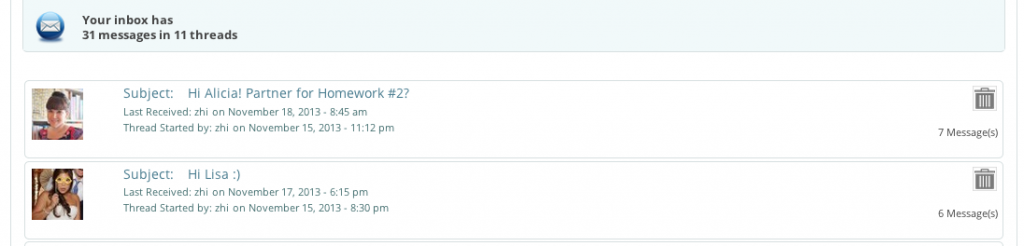
Got some feedback and there is definitely something amiss here. I have three screenshots now. One shows the PM thread status, stating 6 messages. One shows the actual thread – with only 5 messages pulled. And one is of the thread in sfpmmessages, showing all 6 messages. How can I get those to you since I can’t upload theme due to size constraints (same for the ZIP I created)? There’s nothing odd as far as I can tell, no cc, bcc and no forward, just replies.

01-PM-Inbox-Main-5.png
TH Thorsten
Thorsten
Member

I see one screenshot uploaded. I’ll try the next one, albeit highly compressed. This one shows the actual thread with just 5 messages being pulled.

TH Thorsten
Thorsten
Member

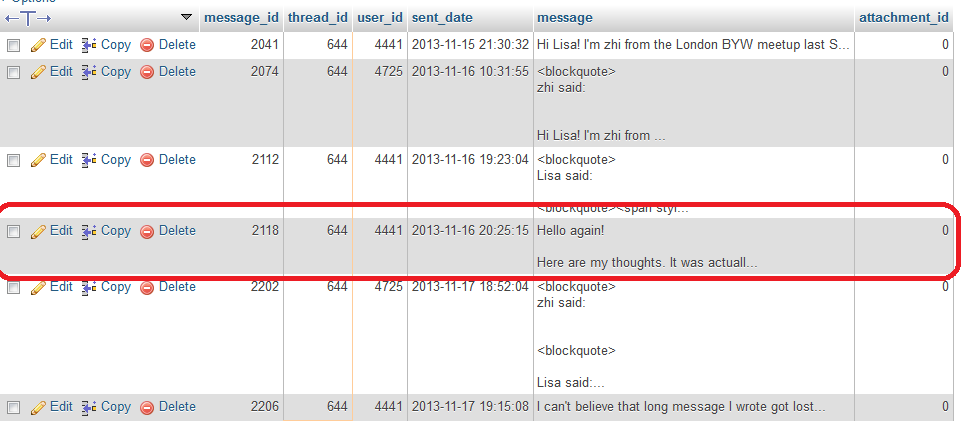
And here’s the db view, showing all 6 messages. I highlighted the one that’s actually missing in the thread view.

Capture-3.PNG
YS Yellow Swordfish
Yellow Swordfish
Member

I have to be honest and say I am not totally sure where Steve (Mr Papa) was heading with this so I can only work my own take here and that is that the sfpmrecipients table would be more revealing. This should list all the recipients for each message in a thread in a relational way. My guess is that one of those rows is missing for this particular user. If it is possible for you to analyse that and let us know it might help. Don’t need a screenshot. It would answer the question on whether the issue is with the data recording or with the display queries which is a first step.

IF this works out to be the database issue I suspect then I am also interested in these warnings you are getting on PMs. We have no other reports of this and what would be useful is if you have one of these messages for each missing recipient entry. The thread ID is shown so do they match up?

TH Thorsten
Thorsten
Member

You are correct, one row is indeed missing. All messages in that thread have two rows except for the one reported missing, there’s only one row. However, there are no warnings or error messages logged for PMs other than the ‘header already sent’ posted prior. Everything else are just notices unrelated to PMs (a lot of those currently).

YS Yellow Swordfish
Yellow Swordfish
Member

Ah well. Good and bad news!

Good in that we can pinpoint where the problem lies but bad that we don’t know why. I was hoping for the error log entry as a ‘headers already sent’ condition might help explain missing entries although, to be fair, I would probably expect no entries to be made rather than just one.

And that leaves us with a difficult problem in terms of tracking down what is, currently, a one-off problem.

Were there no accompanying SQL DB errors reported in the Simple:Press error log (under Toolbox)?

On the Notices front – we do deal with those that get reported and any that our own tests and logs turn up. The problem is that so many are data related – i.e., a setting somewhere that has never been visited and didn’t get properly initialised when created – that the potential combination is huge. And dealing with every one can add sometimes a lie or two of code. But yes – we deal with them all when we encounter them.

TH Thorsten
Thorsten
Member

I do, occasionally, clean out the error logs. But when I checked yesterday I only found two header warnings and I hadn’t cleaned up prior. But I am going to dig into my backups for the past few days and see if I can retrieve something else.

TH Thorsten
Thorsten
Member

So I just loaded a backup from 11/15. One of the messages that disappeared was sent on 11/14. But, there is no entry pertaining to PMs in the error log on that date. There are two on 11/15, but they are simply notices:

file: /wp-content/sp-resources/forum-plugins/private-messaging/ahah/sp-pm-ahah-post.php<br />line: 236<br />function: sp_pm_send_email<br />Notice | Undefined variable: newpost

file: /wp-content/sp-resources/forum-plugins/private-messaging/forms/sp-pm-compose-form.php<br />line: 113<br />function: sp_render_compose_pm_form<br />Notice | Undefined variable: change

127 notices for each. Sorry to say there is nothing else. I’ll check another backup for a message that went missing on 11/16.