Support Forum

Problem with Page/Browser Title

MT Marek Tettinger
Marek Tettinger
Member

Hi, i have one small problem with Page/Browser Title but i cant find solution 🙁

In every single page of forum i have in Browser Title “blog name” and rest of text (topic name, forum name…) like a one word.

Blog name si Rodokmen and forum is Forum – in Browser title i see RodokmenForum. Example you can see on my web http://www.geni.sk/forum (in slovak language). I looked in page templeate in WordPress (page-nosidebar.php) but i cant find where is problem…

Can anyone help me with this problem? 

Thank you!

19 Answers

New Answer

YS Yellow Swordfish
Yellow Swordfish
Member

Take a look at your SEO settings in the forum admin Components section. The default in there should be a bar character to be used as a separator.

MT Marek Tettinger
Marek Tettinger
Member

Yellow Swordfish said
Take a look at your SEO settings in the forum admin Components section. The default in there should be a bar character to be used as a separator.

Yes, i have it there.
If i have in “Page/Browser Title (SEO)” everything OFF i see: “Rodokmeň| Fórum” on every page of Forum.

 But if i try turn ON anyone from “Page/Browser Title (SEO)” i see: “RodokmeňSOMETHING” where SOMETHING can be Forum name, topic name…

MT Marek Tettinger
Marek Tettinger
Member

Mr Papa said
are you running any other seo plugins for wp?

No.

MP Mr Papa
Mr Papa
Member

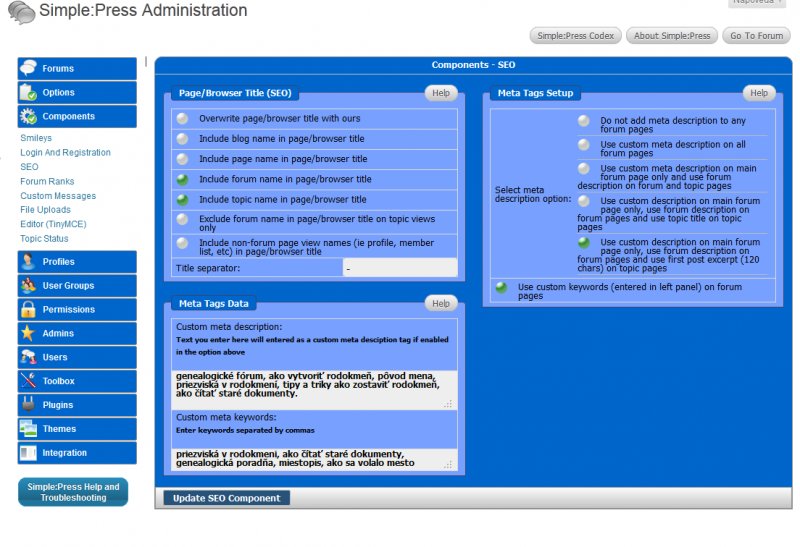
okay. can you post a screenshot of all your seo settings from forum – components – seo?

MT Marek Tettinger
Marek Tettinger
Member

Mr Papa said
okay. can you post a screenshot of all your seo settings from forum – components – seo?

settings.png
MP Mr Papa
Mr Papa
Member

what happens if you check the ‘overwrite’ option?

MT Marek Tettinger
Marek Tettinger
Member

Mr Papa said
what happens if you check the ‘overwrite’ option?

Owerwrite ON:
RodokmeňHľadám predkov – Hľadám predka
(WPblognameSPforumname – SPtopicname)


Owerwrite OFF:
RodokmeňHľadám predkov – Hľadám predka – | Fórum

(WPblognameSPforumname - SPtopicname - | WPpagename)
MT Marek Tettinger
Marek Tettinger
Member

Marek Tettinger said

Mr Papa said
what happens if you check the ‘overwrite’ option?

Owerwrite ON:
RodokmeňHľadám predkov – Hľadám predka
(WPblognameSPforumname – SPtopicname)


Owerwrite OFF:
RodokmeňHľadám predkov – Hľadám predka – | Fórum

(WPblognameSPforumname - SPtopicname - | WPpagename)

Oh, sorry, now i found mistake – i forget one thing in framework of my WP theme.
Its my fault 🙁
Once again sorry and thank you for quick support! 

MP Mr Papa
Mr Papa
Member

np…  lots of things can come into play with seo and browser titles… glad its resolved…

MT Marek Tettinger
Marek Tettinger
Member

Mr Papa said
np…  lots of things can come into play with seo and browser titles… glad its resolved…

…problem is still there:(
but now i know – this is not problem of SP, but problem of colidation SP & theme framework setting… 

RG Robb G
Robb G
Member

I’m having the page title problems as well. For the longest time I used the overwrite page option. When I do that my page title looks like this: http://img406.imageshack.us/img406/3330/pagetitleproblem2.jpg

However, I would like a better page title.I would to include forum name and page name for example. This is what I get: http://img715.imageshack.us/img715/646/pagetitleproblem.jpg

Why does the second one’s page title look so wonky?

YS Yellow Swordfish
Yellow Swordfish
Member

mmm – that admin panel is not really very well worded is it?
Turn on the option at the top – to overwrite the page/browser title. You need that turned on to then include/exclude what you want to show. As I say – not very clear and I will see if we can change that a little.

Having said that – when I do what you have done I do still get the separator even with the double entry. I don’t get the ‘Mozilla Firefox’ part either but I wonder if that is the difference between Windows and OSX (which I am using). I will need to get someone to look for me this end.

Try turning that top option back on and please let me know the result in case we need to change anything

RG Robb G
Robb G
Member

Here are some more options I’ve tried:

http://img823.imageshack.us/img823/7783/pageproblem5.jpg

http://img696.imageshack.us/img696/8995/pageproblem4.jpg

http://img513.imageshack.us/img513/558/pageproblem3.jpg

Still, each option I’ve tried gave me a wonky browser title. The only thing that looks right is if I only select the overwrite page option. Any other ideas?