Also, for your forum, is an id of 3 valid? Just tested the shortcode and its working fine for me on a page… of course, I had to change the forum id of 3 to a valid forum id for my test sites…
Support Forum
Mr Papa said
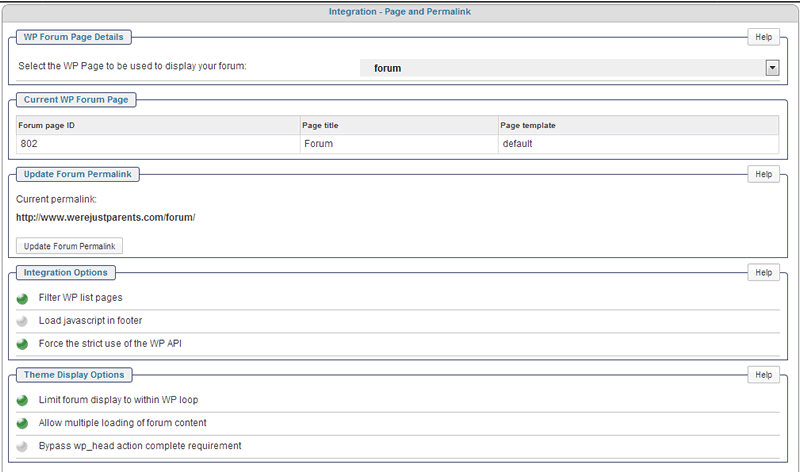
was the wp theme recently updated?can you tell us what the forum – integration – page and permalink panel settings are for display options?
See attached
Mr Papa said
Also, for your forum, is an id of 3 valid? Just tested the shortcode and its working fine for me on a page… of course, I had to change the forum id of 3 to a valid forum id for my test sites…
Yes, and it doesn’t work for any of our pages, not just the one posted.
I cannot get the shortcode to not work… and no other reports… so need to figure out what is going on locally…
try turning off the multiple display option… dont think it will help, but guess we need to try a few things…
also, what happens if you switch to the default wp theme temporarily?
When I turned off multiple display it broke the forum.
When I switched themes it had no effect.
broke display? can you elaborate?
at a bit of a loss as its working fine for other users and in our testing… guess next step might be to send us some temp credentials so we can log in and look around… the temp account should have wp admin and sp admin capabilities… if that works, please pm them to BOTH yellow swordfish and mr papa…
Mr Papa said
broke display? can you elaborate?at a bit of a loss as its working fine for other users and in our testing… guess next step might be to send us some temp credentials so we can log in and look around… the temp account should have wp admin and sp admin capabilities… if that works, please pm them to BOTH yellow swordfish and mr papa…
The forum went blank. I will pm you credentials.
Received the PM but that user account is NOT an SP Admin which means we are unable to review the forum data and settings. Can you please add SP Admin Capabilities?
See nothing obvious and no errors reported… although – oddly – you do not seem to have a ‘pages’ menu in your admin as I was hoping to take a look at the ‘tips’ page to look at the actual short code entered.
Going to need to discuss this one here a bit more I am afraid.
It IS running the tag code.
The message you get proves that. But it is not finding any posts via the query and I am unsure why. Any ideas Steve?
sorry, worked late tonight… wont get to site to look at…
no pages menu?? why not?
need to verify forum id… and look at the actual query – make sure its composed correctly… likely would need ftp access for that… and might need to compare the query to the db with phpmyadmin…
A couple things:
1) I do have pages…not sure why you don’t see it?
2) None of the pages are showing the posts from the forum. I posted the tips as an example, but I have 8 other pages also not showing posts. So I doubt it’s the forum id as the problem.
Thanks
I commented on the ‘pages’ aspect because I had no WordPress ‘pages’ menu in the admin when I logged in to look around. And yes – I can see the forum ID is valid.
The reason why I was looking for the pages menu is that I was trying to find where you had used the code. I did ask back at the start of this problem but you didn’t ever actually tell me. So I was trying to find the code hence was looking for page items.
But as stated – I can see the forum tag code is running because if the message. Just need Steve’s help with determining why it is finding no posts…