Support Forum

"Profile Options" cannot be changed

SH Shama
Shama
Member

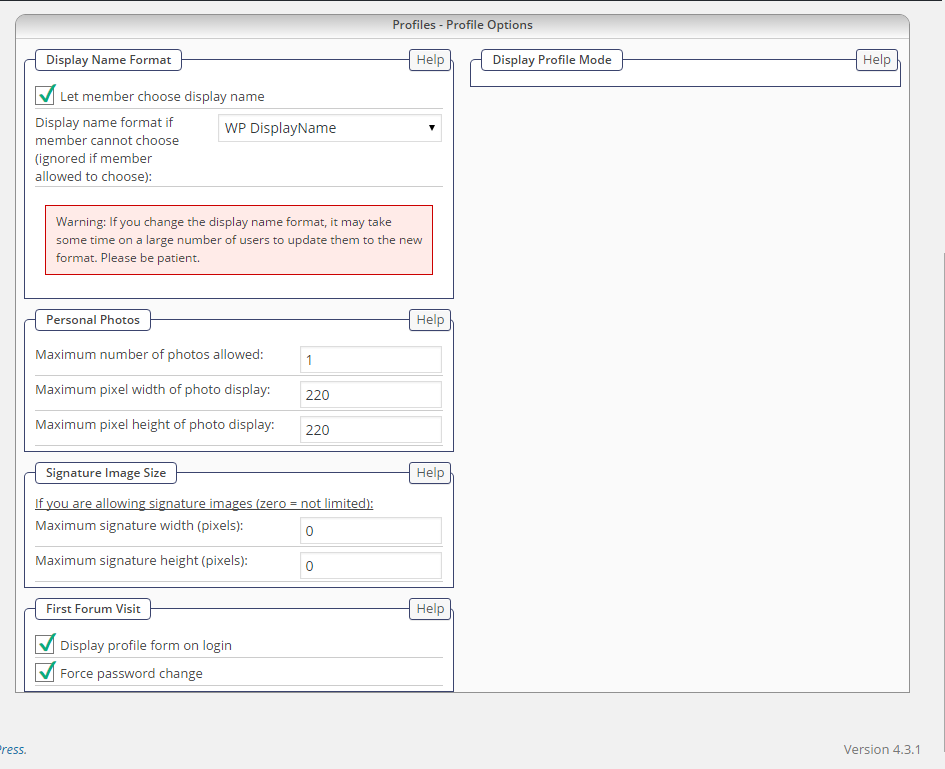
I am trying to change something on the Profiles-Profile Options page. However, unlike on all other settings pages, there is no “update” button on this page. So when I make any changes on this page, I cannot save it. Can you help please.

Specifically I want to eliminate the forced change of passwords after registration which is the option on the bottom of this page.

I have the latest version of SP and the latest version of WP with everything updated.

23 Answers

New Answer

IK Ike
Ike
Member

Hey Shama,

I’m not seeing any problems with the ‘Update Profile Options’ button not showing up on the Profile Options page and haven’t had anyone else report the same, so most likely this is a localised issue probably down to a JavaScript conflict. Are you able to check the browser console when on that page to see if any errors are thrown?

Take a look here for a quick run down on conflicts.

YS Yellow Swordfish
Yellow Swordfish
Member

i am a little confused by what you mean there but that particular option is available on the forum admin > profile options panel.

SH Shama
Shama
Member

Yes, the option is there, but the button for saving the updates is not there. That blue update button is on all the other pages, but not on the profile options page.

I would imagine that if there would be a js conflict, it would affect this button on all pages, but it is only missing on this one page.

Which plugin or extension do I need to use to check  if any errors are thrown on this page? This is something I have never done, but am willing to learn if you point me in the right direction.

Here is a screenshot:

profiles_-_profile_options.png
YS Yellow Swordfish
Yellow Swordfish
Member

You are hitting some kind of fatal block there because the whole right hand side of the panel is missing and breaking at that point.
Ah… are you using the most up to date version of Simple:Press? 5.5.11?

MP Mr Papa
Mr Papa
Member

might check the error log when you load that panel…  Andy is right, something generating an error…

any other user/membership/group plugin?  such as buddypress or mingle?

also, might try turning on wp_debug in your wp config file to see what the error is on your screen when loading that panel…

SH Shama
Shama
Member

Yes, I am using the latest version of SP. I just got a notice to update the WP Smush and Tiny MCE Advanced plugins. I did that and I rechecked the SP profile options page, and suddenly everything showed up as it is supposed to. Since this is the only change I made to the site, I imagine that this issue had something to do with those plugins

YS Yellow Swordfish
Yellow Swordfish
Member

Glad it is all back. Curious as to why either would have any effect in admin panels bit still. I have no personal experience about SP Smush and hopefully it does a great job. I get a bit sceptical about any plugin that claims it will speed up your website!

SH Shama
Shama
Member

Well, now it’s all gone again and just like before with no “save” button and the right panel totally missing. I tried emptying cache and cookies and restarting my browser – that didn’t help. Then I deactivated the All In One  SEO plugin, and low and behold, it all showed up again.

However now there is another issue. After I unchecked the “force password change” option, I tested the registration process. The problem is that now the email with the password reset information is not being sent anymore. I tried it 3 times, and the email never showed up.

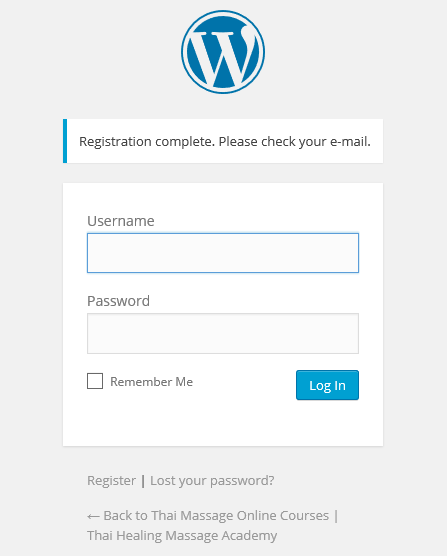
Now when I register, I am redirected to this screen. It says “please check your e-mail”, but the email never arrives. How do I fix this now?


registration_screen.png
YS Yellow Swordfish
Yellow Swordfish
Member

So you are using SP 5.5.11. What about WordPress itself… is that fully up to date? The latest WP changes the way passwords are handled and this also involves the email that is sent out. So it is vital that al components are fully up to date. This would include any plugins that may have anything to do with emailing registration information.

IF you use the Simple:Press new user email – which overrides the WP one – have you ever changed it? If so you may need to edit it as you can no longer send the password in the email. as was the previous case.

Failing that check all emails. WordPress is responsible for sending out emails – all SP does is pass the data over to WP which is famous for often failing. So you need to determine whether it is all emails or just this one.

As to the profile admin panel you will need to take a look in the error log to see what the error is that is stopping it fully loading. The only changes have been checks for the existence of Mingle or BuddyPress plugins so it is possibly related to that although it is hard to see how that might be. An error message (and I DO mean one marked ‘Fatal Error’) will probably be necessary to diagnose the issue.

SH Shama
Shama
Member

My wordpress version is totally up to date.

The only plugins which send out emails is the wordfence security plugin and the Broken Link Checker plugins. All my plugins are up to date. I tried deactivating those two but it didn’t affect anything.

I was not aware of the SP new user email. Where is the setting for this please?

I am including a file with recent error logs.

YS Yellow Swordfish
Yellow Swordfish
Member

The question actually was are any other emails being sent? That is the important thing.

The new user email option is on the forum’s admin email options panel. If it is turned on for use then turning it off and testing again might prove useful.

And for the fatal error issue you will need to look in the sever php error log. If you do not know where that is stored, you can usually view the last few days worth via your hosting control panel. Again please – just those marked ‘Fatal Error’. NOT ‘Notices’ or ‘Warnings’.

SH Shama
Shama
Member

I checked the error log in my cpanel, and there is nothing in there at all.

I disabled the new user email option in SP, and now WP is sending the registration emails.

YS Yellow Swordfish
Yellow Swordfish
Member

Can you go back to the admin panel for the forum email options and copy the text in the alternate email and paste it here?

Not sure I understand the lack of a fatal error which is really the only way that the display can just stop like that. Another way to try and diagnose this would be to briefly turn on the WP_DEBUIG seting in your wp-conflg.php file – and then run the Admin Profile panel to see what gets reported that way., And then turn the option off again. Do you know how to do this?

SH Shama
Shama
Member

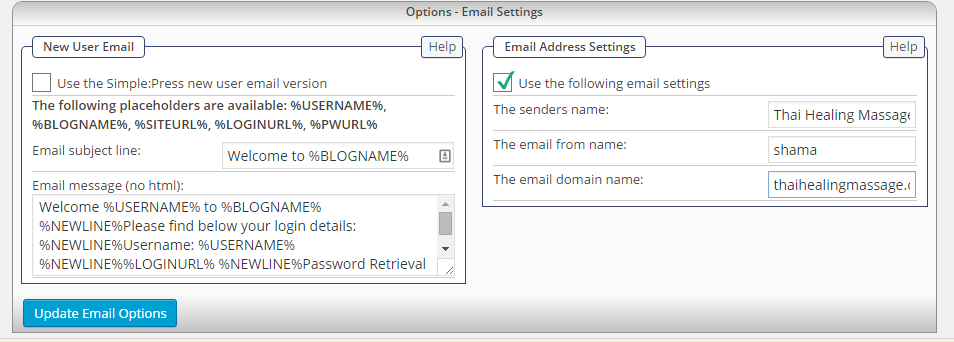
I don’t see an alternate email. Here is a screenshot of the email options panel.

I have never done this WP_DEBUG thing. Do I need special know how to do this?

forum_email_options.png