Support Forum

Recommendations For Social Share Plugin That's Compatible With Simple Press

EL Elsa
Elsa
Member

Can anyone recommend a plugin for fb/ twitter etc. that is compatible with simple press?  While I can get the buttons on the site with a variety of plugins – none work well.Sometimes the buttons are either placed all over the forum. Other plugins look okay, when you try to use them, they pulling in the link of the thread but not the title..or the title, but not link. In most cases they just pull in the link to the forum itself, rather then the specific thread.

I’m tired off all the trial and failure. Does anyone know of a good option?

Thanks!

12 Answers

New Answer

YS Yellow Swordfish
Yellow Swordfish
Member

Have you looked at the Simple:Press ‘Share This’ plugin?

EL Elsa
Elsa
Member

Screen Shot 2014-04-20 at 2.16.09 PM

The problem I’m having is that the forum is part of a blog. I need buttons that work with both. I have found a plug in that looks good in the forum. They work on the blog, but they do not work in the forum.

I installed the sp buttons and they look okay, but I have to figure out how to get rid of the blog-share buttons.

I see this instruction in the “simple share buttons adder”

"Note you can also show/problem-with-post-edit-buttonide your buttons using [ssba] and [ssba_hide]"

Any idea where that goes?  Or alternately, can the SP buttons work in wordpress?

Thanks.


YS Yellow Swordfish
Yellow Swordfish
Member

Mr Papa will confirm this bit as far as I am aware the WordPress ‘Share This’ plugin works in the same way…

MP Mr Papa
Mr Papa
Member

yes, it acts similarly…  our plugin, while not requiring that one, adds its stuff to topics, posts, etc…

EL Elsa
Elsa
Member

What I am seeing is the simple press share plug in works well in the forum, but does not put the buttons on the blog side.

The wordpress plugins (I have tried four of them) populate the entire site, but do not pull in the correct information to link forum posts.  Typically they link the from page of the forum, rather than the specific posts. Some also fail to pull in the title of the thread as well, so they’re truly worthless.  Worthless in the forum, they work well on the blog.

If I use two share plugins (yours and theirs), I wind up with two sets of buttons in the forum, one set that’s on functioning.

I see the wp “share this”.  It’s rated just three stars and not updated to the current wordpress. Are you saying that if I use it, I will be able to configure it so it only shows up on the blog side…and I use the simple press share plug in for the forum?


Thanks!

KV kvr28
kvr28
Member

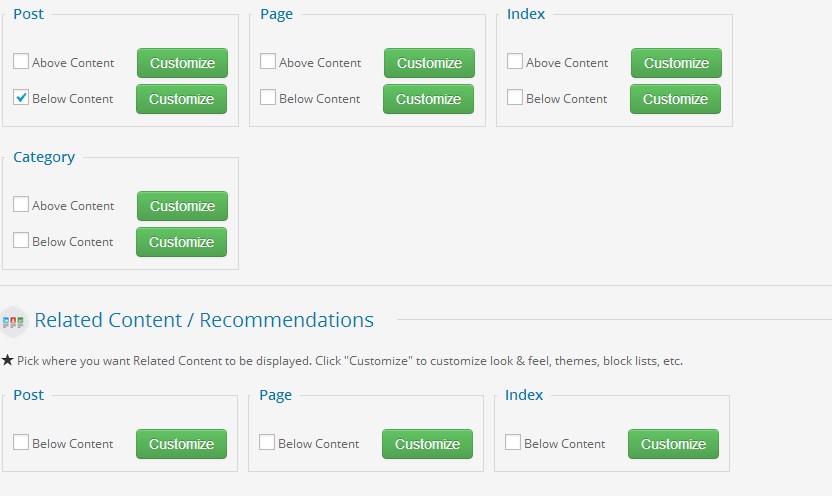
we utilize shareaholic for our blog and the sp sharethis for the forum, so they are totally seperate, you can set the sharaholic buttons so they don’t show up in pages, not sure if you can do that with sharethis, you can also set up related content after the blog posts as well with it


share.jpg
YS Yellow Swordfish
Yellow Swordfish
Member

Sorry Elsa – I have never tried it. It could be done with a little coding anyway if it does not do it by option. But perhaps this ‘shareaholic’ (thanks kvr28) would work best for you…

EL Elsa
Elsa
Member

Thanks. I tried shareaholic and crashed the site. I guess that’s enough experimenting. I will go with the adding the code, as soon as I can find out how!

KV kvr28
kvr28
Member

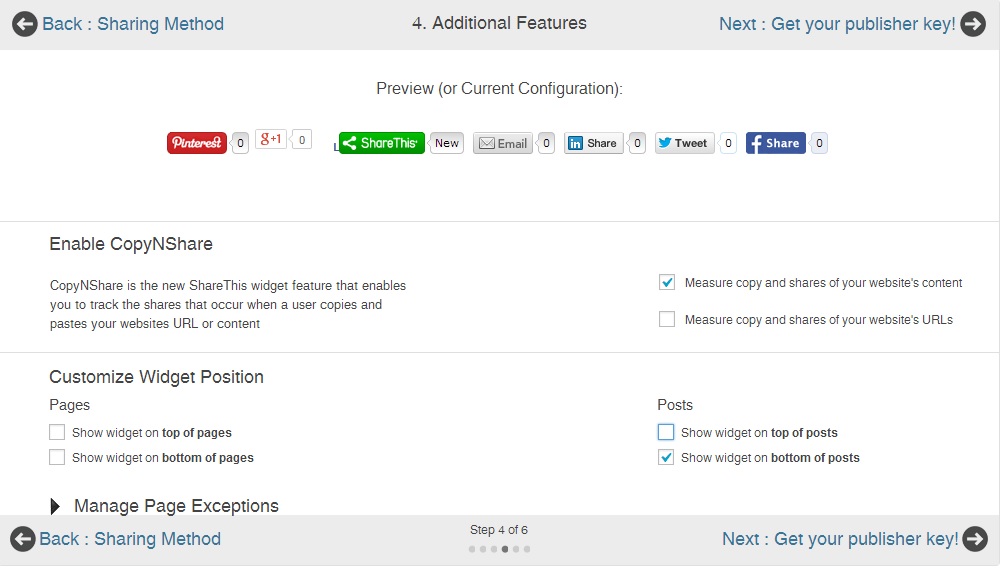
elsa, I just installed the word press plugin for sharethis on my staging server and tested it, go to step four under settings and make sure you only have it check marked for posts not pages, I checked my forum I didn’t see a conflict with that setting, hopefully that helps 

sharethis.jpg
MP Mr Papa
Mr Papa
Member

yes, that was what I was suggesting… sorry for my delay away on business travel… 

YS Yellow Swordfish
Yellow Swordfish
Member

Glad to know that worked out for you. Thanks for updating us.