Support Forum

Search Invalid database query

KV kvr28
kvr28
Member

a member just brought this to my attention the search function does not seem to be working, so I tested it and I am getting invalid database query notification in a pop up, I have deleted all plug ins and reverted to twenty twelve on my staging site and am still getting it, any suggestions?

Thank-you

61 Answers

New Answer

KV kvr28
kvr28
Member

moved it to my staging server, this is the error I am getting in my log

WordPress database error The used table type doesn’t support FULLTEXT indexes for query SELECT  SQL_CALC_FOUND_ROWS topic_id FROM rufus_sfposts WHERE MATCH(post_content) AGAINST (‘earthenstead’ IN BOOLEAN MODE)  AND rufus_sfposts.forum_id IN (5849,5850,5851,5852,5853,5854,5855,5856,5857,5858,5859,5861,5862,5863,5864)  /* From [xxxxxxx.xxxxxxxxx.xxxx.com/forums/?search=1&new=1&forum=all&value=earthenstead&type=1&include=1] in [/nas/wp/www/xxxxxxx/xxxxxxx/wp-content/plugins/simple-press/sp-api/sp-api-wpdb.php:169] */ made by require(‘wp-blog-header.php’), require_once(‘wp-includes/template-loader.php’), include(‘/themes/twentyfourteen/page.php’), get_template_part, locate_template, load_template, require(‘/themes/twentyfourteen/content-page.php’), the_content, apply_filters(‘the_content’), call_user_func_array, sp_render_forum, sp_process_template, sp_load_template, include(‘/sp-resources/forum-themes/default/templates/spSearchView.php’), sp_Search, spSearchView->__construct, spSearchView->sp_searchview_control, spSearchView->sp_searchview_query, spdbComplex->select, spdb_select, referer: http:/xxxxxx.xxxxxx.xxxxx.com/forums/

MP Mr Papa
Mr Papa
Member

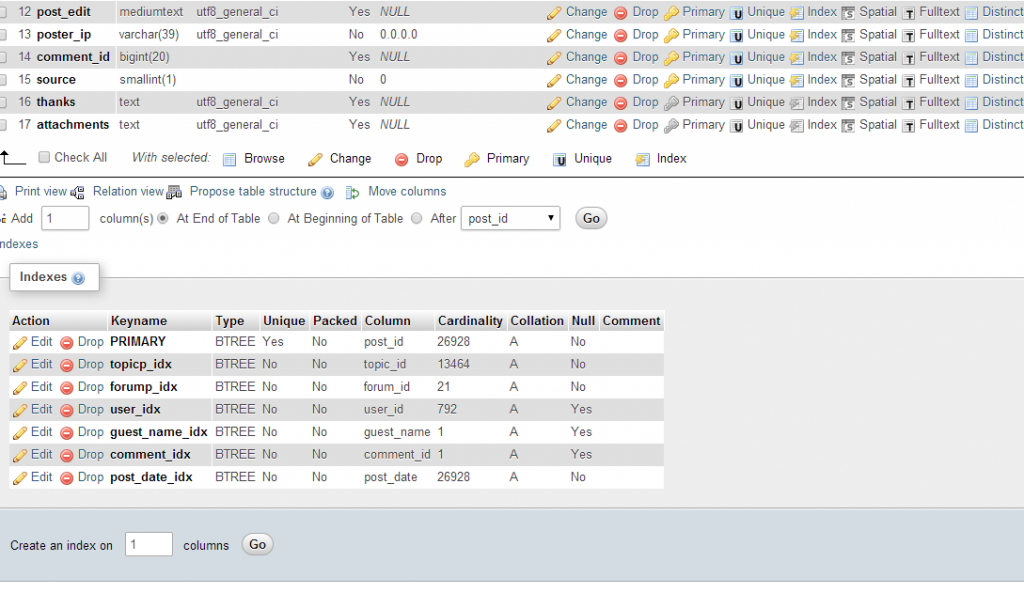
start with the first part of the error… lets look at you db structure for the sfposts column… check the indexes on the table…  it should have sfposts with FULLTEXT type on it…

can you verify please?

KV kvr28
kvr28
Member

Mr Papa said
start with the first part of the error… lets look at you db structure for the sfposts column… check the indexes on the table…  it should have sfposts with FULLTEXT type on it…

can you verify please?

this is out side of my knowledge base, where would I look for this? In admin or myphp?

MP Mr Papa
Mr Papa
Member

phpmyadmin…  or other db tool your host might provide (named one is most popular)…  look at the sfposts table.. then its structure… then its indexes to see if it has fullttext type…

MP Mr Papa
Mr Papa
Member

yes, that was step 2… then you need to view the indexes… typically under all that stuff will be a small link to indexes to expand them…  check the post_content for fulltext…

indexes.pngfulltext.png

KV kvr28
kvr28
Member

bigpapa.pngHouston, we have a problem, I don’t see that index

MP Mr Papa
Mr Papa
Member

well that would be interesting… not sure how you wouldnt have it – its clearly in the install…  I assume you havent modified your db tables since the install?

are your tables innodb or myisam?

you can just try to add it with a query in phpmyadmin:

CREATE FULLTEXT INDEX ‘post_content’ (‘post_content’)

if that doesnt work, maybe Andy (our resident mysql expert) will have some more ideas…

YS Yellow Swordfish
Yellow Swordfish
Member

Sadly – following your comments on another thread – we can not do this without getting technical! But will do my best to explain.

MySQL – the database engine where all of your site data is stored – essentially has two different types of table type – storage format if you like. The most common – and the one that WP automatically will use – is called MyISAM. The other – better in many ways but more restrictive – is called innoDB.

As I say – by default most hosts set their mySQL up to create MyISAM tables as does the WordPress installer. The Simple:Press install script specifies myISAM in it’s command code.

Simple:Press utilises an index type named FULLTEXT which is powerful and useful to implement search queries against. We create a FULLTEXT index on both the Simple:Press sfposts and sftopics tables. However, FULLTEXT indexing requires the table to be MyISAM. It will not work with innoDB. (OK – actually this is not quite true as I understand it. The most recent versions of MySQL do, I believe, now offer FULLTEXT support on innoDB tables. But – most, if not virtually all – hosting companies are always several versions of mySQL behind as they prefer to play it safe. I understand this bit it is a nuisance). It is one of the main reasons why Simple:Press specifically commands tables to be MyISAM – to get the FULLTEXT support needed for better searching.

Now- the only way I can think of that you are not seeing the FULLTEXT index is if your tables have been created as type innoDB against the commands of out install script. I have to say that I have not encountered such a thing happening before but it may be possible that your host company has set things up this way.

So the first thign to check – now we know the index is missing – is to find out the table type and you can do this using phpMyAdmin with the following steps:

  1. Launch phpMyAdmin and display the list of tables that make up your site database
  2. Locate the ‘…sfposts’ table and click on the ‘structure’ link to the right of it.
  3. When loaded click on the ‘Operations’ menu item along the top of the display.
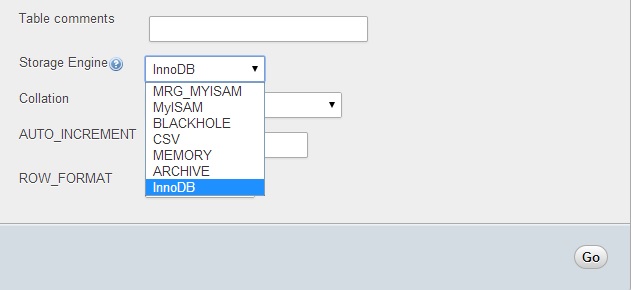
  4. Simply look at the third column – Table Options and see what it says the ‘Storage Engine’ is for that table.
  5. Close it down without doing anything else – it’s a scary place to be if you clicked an option by mistake!

IF the engine is ‘MyISAM’ then we scratch our heads, wonder why the index was not created and walk you through creating it which is easy enough.

IF the engine is ‘innoDB’ then I would firstly ask your host why innoDB has been imposed against the table creation script and if those two tables (sfposts and sftopics) can be changed to MyISAM tables.

And then let’s take stock.

KV kvr28
kvr28
Member

it is innoDB, I see a drop down menu that gives a option to change, will that mess up the install if I do? We host on wp-engine, I’m contacting the help desk now about it

yello.jpg
KV kvr28
kvr28
Member

contacted the help desk, they created a support ticket and are working on it, since we host on wp-engine I have a separate staging site with it’s own database, would it be a bad thing if I just changed those two tables on the testing server database and see what happens?