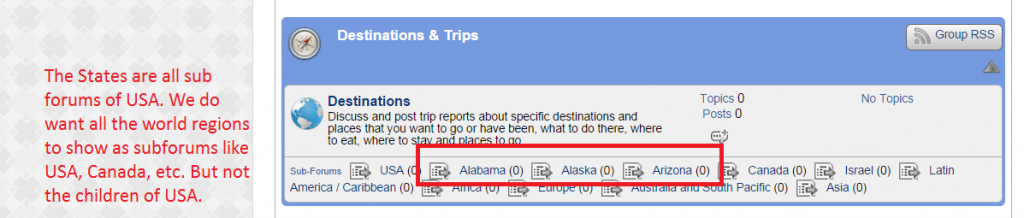
How do we show Child themes but not grand child themes? We do not want all the US states to show on the home page. Our site is www.koshertravelinfo.com.


How do we show Child themes but not grand child themes? We do not want all the US states to show on the home page. Our site is www.koshertravelinfo.com.


Hey,
There is a nice and easy way to achieve this. Firstly if you haven’t already, you would need to arrange your forums so Alabama, Alaska and Arizona are themselves sub forums of USA, then all you need to do is edit a small line of code. Looks like you are using Default theme so let’s go with that as an example.
Firstly, navigate to your themes folder and open your group view template which is:
sp-resources > forum-themes > default > templates > spGroupView.php
If you have a good editor then you want to skip to line 83, if not, you want to search for the function ‘sp_ForumIndexSubForums’
You should see that displayed in full as:
sp_ForumIndexSubForums('unreadIcon=sp_SubForumUnreadIcon.png', __sp('Sub-Forums'), __sp('Browse topics in %NAME%'));
All you need to do is add ‘&allNested=0’ as another argument after the unread icon is loaded. The complete function will then look like:
sp_ForumIndexSubForums('unreadIcon=sp_SubForumUnreadIcon.png&allNested=0', __sp('Sub-Forums'), __sp('Browse topics in %NAME%'));
This way, it will ‘nest’ the sub-sub forums or ‘grandchild’ forums and not display them on the top level.
Hope this helps
Your product is great. Yours support is even better:
Thank you!!!!!!!!!!!!!!!!!!!!!!!!!!
