I think I’m going mad.
I think I’ve posted a couple of replies but the next day the posts are not there any more. Is Simple press forgetting my posts? Do i have to reset something to make that work?
Mike


I think I’m going mad.
I think I’ve posted a couple of replies but the next day the posts are not there any more. Is Simple press forgetting my posts? Do i have to reset something to make that work?
Mike

Hey Mike,
Just to cover a couple of basics, are you running any caching plugings? Also what timezone have you set?

…and – maybe a daft question but are you referring to this happening on your own site or on this one?
I have a cache plugin but it’s not active. Time zone was set to UTC. I’m in London, so I set it to London time. 1hr ahead of UTC.
I’m referring to my own site.
OK. Well the cache plugin is spot on. You can run it if you have the ability to omit the forum from being cached. As for the timezone, hopefully this should solve the problem. I believe UTC is not valid under WP and will cause all kinds of problems related to the original question.
Hopefully this will resolve it!
Right, I’m definitely not going mad.
I just wrote a couple of replies and they’re not showing up.
I used the admin postbag to reply to the threads.
Any idea what’s going wrong?
Thanks,
Mike
First question – what version of WP, SP and if up to date are all the SP plugins also up to date.
Next – browser. What browser and is it also up to date with the latest release?
About a year ago I started to have this intermittent and random problem on this site. Nobody else here had the issue and we never were able to track down the cause. But – a few browser updates later (and possibly- in my case – switching to using Chrome instead of Firefox) and the problem has completely gone away. So we never were able to track it, pin it down, replicate at will. It was completely random.
Now there is also the possibility that you just have a simple script conflict that is stopping the quick reply ajax from functioning. Do you by any chance know how to use the script console to check for script errors? if so you could perhaps monitor yourself writing replies with the admin bar to see if any errors are reported.
WP 4.0
SP Version 5.5.1 [i just now updated to 5.5.2]
Chrome Version 38.0.2125.104
All plugins are up to date
I don’t know how to use the script console to check for script errors, but happy to have go if it’s not too difficult.
That looks pretty good!
Using Chrome – View Menu -> Developer -> Javascript Console.
That should open it with the Errors section already highlighted. Basically, relaunch a forum page. Open the Admin Bar – make a reply and then save the reply. And see if anything gets reported in the console at the bottom,.
Here’s what happened in the console when I did that.
Any idea what’s happening?
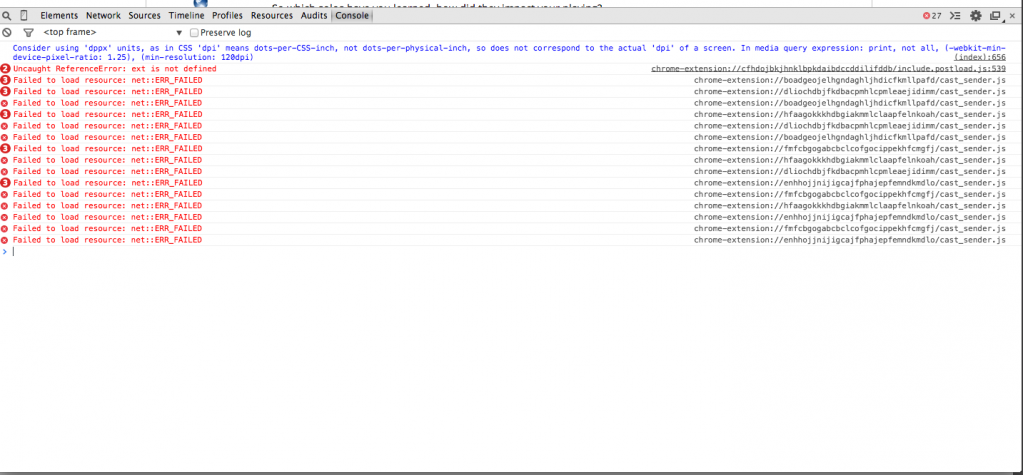

This actually looks more like a browser issue by the look of it. I did a quick search on the error and it looks like it could be something to do with extensions such as AdBlock..
Unless someone else knows something more specific on this issue, maybe it’s worth trying the same using a different browser?
Yes – that first one – whatever it is – might well cause the script engine to stop functioning…