Support Forum

SP forum issues with rendering

PA PaddleMan
PaddleMan
Member

I like to report three intermittent issues with the forum plugin.

I have an uncustomized Simple Press site (and only other plug in active is the Facebook Simple Connect). I am using WP twenty twelve theme – this site does hot yet have a customised theme.


1. Issue #1: The forum seems to display a box (circled) on the right hand side. Also it seems to remember the name of the last person logged in in the persnal greeting even thought he/she is clearly not logged on:

—————————————————————————


2. Issue #2: for about a half a second, the forum is not rendering the theme – and instead showing everything unformatted. 

————————————————————————————–


3. Issue #3: 

Sometimes the forum repeats itself when you press the F5 / refresh button, and showing the header below the repeated forum
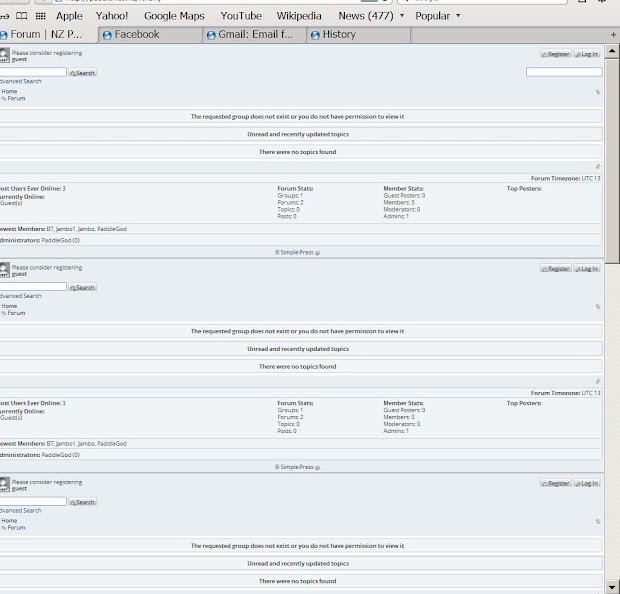
Issue #3

7 Answers

New Answer

PA PaddleMan
PaddleMan
Member

Issue #2 and #3 are related to Simple Facebook Connect. It dissipated when I made it this plugin active and came back when I made it active.

Issue 1 is still there – and please help me fix it.

MP Mr Papa
Mr Papa
Member

for #1, please see:  https://simple-press.com/support-forum/sp5-general-topics/last-guests-post-details-being-held-and-visable-to-next-guest-that-posts/page-3/#p117175

for #2 and #3, would suggest taking a look at the forum – integration – page and permalink admin panel… and play with the display integration options including display multiple, display in loop and strict wp api…

YS Yellow Swordfish
Yellow Swordfish
Member

#1 is not really to do with the thread Steve pointed you to. So let’s discuss those two items.

The name on the left. Yes it recalls the name of the user. It does not say they are logged in. It is quite aware that they are not. It uses the optional cookie for this.

The area on the right looks to me like one of the the Quick Links select boxes that is not being processed properly. See ours above. This can happen – mainly – if there is Javascript that stops the processing. Does it seem to be one of those two Quick Links fields?

BR Brandon
Brandon
Member

Yellow Swordfish said The area on the right looks to me like one of the the Quick Links select boxes that is not being processed properly. See ours above. This can happen – mainly – if there is Javascript that stops the processing. Does it seem to be one of those two Quick Links fields?

Actually I think that is an issue with SP we need to look at. If a guest has no permission to view any forum the Quicklinks Forums box is still displayed with no content.

YS Yellow Swordfish
Yellow Swordfish
Member

Oooh. Good find Brandon.

And fixed up for the next release.

PA PaddleMan
PaddleMan
Member

Brandon C said

Actually I think that is an issue with SP we need to look at. If a guest has no permission to view any forum the Quicklinks Forums box is still displayed with no content.

Thanks – will look forward to a fix in coming releases. It is not so bad on a big screen – but it looks really bad on an iPhone Browser … Talking of which I should post a new topic about that.

MP Mr Papa
Mr Papa
Member

will be in the next one… probably timed with wp 3.5 release…