Support Forum

SQL Processes Cripple Server After SP Update

35 Answers

New Answer

JI jim
jim
Member

Yellow Swordfish said
…you usually in the past have updated a test rig first. Did that biot hapen this time? And if it did does that show the same issues?

It appears that the “database has gone away” error is indeed happening on all our domains, and has been for some time. Yet it has no real adverse symptoms. I did update the test install, and it did not have issues, likely since it is not an exact mirror of the live db which is much larger.

Perhaps you could also conform the version you were using prior to the latest update.

Are you suggesting a roll-back to the previous SimplePress version? Steve recently mentioned that reverting is a bad idea.


So…

While those db errors are troubling, I don’t believe they are the primary cause of spiraling loads upon SimplePress activation since they occur with the plugin off and have no apparent adverse affects on performance.

Can we please focus on addressing the following errors that I get after activating the plugin:

[03-Nov-2013 13:11:23 UTC] PHP Notice: Undefined index: forumname
[03-Nov-2013 13:11:24 UTC] PHP Notice: Undefined variable: tipSubmitButton
[03-Nov-2013 13:11:24 UTC] PHP Notice: Undefined variable: tipCancelButton
[03-Nov-2013 13:12:23 UTC] PHP Notice: Undefined index: sfnotify

Which tables should I check for these missing indexes “forumname” and “sfnotify” and what should their structure look like? Another screenshot would be very helpful if I need to recreate them. I’m also unsure what to do about those undefined variables.

Thank you!

YS Yellow Swordfish
Yellow Swordfish
Member
  1. Of course the ‘database gone away’ has adverse effects. It can stop updates mid-stream and leave the database potentially inaccurate and in conflict. Ity really does need to be dealt with to maintain a healthy system.
  2. No – I am not suggesting a roll back. I wanted to know the last version you were using before the last update and would still like to know.
  3. I see little point on focusing on unimportant and inconsequential php notices when you have more important issues to resolve. I think we have explained before – notices are just that – something that does not effect processing and are just – well – a notice. They are a nuisance. Although they can sometimes suggest unexpected data being returned form the database.


MP Mr Papa
Mr Papa
Member

also, lets be sure we are not confusing php undefined indexes with mysql indexes (mentioned earlier)…  they are totally unrelated and completely different…  you wont find the php notices by looking at mysql tables…

as Andy says, a php notice is a nuisance – a super minor code issue that 99.9% of the time has no impact on results…

take the forumname for example… cause by something like

$test = $forumname;  // (over simplified but hopefully explains;

the php notice is thrown because $forumname does not exist or has not been initialized…  so $test becomes empty…  in this super simple case, $forumname should have been initialized with say an empty string

$forumname = ”;

well, guess what… php takes care of anyways…  and in my example, $test would get set to the empty string or other empty condition anyways…  so no harm no foul…

php throws the notice to let you know that $forumname was not defined…  useful in the case that the variable name should have $forumnames (or other)…  lol, in order to make php happy, you end up with an awful lot of code that does nothing but make php quit complaining…

but again…  php notices have NOTHING to do with mysql and table indexes…


JI jim
jim
Member

Yellow Swordfish said

  1. Of course the ‘database gone away’ has adverse effects….It really does need to be dealt with

Yup, we’re researching and working frantically to do just that.

  1. No – I am not suggesting a roll back. I wanted to know the last version you were using before the last update and would still like to know.

Thanks for the clarification. All was working well with SimplePress v5.3.3. Immediately after updating to v5.3.4 MySQL processes and server loads increase rapidly upon plugin activation.

  1. I see little point on focusing on unimportant and inconsequential php notices

Sorry, I realized after that last post that those were the same notices I posted earlier.

JI jim
jim
Member

Mr Papa said
again…  php notices have NOTHING to do with mysql and table indexes…

Understood, thank you.

Steve, could you please review our my.conf settings I posted above to see if anything looks out of order for a site running forums of our size? I’d love to hear if you have any recommendations for configuring MySQL and/or Apache. Please feel free to PM me if you’re willing and able to take this troubleshooting on under paid contract.

I have involved our host’s server/db tech but am not getting anywhere so far. Since the site-crippling symptoms only occur when activating the plugin, the suggestion is to disable the plugin which we need to get reactivated successfully, and soon.

MP Mr Papa
Mr Papa
Member

nothing screams out at me in the mysql conf file… but then again, I really dont change mine from the server defaults my host sets up…

what version of sp did you upgrade from??  5.3.3, I think you said?

The only real change in 5.3.4 was the removal of a debug statement that was affecting user display names for recent members…  one other line affecting php undefined notices made it in too, but not sure how that would affect your mysql (might show serious signs of mysql setup instability)…  you could try putting that one back in…

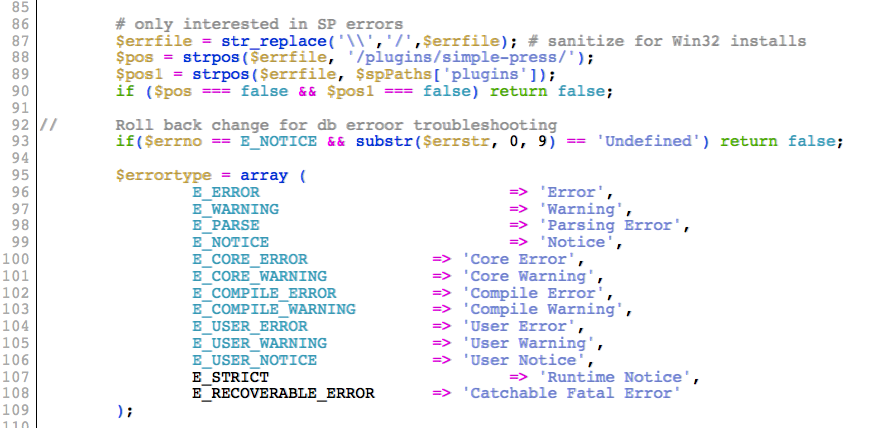
around line 89 in simple-press/sp-api/sp-error.php, right before:

                E_ERROR                          => ‘Error’,
                E_WARNING                        => ‘Warning’,
                E_PARSE                          => ‘Parsing Error’,
                E_NOTICE                         => ‘Notice’,
                E_CORE_ERROR             => ‘Core Error’,
                E_CORE_WARNING           => ‘Core Warning’,
                E_COMPILE_ERROR          => ‘Compile Error’,
                E_COMPILE_WARNING        => ‘Compile Warning’,
                E_USER_ERROR             => ‘User Error’,
                E_USER_WARNING           => ‘User Warning’,
                E_USER_NOTICE            => ‘User Notice’,
                E_STRICT                         => ‘Runtime Notice’,
                E_RECOVERABLE_ERROR      => ‘Catchable Fatal Error’
        );

add back in a removed line:

        if($errno == E_NOTICE && substr($errstr, 0, 9) == ‘Undefined’) return false;

JI jim
jim
Member

Thanks Steve. I’d like to try this but could you please confirm the precise placement for that line? Placing it directly above the E_ERROR line (within that array) throws a fatal error prohibiting plugin activation. And inserting it at the line shown in my screenshot below didn’t help.

But I think we may be on to something. There are a lot of the errors in the log on sferrorlog queries and you did mention this update generated a lot of new notices. We’re also seeing a lot of slow queries on “SHOW TABLES LIKE” especially for wp_1_sferrorlog.

And yes, I updated to 534 from 533.sp-error-hack.png

JI jim
jim
Member

Yellow Swordfish said
Steve made some changes to ours about a year back when we saw some of the ‘gone away’ messages on our server so he may recognise something perhaps.

Steve, do you recall what changes you may have made to your MySQL config that Andy is referring to? Or could you possibly provide your current my.conf file so I can have my DBA compare notes? I presume you were able to squelch the “gone away” errors.

MP Mr Papa
Mr Papa
Member

the gone away errors were due to host incompetence…  had multiple issues with them…  everything resolved nicely with our new host – no issues…  and running the stock mysql conf they set us up with…  could it still be improved?  maybe…  but I dont know enough to risk the changes…  nor do I remember the tweaks I had tried based on google search results (I am far from mysql expert)…

the screenshot is correct…  I said around line 89 because I have dev version of sp which may or may not be the same location… but seems my first line (the array statement) didnt make the cut and paste…  sorry…

I didnt expect it to help, but it was the only other change in 5.3.4 besides removing the accidental debug code (reason for the release)…  I dont understand how 5.3.4 vs 5.3.3 has anything to do with it…  3.7 is a new variable, but 5.3.3 handled and 3.7 issues…

the code change I listed, would reduce the number of notices… you wont see any more php undefined notices…  we are fixing any that have popped up during the 5.3.5 development, but of course not available to you now…  may take a couple releases to catch them all…

JI jim
jim
Member

Mr Papa said
I dont understand how 5.3.4 vs 5.3.3 has anything to do with it…

Nor I, but that’s clearly when things went awry.

If anyone gets any bright ideas, I’m all ears.

YS Yellow Swordfish
Yellow Swordfish
Member

well you could start with upping the mysql timeout value as various websites suggest. Not actually sure where this is done though.

JI jim
jim
Member

OK guys, this is where it gets fun…

I’ve worked with our server manager to silence all “gone away” errors. We’ve adjusted MySQL settings, defragmented all tables and confirmed good health of the database. I gave it ample time to confirm there are no longer any communication problems with the db and there are no longer any errors.

I then activated SimplePress while we monitored the MySQL process list and we immediately watched loads spiral out of control with constant SHOW TABLES LIKE ‘wp_1_sferrorlog’ queries:

| 5384 | root             | localhost |                       | Query          | 0    |                      | show processlist                   |
| 5521 | tripawds_wpmu1   | localhost | tripawds_wpmudb0709   | Query          | 1    | checking permissions | SHOW TABLES LIKE 'wp_1_sferrorlog' |
| 5539 | tripawds_wpmu1   | localhost | tripawds_wpmudb0709   | Query          | 1    | checking permissions | SHOW TABLES LIKE 'wp_1_sferrorlog' |
| 5554 | tripawds_wpmu1   | localhost | tripawds_wpmudb0709   | Query          | 1    | checking permissions | SHOW TABLES LIKE 'wp_1_sferrorlog' |
| 5558 | tripawds_wpmu1   | localhost | tripawds_wpmudb0709   | Query          | 1    | checking permissions | SHOW TABLES LIKE 'wp_1_sferrorlog' |
| 5561 | tripawds_wpmu1   | localhost | tripawds_wpmudb0709   | Query          | 1    | checking permissions | SHOW TABLES LIKE 'wp_1_sferrorlog' |
| 5565 | tripawds_wpmu1   | localhost | tripawds_wpmudb0709   | Query          | 1    | checking permissions | SHOW TABLES LIKE 'wp_1_sferrorlog' |
| 5573 | tripawds_wpmu1   | localhost | tripawds_wpmudb0709   | Query          | 1    | checking permissions | SHOW TABLES LIKE 'wp_1_sferrorlog' |
| 5578 | tripawds_wpmu1   | localhost | tripawds_wpmudb0709   | Query          | 1    | checking permissions | SHOW TABLES LIKE 'wp_1_sferrorlog' |
| 5580 | tripawds_wpmu1   | localhost | tripawds_wpmudb0709   | Query          | 1    | checking permissions | SHOW TABLES LIKE 'wp_1_sferrorlog' |
| 5582 | tripawds_wpmu1   | localhost | tripawds_wpmudb0709   | Query          | 1    | checking permissions | SHOW TABLES LIKE 'wp_1_sferrorlog' |
| 5586 | tripawds_wpmu1   | localhost | tripawds_wpmudb0709   | Query          | 1    | checking permissions | SHOW TABLES LIKE 'wp_1_sferrorlog' |
| 5588 | tripawds_wpmu1   | localhost | tripawds_wpmudb0709   | Query          | 1    | checking permissions | SHOW TABLES LIKE 'wp_1_sferrorlog' |
| 5589 | tripawds_wpmu1   | localhost | tripawds_wpmudb0709   | Query          | 1    | checking permissions | SHOW TABLES LIKE 'wp_1_sferrorlog' |
| 5590 | tripawds_wpmu1   | localhost | tripawds_wpmudb0709   | Query          | 1    | checking permissions | SHOW TABLES LIKE 'wp_1_sferrorlog' |
| 5591 | tripawds_wpmu1   | localhost | tripawds_wpmudb0709   | Query          | 1    | checking permissions | SHOW TABLES LIKE 'wp_1_sferrorlog' |
| 5592 | tripawds_wpmu1   | localhost | tripawds_wpmudb0709   | Query          | 1    | checking permissions | SHOW TABLES LIKE 'wp_1_sferrorlog' |

This is just a small sample of constant entries like this that I was able to capture. The server load spiked to 25+ within a minute. Immediately upon plugin deactivation, the load quickly dropped and stabilized.

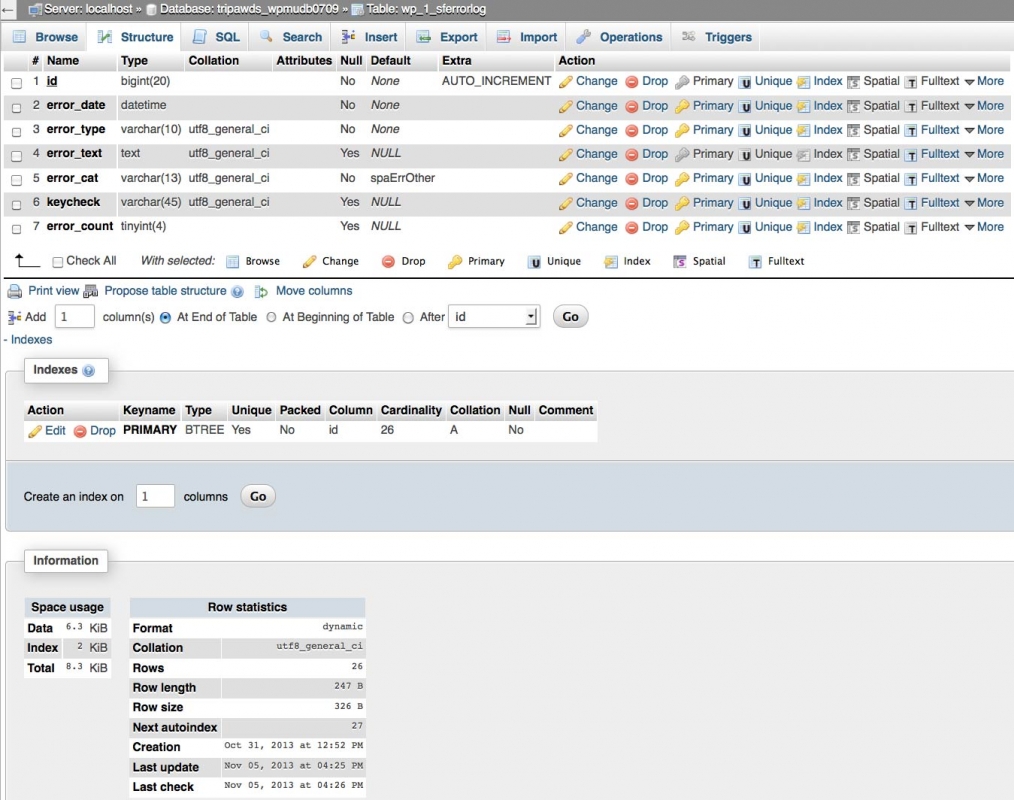
I’ve confirmed that all permissions are correct with the db and db user. I also ran another repair and mysqlcheck on the wp_1_sferrorlog table and all appears OK.

Could you please review the table structure and index in the attached screenshot below and advise of anything out of order? If necessary, please provide steps on how I might rebuild this table and its index if that may help.

If you recalll, when we had serious performance issues last summer Andy recommended this hack to comment out a SHOW TABLES LIKE query on the sfoptions table. I wonder if something similar may be going on or you might be able to suggest a similar fix.

One DBA I consulted suggested that SHOW TABLES LIKE may be poor practice, especially when dealing with a db that has thousands of tables like ours. Admittedly this is way over my head, so I’m desperately hoping you may be able to offer further assistance here. Is there any way to just disable the SF error log function to see if the forums will load without spinning the server out of control? Any other suggestions?

Thanks again for any direction. Our forums have now been offline for days and Tripawds members are getting restless.

sferrorlog-structure-1.jpg
MP Mr Papa
Mr Papa
Member

that singular index on that table looks good – at least what I would expect… will let Andy comment if more is needed…

Andy did make a change today to the error logging to ping the mysql server to make sure its there before query the like tables since a slew or errors are created if its not there (nothing we can do about that)…  but if you have ceased the gone errors, that code change wont help you either…

will have to let Andy (our mysql guru) comment about querying like tables for large number of tables… this is multisite, so how many network sites do you have? 

If you want to disable error logging:

in file sp-site-support-functions.php, around line 160 find and comment out this code:

        $wpdb->hide_errors();
        set_error_handler(‘sp_construct_php_error’);

comment out both lines…

still not really sure why that is killing your msyql server…

MP Mr Papa
Mr Papa
Member

jim, sorry if covered earlier, but what version of mysql are you using?

JI jim
jim
Member

Mr Papa said
…how many network sites do you have? 

As of right now Tripawds currently hosts 1,122 blogs with 5,431 members, and more joining all the time. Any “SHOW LIKE” query is scanning 10,370+ database tables so you can see how MySQL processes quickly add up.

I recall you mentioning that this update had an increased number of notices so that may explain why the sudden impct on our site after this upgrade.

I noticed other queries in the SP code that were calling tables directly with some sort of WP prefix variable, like these snippets from sp-db-management…

$sql = ‘SELECT * FROM ‘.SF_PREFIX.”options

$wpdb->query(‘DELETE FROM ‘.SF_PREFIX.”options WHERE option_name=’_transient_timeout_$transient[1]'”);

$wpdb->query(‘DELETE FROM ‘.SF_PREFIX.”options WHERE option_name=’_transient_$transient[1]'”);

I’ve noticed others, so I wonder if that might be better practice than SHOW TABLES LIKE for better performance on large databases. Of course, any such prefixes would have to account for wp_x_ in a multisite environment.

OK. I admit, I don’t really know what I’m talking about here. I’ve been researching like crazy and have come across a few discussions about how the SHOW TABLES LIKE query can bog things down when dealing with a lot of tables. And I’m reaching for straws at this point.

Thanks for the input! I’ll try turning of SF error logging and see what happens.

PS: We are running

MySQL version    5.5.32-cll
Apache version    2.2.24
PHP version        5.3.26

My server Admin tells me MySQL 5.5.3 is the latest version compatible with cPanel.