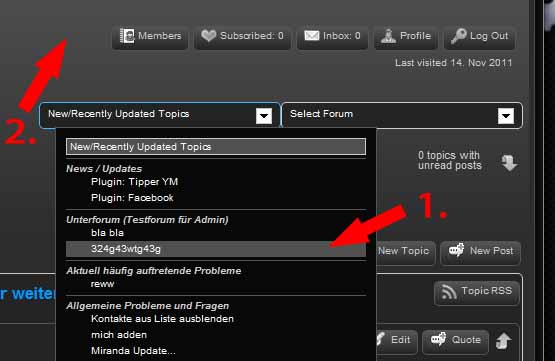
#2 you are on the right track… the theme template files are nothing more than a php file where you can add any php you like… we just provide a slew of template tags to make getting at sp data easier…
so yes, in spHead.php, you will see this section that outputs the buttons in question:
sp_SectionStart(‘tagClass=spPlainSection’);
sp_LoggedInOutLabel(‘tagClass=spLabelSmall spLeft’, __sp(‘Logged in as<br /><b>%USERNAME%</b>’), __sp(‘Please consider registering<br /><b>guest</b>’), __sp(‘Welcome back <b>%USERNAME%</b><br />Please log in to post’));
sp_LogInOutButton(‘tagClass=spButton spRight’, __sp(‘Log In’, ‘2011’), __sp(‘Log Out’), __sp(‘Log in and log out’));
sp_RegisterButton(‘tagClass=spButton spRight’, __sp(‘Register’), __sp(‘Register’));
sp_ProfileEditButton(‘tagClass=spButton spRight’, __sp(‘Profile’), __sp(‘Edit your profile’));
if (function_exists(‘sp_PmInboxButton’)) sp_PmInboxButton(‘tagClass=spButton spRight’, __sp(‘Inbox:’), __sp(‘Go to PM inbox’));
if (function_exists(‘sp_SubscriptionsReviewButton’)) sp_SubscriptionsReviewButton(‘tagClass=spButton spRight’, __sp(‘Subscribed:’), __sp(‘Review subscribed topics’));
if (function_exists(‘sp_WatchesReviewButton’)) sp_WatchesReviewButton(‘tagClass=spButton spRight’, __sp(‘Watching:’), __sp(‘Review watched topics’));
sp_MemberButton(‘tagClass=spButton spRight’, __sp(‘Members’), __sp(‘View the members list’));
sp_InsertBreak(‘direction=right’);
sp_LastVisitLabel(‘tagClass=spLabelSmall spRight’, __sp(‘Last visited %LASTVISIT%’));
sp_SectionEnd(‘tagClass=spClear’);
so if you want another button next to members button, after the template tag above, just output it or use ?> and <?php to enter html mode…
#3 not sure what you want… in the start of the code section for the function (yes, we are working on some online docs) find the $defs array definition… those are the arguments you can pass to the function to control what it does… they are explained in more detail above in the comment area above the function… one of the key ones if itemOrder… that controls which elements (forum name, topic name, date, avatar, etc) will be displayed and in what order… default is forum, then topic, then poster name and finally date… you can move the order or add/delete items… then using the before and after args, you can alter the appearance, ie add/remove linebreaks, etc