Support Forum

Tiny MCE Editor Bar not showing up

TT Terrance Taylor
Terrance Taylor
Member

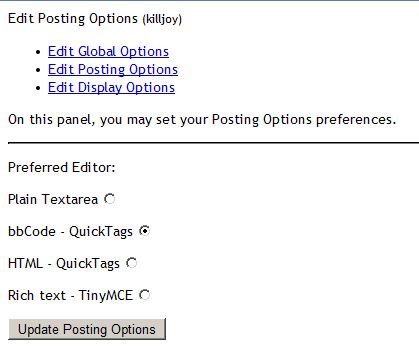
When users have their editor preference set to TinyMCE the interface seems to default to plain text instead. No tool bar shows up and formatting cannot be edited.

This screen is from my admin account which is set to use the TinyMCE editor.
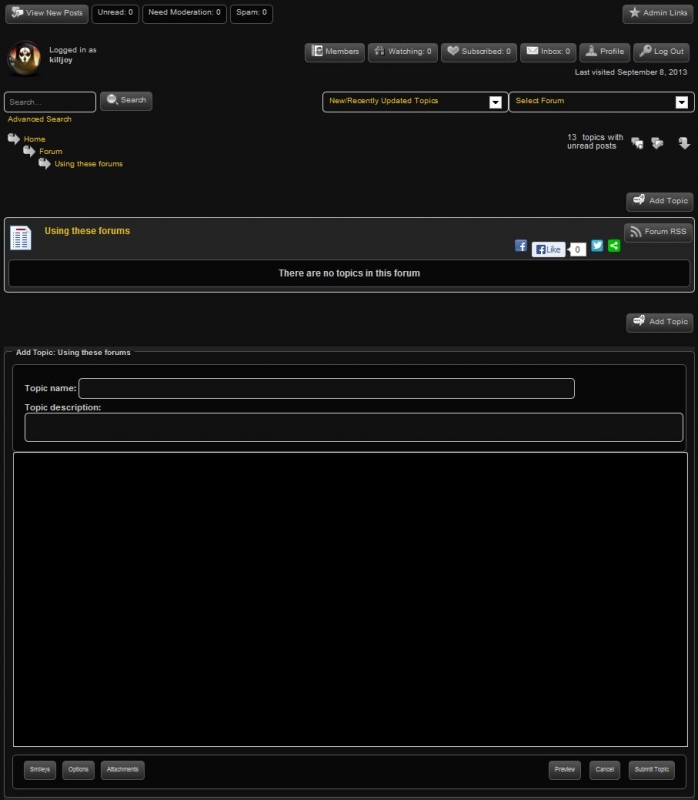
plaintext.JPG


WordPress Version 3.6

Simple:Press Version 5.3.1

Using the black-gold theme.


Hate to load up but, new admin and having a bunch of little issues and cannot find answers using what I think are intuitive searches in the Codex.


  1. If using the HTML or BBcode editors attached media files that are uploaded are duplicated.
  2. User Profile menu options have a nasty habit of dumping out to HTML v1 looking screens and then returning success fail responses on a page that confuses users.uglyass.JPGuglyass2.JPG

12 Answers

New Answer

TT Terrance Taylor
Terrance Taylor
Member

sorry one more thing having problems with. Thumbnails do nothing when clicked.

MP Mr Papa
Mr Papa
Member

you didnt give us a link to your site… but this is usually due to js conflicts on your site or your wp theme or another plugin incorrectly adding buttons or items to js… does the latter sound possible?  often the incorrectly assume the wp editor will only be shown in the admin, but wp api fully supports the editor on the front end…

might help narrow it down if you try temp switch to the default wp theme and see if it clears up…

TT Terrance Taylor
Terrance Taylor
Member

Okay. Sorry about the missing link. The URL is http://www.retributionblade.com….


I created the Theme myself using Artisteer 4.1. When I switched to the default theme everything seemed to work properly so I went back and created a completely new theme that was as stripped down and simple as possible. No custom code very little CSS, just enough to put a wrapper on the site.

Now everything seems to be working just fine EXCEPT the avatar upload function. Is there a specific snippet of code JS or CSS that I should be looking for to clear the interference?

Just to be sure I disabled all of the other plugins for both WordPress and Simple:Press and still this is the only function that is not working.

YS Yellow Swordfish
Yellow Swordfish
Member

This codex article explains what this means and what to look for:

http://codex.simple-press.com/codex/faq/troubleshooting/what-is-this-jquery-conflict/

Your site is loading jQuery twice – one of those is from a ‘bad’ source – your WP theme. It is also not being loaded using the proper WP API functions.

I am also seeing an error (which will stop some jQuery from operating) in this in-line script code:

document.body.style.webkitTouchCallout=’none’

and that error is caused because the ‘body’ tag has not yet been defined when this is run.

There may be other conflicts going on but until the proper jQuery loading is sorted out it can be hard to tell.

TT Terrance Taylor
Terrance Taylor
Member

I found out that the Artisteer program has a known issue where it uses the non-word iclude when it should state iNclude. I also found a snippet of code that forces the most current version of jquery. 

As far as I can tell now (but please note that I am not a PHP coder or troubleshooter by any means) the only version of jquery now in use on the site is 1.10.3.

I am completely lost here and need some hand holding to figure this out. Please be patient with me. Any additional help would be greatly appreciated.


HELP!cry

TT Terrance Taylor
Terrance Taylor
Member

I have checked and double checked this issue. I have gone so far as to uninstall of the plugins I had loaded and delete all of the artifact tables what were left behind and the file structures too. The only thing running on the site now is Simple Press and still the Admin Bar and the Avatar Browse function are not working.


confused
MP Mr Papa
Mr Papa
Member

write now, your site is not coming up… throwing 502 errors

502 – Web server received an invalid response while acting as a gateway or proxy server.
There is a problem with the page you are looking for, and it cannot be displayed. When the Web server (while acting as a gateway or proxy) contacted the upstream content server, it received an invalid response from the content server.

at least based on the url you gave us…  http://www.retributionblade.com/

TT Terrance Taylor
Terrance Taylor
Member

Sorry, I have been messing with the site a lot to try to nail this down. I don’t know what you gyus are looking at to try to help (ANS A HUGE THANK YOU FOR PUTTING UP WITH THIS NOOB) but, I think it’s this….


// <![CDATA[

/* <![CDATA[ */
var userSettings = {“url”:”/”,”uid”:”101″,”time”:”1379108849″};
/* ]]> */
// ]]>


The site should respond now. I am just so totally clueless on this issue. thanks again guys. I’ll send you cash for lunch or a 12 pack if you can help me nail this smile

TT Terrance Taylor
Terrance Taylor
Member

It cut it all off with a too many links error, oh well. the site should be available…..

MP Mr Papa
Mr Papa
Member

we look at the site to see if themes or plugins are not handling js/query in the proper wp api method…

In your case, you have many, many, many jquery errors being thrown… likely because of this one error:

“NetworkError: 404 Not Found – http://ajax.googleapis.com/ajax/libs/jquery/1.10.3/jquery.min.js?ver=1.10.3”

as many many jquery not defined errors…

first, it cannot be found… second its just wrong to load jquery from external source instead of using the jquery that comes with wp…

also other missing js files…

“NetworkError: 404 Not Found – http://www.retributionblade.com/wp-content/themes/retbladenew/script.js?ver=3.6.1”
“NetworkError: 404 Not Found – http://www.retributionblade.com/wp-content/themes/retbladenew/script.responsive.js?ver=3.6.1”


MP Mr Papa
Mr Papa
Member

this normally comes down to another plugin misusing the wp api when it comes to using the wp editor.. the mistakenly assume the wp editor is only used in the admin, but it fully supports being used in the front end too… so they load tinymce buttons or other plugins incorrectly causing it to break on the front…

I do see you have several wishlist member plugins… unfortunately they have several that dont follow the rules…  we use wishlist here but none of their plugins…  so likely need to narrow down which plugin is doing it wrong and see if we can suggest fixes to it…