Support Forum

TinyMCE icons not showing

BD Bruce Dienes
Bruce Dienes
Member

I have a multisite install of Simple Press 5.5.0 on WP 3.9.2 running Sterling theme

On all but one of the subsites the TinyMCE icons in the editor do not show. 

I have tried to figure out the difference but cannot. All the settings seem to be the same.

I have tried reinstalling SP themes, switching themes, I have tried on notebook, tablet and smartphone and it is the same.

There were some issues with the Integration with a couple of the subsites where Forum CSS/JS Cache was pointed to the wrong place. I created a folder where it should be and the Integration error went away, but still no icons. Yet the one subsite works fine….

Where should I be looking??

20 Answers

New Answer

IK Ike
Ike
Member

I don’t have any experience with subsites unfortunately, but just starting with the basics..

Do subsites allow their own WordPress plugins? or is one plugin activated across all subsites. If individually, is there a possibility you having something running on the sites with the issue, that you don’t on the one that is OK?

Are you getting any errors in the console on the subsites with the problem?

Is this a new issue? or has your editor been missing the icons for a while.

Sorry it’s a bit vague at the moment.

YS Yellow Swordfish
Yellow Swordfish
Member

And when you refer to ‘settings’ being the same, does this include the editor tinyMCE settings under components?

MP Mr Papa
Mr Papa
Member

remember, each network site install is unique with essentially no tie to any other install… so as Andy asks, make sure you have the settings for the site and simple press as desired…

can you elaborate on the changes you made to the combined css and js cache locations?  if that was an issue, it still may be…  perhaps try disabling the caches on forum – options – global settings….

BD Bruce Dienes
Bruce Dienes
Member

I have methodically compared two subsites (one that works and one that doesn’t) and all the settings, including the TinyMCE settings in Components are identical. Both are set to use a plain text editor, but changing that to use Rich Text (TinyMCE) editor does not change the way that the editor displays… Not sure why. Do I need to log out and log in again to see the change??

Simple-Press seems to still try to use blogs.dir to set itself up on a multisite, but that directory doesn’t exist, so when I set it up on a new subsite I have to manually create the directory, unzip the two resources files and edit the Integration file locations. It’s possible that in this manual process that the files did not all propagate properly.

Where specifically are the editor icon image files located? If I know that, I can make sure that they are in fact there!

YS Yellow Swordfish
Yellow Swordfish
Member

Are we really talking about tinyMCE with no icons? Or are we really talking about no tinyMCE editor at all? Can you put the cursor into the edit window and type text? And while asking questions – are all of these sites running identical WP plugins and themes?

BD Bruce Dienes
Bruce Dienes
Member

Yes the editor works fine, and the links are all there for the buttons, and the descriptive text pops up when you mouse over them. The links all work for Bold, Italic, etc, but there are no icon images to tell the user which button is which. So I think it is either pointing to the wrong place or the icons are not where they are supposed to be. See screenshot below:mce.jpg

YS Yellow Swordfish
Yellow Swordfish
Member

Ah. Sorry. I had misunderstood the problem. OK – so lets start with the story!

In version 3.9, WordPress adopted version 4 of the TinyMCE editor from Moxie. One of the things this included was ceasing to use the old icons for the toolbar and replacing them with a font set of glyphs. If your toolbar works on the WordPress Post and Pages then you will be seeing these. This change was a major shift.

Some plugins that add functionality to the editor toolbar were not updated to take this change into account which can cause the sort of failure you see here. Some plugins that add functionality incorrectly assume that the editor can only be used in the backend, administrative side of WordPress. They will use the WP API to instantiate the extra toolbar buttons and functions but do say in a way that affects both back and front ends without loading the code for the front end. This too can result in the sort of problem you see.

The final problem that can manifest itself in what you see is if the WordPress/SImple:Press/SP TinyMCE plugin are not all using the most up to date versions.

Now – looking at the screen shot you attached I can see that you DO have some sort of plugin adding a lot of items to the TinyMCE toolbar. i would start by simply deactivating that to see if that is the culprit.

BD Bruce Dienes
Bruce Dienes
Member

OK. I’ve gone through all the SP plugins and made sure the exact same ones are activated (and the same version) on the subsite that doesn’t work as on the subsite that works. Ditto with the WP plugins. I turned off any extras one by one and reloaded the “Add Topic” page each time and still no glyphs. The WP blog editor works fine on both sites. I turned off TinyMCE Advanced 4.02. Updated to SP 5.5.0.1 Tried turning off the CSS/JS Cache.

Is it possible that due to the glitches in the install with having to create new folders, etc that there is a SP file missing? Which file points to the glyphs’ location? I assume SP uses the WP glyphs and not its own set…

Any ideas for a next step? Any common culprits to look for? Could it be a missing CSS file?

MP Mr Papa
Mr Papa
Member

all the icons are located with the sp tinymce plugin- they are a set we deliver with the pliugin, not the wp ones…  so if it loads on any one site, the icons are there…  there is not a unique install per network site – just the single install…  which indicates some kind of permission or path issue from the network site to the location of the plugin… 

if you inspect the css for the icons, you should be able to see where its pointing and see if that file is accessible…

are you using any kind of domain mapping plugin?  or a security module (apache or wp) that might be blocking one of the network sites from accessing a file in the main site?

CA Capitano
Capitano
Member

I have a variation of this issue.

Glyps/icons appear as expected on my Windows/Maxthon browser and on my Android phone.

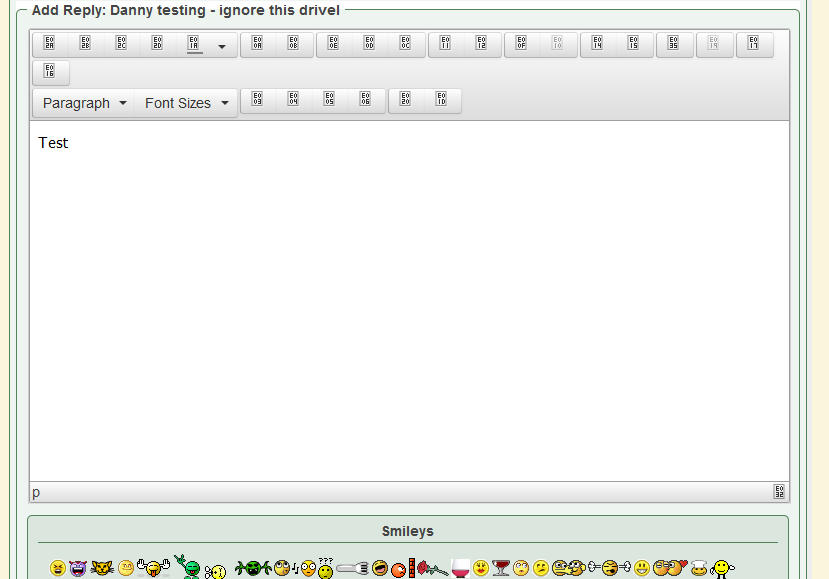
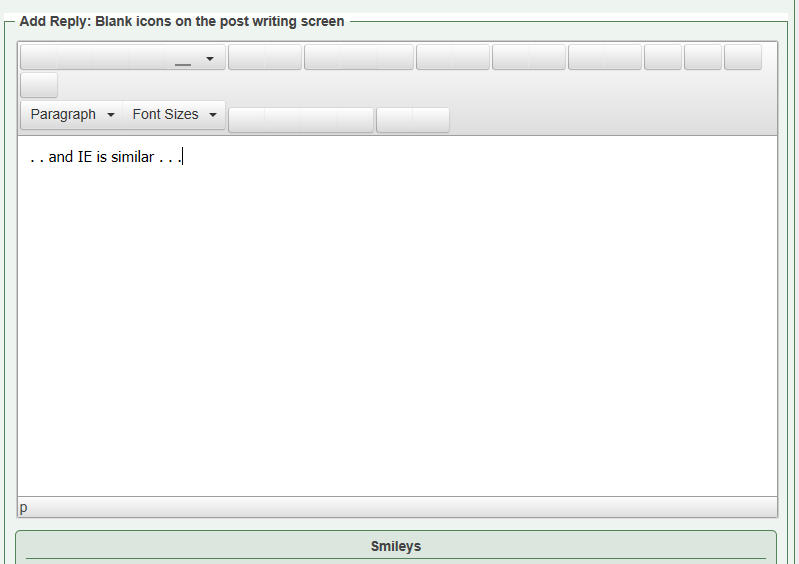
But users with Firefox and IE just see blank boxes where the glyphs should appear.


Firefox


IE

YS Yellow Swordfish
Yellow Swordfish
Member

Can you give me a link to your forum page and if guests are not allowed to make posts would you be able to create an account we could use just so we can look at the editor? If possible then please PM credentials to both myself, to ‘Mr Papa’ and to ‘Ike’. Please include in the PM a link to your site, a link to this thread and brief reminder of the problem. And one of us will take a look for you.

YS Yellow Swordfish
Yellow Swordfish
Member

Most curious. I was expecting to see an error in the console whereas there were none at all. Unusual.

Do you have any plugins active that add buttons to the tinyMCE toolbar? I mean for when you write a blog post NOT for the forum. Many plugins will add a button for special usage. Anything? And if so could you briefly deactivate it – clear the firefox or IE browser cache and then take another look to see if that is the cause?

CA Capitano
Capitano
Member

Yep – I disabled all but 3 WP plugins and then the problem disappeared.

I don’t have a specific plugin that intentionally modifies TinyMCE but one of them obviously is interfering.

Once I have identified the culprit I will report back.

CA Capitano
Capitano
Member

WP Super Cache is the culprit.

Can’t live without that for the blog section unfortunately.