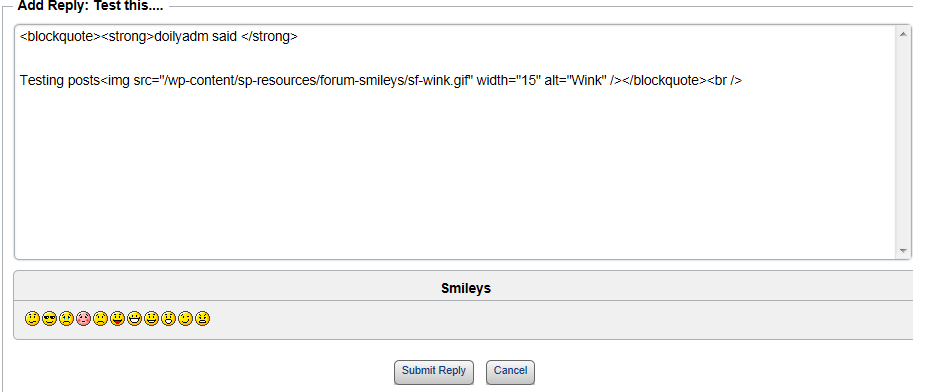
I installed and activated Ultimate tinyMCE and I only see Plain text (Plain Text) in Forum>options>global settings>post editing. I was looking for an editor for Simple:Press, because right now, when I go to edit a forum post, all I see is html. I am close to launching my site…this is the only thing holding me up. I hope you can help.
Support Forum
Did you install the TinyMCE plugin available here for Simple:Press or the WordPress one? After installing the Simple:Press one it should be available for members to select in their profile. You can also make it the default one used in Forum Admin > Options – Global Settings
I installed it from WordPress. I’ll deactivate and delete it, then install from the SP website to see what happens.
I only see the TinyMCE WYSWYG Editor link. Is this the one I need to install?
yes, install our tinymce plugin from our downloads page… do per: http://codex.simple-press.com/codex/plugins/plugin-basics/using-plugins/
I downloaded the TinyMCE WYSWYG Editor from Simple:Press, unzipped it, then uploaded to my website in the forum plugin folder. I then activated it from the WordPress Plugins area within the Forum plugin. Next step was to go to Forum>options>global settings>post editing and select TinyMCE as the default editor. Tested it and it worked perfectly! Thank you! You rock!
Just 2 more questions:
1) Is there a way that I can hide the Plain text editor option from the user when they go to their profile?
2) Can you point me to a link on how to delete posts, so I can clean up the forum before I go live?
Thank for your help! I should have posted to the forum from the get go.
sorry, but why would you want to keep them from selecting that editor? not sure I understand the use case here… but sorry, no way to not allow the basic editor – frankly, no one has ever asked this before…
you can delete posts using the forum tools… more info:
http://codex.simple-press.com/codex/faq/problem-with-post-edit-buttonow-to/problem-with-post-edit-buttonow-to-delete-a-topic-or-post-and-other-tools/

what did I say to make you think that is not the plain textarea???? as name implies, its a simple, html textarea – just like your image…
I asked why you would want to prevent users from using that editor if they wanted…
if you are referring to the forum tools, I mentioned, they have nothing to do with the editor… they will show when you hover the mouse over the user info (in our forum, the left hand side, next to the post content, with the avatar…
Most folks (in my forum) don’t understand html. When I switch it to Plain text, the user sees html and I just don’t want them to “freak out”. I was thinking that the Plaintext Editor would have some editing buttons as a basic editor. But I guess it doesn’t and it just shows htlm. I set TinyMCE as the default. So perhaps that will be fine for the user and they won’t switch it.
if they switch it, their fault…
jk… but seriously, they can then switch it back…
I will make a note for us to discuss if we should or want to offer a way to hide the plain textarea editor… gets a bit harder with the other editors being plugins, but we can chat about it…
I agree about it’s their fault…LOL. Perhaps Admins can select which editors to show the user…just a thought. Thanks for helpling me. Looks like I’ll launch my site tomorrow.
that would be the discussion topic… in 4.x that is how it work, but as I said, has become more complicated with them as plugins…
good luck with site and launch!