Support Forum

Translate/Change date

MB Markus Brocker
Markus Brocker
Member

Hey,

i copied, the german language files into these folder:
/wp-content/sp-resources/forum-language/simple-press/
/wp-content/sp-resources/forum-language/sp-themes/
/wp-content/sp-resources/forum-language/sp-plugins/

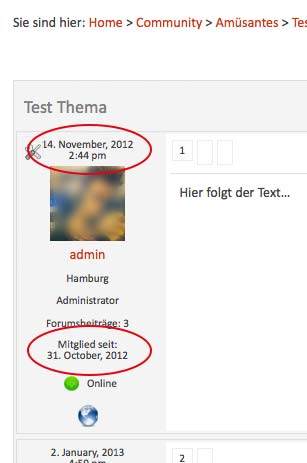
Everything is now german, expect for some lines in the profil (i can live with that), but the date format is still english. I have no idea where to change it.

Can you please help me?

Regards,Markus
Bildschirmfoto-2013-01-04-um-17.20.10.jpg

5 Answers

New Answer

MP Mr Papa
Mr Papa
Member

Change them on forum – profile – tabs and menus

YS Yellow Swordfish
Yellow Swordfish
Member

You need the forum admin > Options > Content Settings where you can set the format string.
And I suspect for the remainder of your profile text you need to visit the forum admin > profiles > Tabs and Menus and indeed the Options panel

MB Markus Brocker
Markus Brocker
Member

Im sorry for my bad english. I think you get me wrong.
I dont want to change the format from like “F j , Y” (or whatever), to “j. F, Y” (or whatever).

I want to change December to “Dezember”, January to “Januar”. I want to translate it..
Like i said, i allready copied the translation files (simple-press, sp-themes).
Everything is germay, expect for the date.

In my WordPress wp-config.php i said:
define(‘WPLANG’, ‘de_DE’);

You think it has something to do with my WordPress Setup / Settings?

MP Mr Papa
Mr Papa
Member

may need Andy on the date translation but yes, I believe it should be translated auto my the wp i18n stuff…

YS Yellow Swordfish
Yellow Swordfish
Member

That’s correct. This should be translated by your WP core language translation. I am unaware of ever getting other reports that this is not happening so I believe this does indeed work successfully. Are you using a translation file for the WP environment?