Support Forum

Turning off "first posts are subject to administrator approval before being displayed" message

22 Answers

New Answer

NE neto
neto
Member

I like the idea Gorky5 asked about.. displaying that message to a user with hundreds of posts would be nice to avoid..

I searched the Simple Press folder for spForumView.php and got 2 results sp-forum-view-class.php and sp-forum-view-functions.php

Is it one of these two – if so which one? and if not in which folder is spForumView.php located?

IK Ike
Ike
Member

Hey neto,

You should find spForumView.php in your themes folder, not the core:

sp-resources > forum-themes > yourtheme > templates 

NE neto
neto
Member

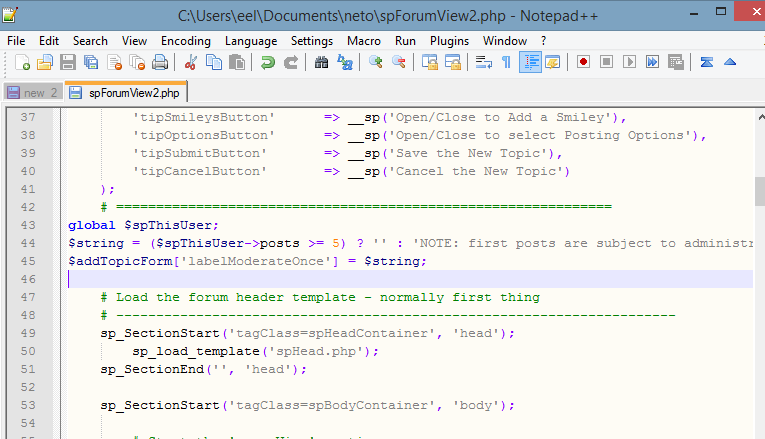
Would this be correct? I set it at 5 posts – renamed the file so I could keep the original in case I need it.

sp-mod.png
NE neto
neto
Member

Not yet  

 “measure twice, cut once”

I wanted to make sure I had the code in the right place in the file before trying it.

Thanks

IK Ike
Ike
Member

Well, it looks like it’s in the right place, let us know how you get on!

NE neto
neto
Member

The code worked – I set the post count to 5 – the moderation message shows in the post header for user with 5 or less posts and does not show for users with more than 5 posts.

Thanks..


Will this be affected by updates to theme (using Default 1.2.9)?

IK Ike
Ike
Member

Hey that’s good news, and yes very possibly. We always recommend any changes be put into a custom theme or a child theme to preserve changes. If you have a lot of changes it’s probably best to just duplicate and rename everything, however if this is your only change, you might want to make this a child theme, as it’s far smaller and easier to manage..

Just shout if you need any help with child themes.