
Support Forum

Tweaking Recent Forum Posts widget

CP chris powell
chris powell
Member

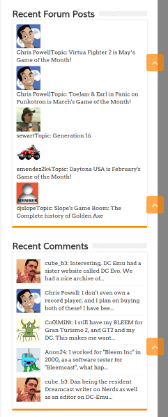
For some reason, when displaying an avatar in the Recent Forum Posts widget, it adds a break to the following text. I’ve tried changing the avatar size and alternating the display order, and nothing seems to work.

Also, there isn’t a space in between the username and thread title.

I’ve included an image of what I’m talking about. I’d like to get it to look exactly like the Recent Comments widget directly below the Recent Forum Posts widget.

Any idea what the issue is?
forum-widget.jpg

7 Answers

New Answer

MP Mr Papa
Mr Papa
Member

just a little bit css… but hard to be specific since one cannot tell from an image – need to see what css your wp theme might be applying to widgets…  link works much better than image..

but see this link:  https://simple-press.com/support-forum/sp5-plugin-topics/recent-forum-posts-widget-how-to-add-format/#p128031

for an example of what we do to ours (see in footer)…

if elements are together, it might be your widget options…

CP chris powell
chris powell
Member

My apologies, I forgot to post a link to my site. Here you go – http://www.seganerds.com. 

MP Mr Papa
Mr Papa
Member

did you try the suggestion?  appears it would work…  and the options allow you to do what you want after the user (line break, space, etc)… did you look at the widget options?

CP chris powell
chris powell
Member

I’m attempting to, but I admit that I’m not incredibly knowledgeable with all of this.

Do I simply paste this code into my global css or does it need to specifically go into the WP stylesheet. If so, does it matter which section to paste the code?

This is the code I’m attempting to use:

}

.widget-wrapper .spAvatar {
padding-bottom: 3px;
float: left;
}
.spListItemTag img {
margin: 0 10px 0 0;
vertical-align: middle;
}

MP Mr Papa
Mr Papa
Member

what do you mean by global css?  is that a theme option provided by your wp theme?  in the admin? if so, should be fine there…

but yes, just adding them to your wp theme anywhere should work…

but instead of .widget-wrapper, use .widget-container

CP chris powell
chris powell
Member

Awesome, that worked great! However, there is still a lack of a space between the username and the topic title. Any suggestions on how to correct that?

MP Mr Papa
Mr Papa
Member

did you look where I suggested you look?  in the widget options… you can affect elements, and what’s before and after elements…  if unsure, post a screenshot of your widget options…