Support Forum

Unable to edit any posts

PC phyllis crandall
phyllis crandall
Member

Hello,

I am having an issue where I (even as admin) cannot edit my/any posts. When I click on the edit button (or Forum Toolset) – the page jumps to the bottom of the post, but I’m not getting any text area for editing. I tried it on multiple browsers (IE, Firefox, Chrome) and it’s not working on any of them.

I originally thought maybe this was due to the jquery issue – http://codex.simple-press.com/codex/faq/troubleshooting/what-is-this-jquery-conflict/ – but it’s coming from my domain so I don’t think it’s that.

Thanks!

Phyllis

29 Answers

New Answer

YS Yellow Swordfish
Yellow Swordfish
Member

Link to the forum? We can at least double check the loading and look for js errors?

PC phyllis crandall
phyllis crandall
Member

Hi – I will PM you the access…it’s going to be for an online support group so we have it pwd-protected.

YS Yellow Swordfish
Yellow Swordfish
Member

Actually it seems to loading smoothly but there are several things not working – not just edit – like pinning a topic or post for example. These are not reliant on javascript but good old fashioned html POST processing.

Could we start by you asking your host if they have mod_security imposed on your site and if so ask if this could be effecting the procesing of POST variables?

PC phyllis crandall
phyllis crandall
Member

Hi – our host says:

We are not running mod_security, I checked. However I did see many recurring error messages in the apache log referring to this project. They are attached, perhaps they will be helpful in the forums to diagnose the problem.

I will send this file to you via PM

YS Yellow Swordfish
Yellow Swordfish
Member

99% of these are ‘notices’. They are a harmless nuisance and I would bet that it probably comes down to just 2 or 3 that are repeating over and over. I will come back to those in a moment.

There are a small group of ‘warnings’ – which are more worrying – pertaining to the ‘Cimy_User_Extra_Fields’ plugin but I believe – at least there is a suggestion in the php log – that this is when it called FROM the forum page. Would that be to register as a user? I am not totally sure what this plugin does or when and how it is invoked.

There are no actual ‘fatal’ errors in that list – nothing, I believe, that would stop things actually working.

But it does give me an idea – although a long shot – so back to the Notices.

Can you go If possible on a different browser tab) to the forum admin > toolbox > error log. Ignore anything that is there – just scroll down and clear the log. Go back to the forum and try an edit. after the page reloads, back to the error log to see what was reported.

PC phyllis crandall
phyllis crandall
Member

OK – ‘Cimy_User_Extra_Fields’ plugin is for gathering additional fields from the user upon registration. It does handle the email confirmation but that’s really it.

I followed your instructions and this is what I get:

May 3, 2012
3:43 pm
php file: /simple-press/forum/content/sp-common-view-functions.php
line: 2007
function: sp_ForumStats
Notice | Trying to get property of non-object
May 3, 2012
3:43 pm
php file: /simple-press/forum/content/sp-common-view-functions.php
line: 2006
function: sp_ForumStats
Notice | Trying to get property of non-object
May 3, 2012
3:43 pm
php file: /simple-press/forum/content/sp-common-view-functions.php
line: 2005
function: sp_ForumStats
Notice | Trying to get property of non-object
May 3, 2012
3:43 pm
php file: /simple-press/forum/content/sp-common-view-functions.php
line: 2004
function: sp_ForumStats
Notice | Trying to get property of non-object
May 3, 2012
3:43 pm
php file: /simple-press/forum/content/sp-common-view-functions.php
line: 2058
function: sp_MembershipStats
Notice | Trying to get property of non-object
May 3, 2012
3:43 pm
php file: /simple-press/forum/content/sp-common-view-functions.php
line: 2057
function: sp_MembershipStats
Notice | Trying to get property of non-object
May 3, 2012
3:43 pm
php file: /simple-press/forum/content/sp-common-view-functions.php
line: 2056
function: sp_MembershipStats
Notice | Trying to get property of non-object
May 3, 2012
3:43 pm
php file: /simple-press/forum/content/sp-common-view-functions.php
line: 2055
function: sp_MembershipStats
Notice | Trying to get property of non-object
May 3, 2012
3:43 pm
php file: /simple-press/sp-api/sp-api-timezone.php
line: 29
function: date_default_timezone_set
Notice | date_default_timezone_set(): Timezone ID ‘UTC 0’ is invalid
May 3, 2012
3:43 pm
php file: /simple-press/sp-api/sp-api-timezone.php
line: 29
function: date_default_timezone_set
Notice | date_default_timezone_set(): Timezone ID ‘UTC 0’ is invalid
May 3, 2012
3:43 pm
php file: /simple-press/sp-api/sp-api-timezone.php
line: 29
function: date_default_timezone_set
Notice | date_default_timezone_set(): Timezone ID ‘UTC 0’ is invalid
YS Yellow Swordfish
Yellow Swordfish
Member

Oh well. Nothing significant to the edit problem itself but more evidence that something in your environment is stifling processing…

So – back to edits as a good example. There is something installed – either a server setting or maybe another Wp plugin of some sort – that is either destroying or inhibiting the use of the POST variables from forms. It may be some sort of over-zealous security module of some sort – which is why I asked about mod_security which can have this effect.

So I guess it’s plugins next. Can you tell me what WP plugins you have active?

PC phyllis crandall
phyllis crandall
Member

Could it be something w/ PHP? What’s the PHP version system requirement for Simple Press?

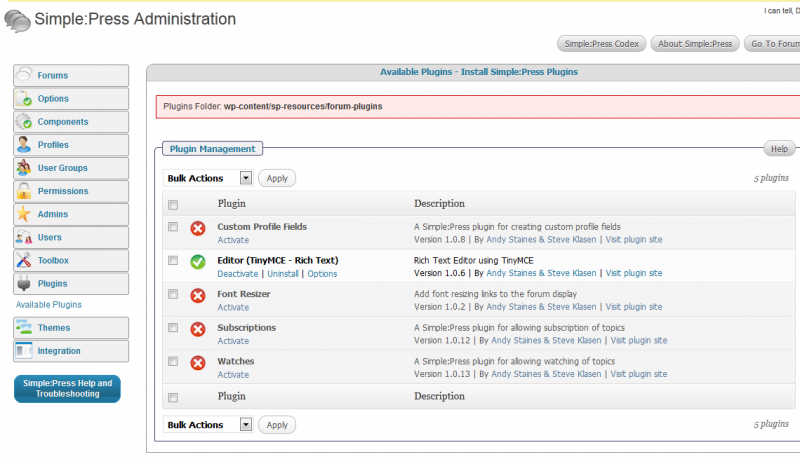
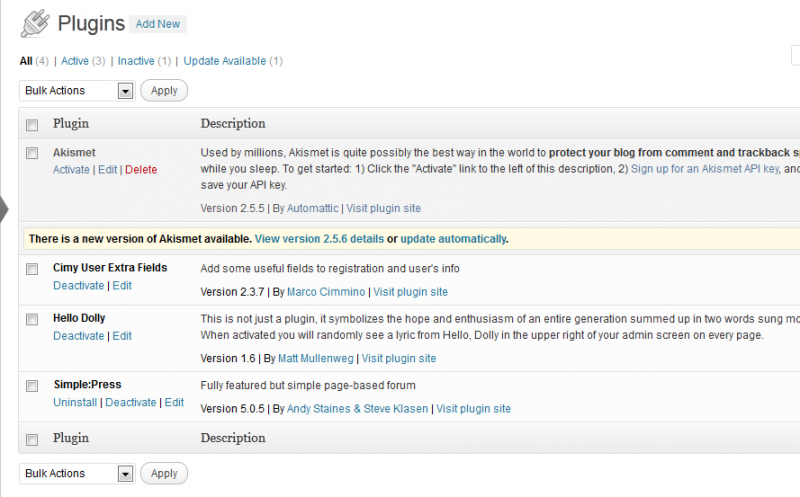
Here’s what I have for plugins on WP & SP

[Image Can Not Be Found]

PC phyllis crandall
phyllis crandall
Member

oops – here are the screen caps of the plugins

sp-plugins.pngwp-plugins.png

YS Yellow Swordfish
Yellow Swordfish
Member

System requirements are here: http://codex.simple-press.com/codex/installation/installation-information/system-requirements/. But that should be fine as it is checked on install and in any case WP also needs the same minimum versions.

So – I can see there are no plugins! That is about as bare a system as you could run. So – it comes back to the server in some way. Could you ask your host of they can shed any light on why POST variables are being discarded/ignored?

PC phyllis crandall
phyllis crandall
Member

OK – I was able to do a screenshare w/ the developer who hosts/manages our site and we were able to do a lot of troubleshooting, which I hope will be helpful!

  1. He wrote a simple test to verify that POST array is being recognized, which it is.In addition, other POST-related functions in the forum are working properly (i.e. REPLY and ADD topic).
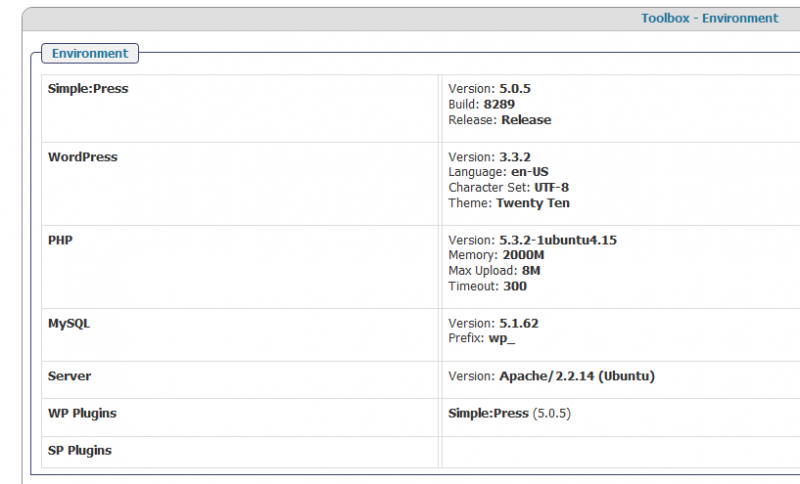
  2. We confirmed our environment, and we are running the correct versions of everything – 5-10-2012-11-15-46-AM.png
  3. We discovered a number of errors in the log – one was due to invalid time zone (FIXED), the others were due to an inability to get stats from sp_get_option. we commented out these lines so that the program should continue to execute. At that point we were able to get rid of all the errors in the log, but the edit button still was not working.
  4. we also tried deactivating all the plugins (on both forum and within simple press) but edit function was still not working.
  5. Our developer thinks it may have to do w/ the javascript redirect. He noticed there is a seemingly older version (1.7.1 vs. 1.8.16) of jquery being called when viewing the source of a forum page –
    <script type=’text/javascript’ src=’wp-includes/js/jquery/jquery.js?ver=1.7.1′></script>

    <script type=’text/javascript’ src=’wp-content/plugins/simple-press/resources/jscript/checkboxes/prettyCheckboxes.js?ver=3.3.2′></script>

    <script type=’text/javascript’ src=’wp-content/plugins/simple-press/forum/resources/jscript/print/jquery.jqprint.js?ver=3.3.2′></script>

    <script type=’text/javascript’ src=’wp-includes/js/jquery/ui/jquery.ui.core.min.js?ver=1.8.16′></script>

    <script type=’text/javascript’ src=’wp-includes/js/jquery/ui/jquery.ui.widget.min.js?ver=1.8.16′></script>

    <script type=’text/javascript’ src=’wp-content/plugins/simple-press/forum/resources/jscript/msdropdown/msdropdown.js?ver=3.3.2′></script>

    <script type=’text/javascript’>

    /* <![CDATA[ */

    var sp_forum_vars = {“problem”:”Unable to save”,”noguestname”:”No guest username entered”,”noguestemail”:”No guest email Entered”,”notopictitle”:”No topic title entered”,”nomath”:”Spam math unanswered”,”nocontent”:”No post content entered”,”rejected”:”This post is rejected because it contains embedded formatting, probably pasted in form MS Word or other WYSIWYG editor”,”iframe”:”This post contains an iframe which are disallowed”,”savingpost”:”Saving post”,”wait”:”Please wait”};

    /* ]]> */

    </script>

    <script type=’text/javascript’ src=’wp-content/plugins/simple-press/forum/resources/jscript/sp-forum.js?ver=3.3.2′></script>

    <script type=’text/javascript’ src=’wp-includes/js/jquery/ui/jquery.ui.mouse.min.js?ver=1.8.16′></script>

    <script type=’text/javascript’ src=’wp-includes/js/jquery/ui/jquery.ui.resizable.min.js?ver=1.8.16′></script>

    <script type=’text/javascript’ src=’wp-includes/js/jquery/ui/jquery.ui.draggable.min.js?ver=1.8.16′></script>

    <script type=’text/javascript’ src=’wp-includes/js/jquery/ui/jquery.ui.button.min.js?ver=1.8.16′></script>

    <script type=’text/javascript’ src=’wp-includes/js/jquery/ui/jquery.ui.position.min.js?ver=1.8.16′></script>

    <script type=’text/javascript’ src=’wp-includes/js/jquery/ui/jquery.ui.dialog.min.js?ver=1.8.16′></script>

    <script type=’text/javascript’ src=’wp-content/plugins/simple-press/resources/jscript/sp-common.js?ver=3.3.2′></script>

    <link rel=”EditURI” type=”application/rsd+xml” title=”RSD” href=”http://www.nyee.edu/uveitis/xmlrpc.php?rsd” />

    <link rel=”wlwmanifest” type=”application/wlwmanifest+xml” href=”http://www.nyee.edu/uveitis/wp-includes/wlwmanifest.xml” />

MP Mr Papa
Mr Papa
Member

timezone issue… just an annoying notice… hopefully we will get that fixed in 5.1 but does not affect anything really…

5)  we do NOT load any jquery… we simply tell wp to load the jquery it ships with… and besides you are confusing jquery and jquery ui…  jquery is version 1.7.1 and jquery ui is 1.18.16… those are proper current wp versions….  and keep in mind that jquery and jquery ui are NOT the same thing…  jquery ui is an additional library that uses jquery…

sorry if I missed it by I dont see a link to your site… can you provide so we can take a look?

is your host running mod_security?? they may need to whitelist simple press or deactivate it (its about worthless anyways)…

PC phyllis crandall
phyllis crandall
Member

No, we are not running mod_security.

I will PM you the credentials as this is a secured site.

Thanks!

Phyllis

PC phyllis crandall
phyllis crandall
Member

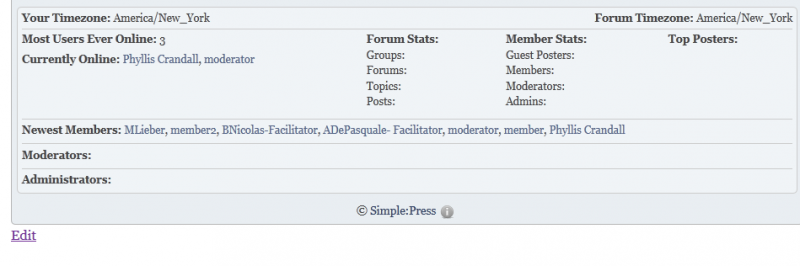
Not sure if this is somehow related…but also noticed that forum/member stats are not showing up on the forum. Also, it’s not showing any names under Moderators/Administrators…stats.png