Support Forum

Unable to Submit Post!!! – ERROR: "Unable to Save, No post content entered"

38 Answers

New Answer

MP Mr Papa
Mr Papa
Member

Nor I really… I know when you first came here we had to work hard to get stuff working – you initially had multiple js issues… but I remember it eventually being okay, I think…

so no real updates except for wp 3.5 which did include a new version of jquery… what is odd to me is that during all the work we did previously with you, seems we certainly would have noticed the old, outdated version of jquery being pulled in by the theme… its normally the number one cause of conflicts and problems for other wp plugins that use jquery… and the first thing we look for… we can only test simple press with the version that comes with wp… which is partially why I asked if the theme had been updated recently…

all that said, we may find out that if we fix the theme jquery usage, that it doesnt resolve anything… its a step in the process… but when the site is throwing jquery errors and its a different version of jquery than that which comes with wp, its the first place to start…

earlier I did edit the theme and remove the loading of the older jquery version… I then got a bunch of errors in the theme custom.js file… potentially indicating that its internal code is reliant on that specific version of jquery… a bit of a mess that not sure how to proceed…

but hope to revisit again tomorrow…

BI BigFeat
BigFeat
Member

Here is a test domain you can use in the interim: http://inceptionradionetwork.info.  This testbed site runs the exact same theme.  There are a few things that are slightly different in this .info sandbox site, but it’s mostly cosmetic style sheet scripts that assigns colors to certain parts of the site and so forth.

So please use this website with the exact same dashboard credentials for testing – http://inceptionradionetwork.info.  If something breaks on this .info site, I can live with it because it’s only a test site.  However, being that the .com is operational and in use by our users, I’m afraid to tinker around with it too much now to create any more unforseen obstacles for visitors.  Thanks in advance.

BI BigFeat
BigFeat
Member

REGARDING API CALLS: The WP theme developer wrote back an claims he fixed the api issues in the .com site (http://inceptionradionetwork.com/forum).  Please verify whether the api issues has been in deed taken care of. Thanks.

MP Mr Papa
Mr Papa
Member

okay, will do… has the .info site been similarly updated?

stopped by real quick and it did fix some of the errors… but still getting one in custom.js and flex slider… as well as another from our captcha…

so improvement but something else still at issue…

pushing out some releases this morning, so probably this afternoon…

BI BigFeat
BigFeat
Member

The change has only been done to the .com as we can only ask the developer for support in our operational site.

MP Mr Papa
Mr Papa
Member

btw…  your developer did not really fix the jquery issue…  he changed it to not load the jquery from within the theme, but changed it to load it from googleapis instead…  which really does nothing…  its still loading an external jquery library instead of the one that comes with wp…  and to boot its still a quite old version of jquery (1.6.4) vs the current version that ships with wp (1.8.3)…  makes me wonder if he has some older jquery functionality/usage in the theme and cannot use a newer version…

can you provide ftp access to that .info site?

btw, not sure if I mentioned this… but your site is throwing the js/jquery errors on all pages, not just the forum…

BI BigFeat
BigFeat
Member

I’ve forwarded your comments to him. I will PM you FTP login info.

MP Mr Papa
Mr Papa
Member

I think the first step is going to be to resolve the js/jquery issues on every page… then we can get down to any specific ones left on the forum page… does he not see those errors on every page?


BI BigFeat
BigFeat
Member

FYI: I just completed the SimplePress upgrade on the .com domain and it appears the issue is still there.  I’m still waiting for the WP theme developer to explain what’s going on.

I guess one test that we can do in the meantime is to simply apply a default WP theme like Twenty 10 to the .info site and see if the Forum issues go away. if it doesn’t then, I would guess there is something more sinister then the jquery issue you raised.

I’m also noticing that the text in the posts also don’t appear. The post fields are blank.

MP Mr Papa
Mr Papa
Member

post fields?

let me know what happens with default wp theme… 

BI BigFeat
BigFeat
Member

Mr Papa said
post fields?

let me know what happens with default wp theme… 

The post is able to save with the WP default Twenty 10 theme. I have reverted back to the preferred theme which appear to be suspect.

The archived posts themselves appear blank. It shows the date and time the post were made, but all the content is missing.

MP Mr Papa
Mr Papa
Member

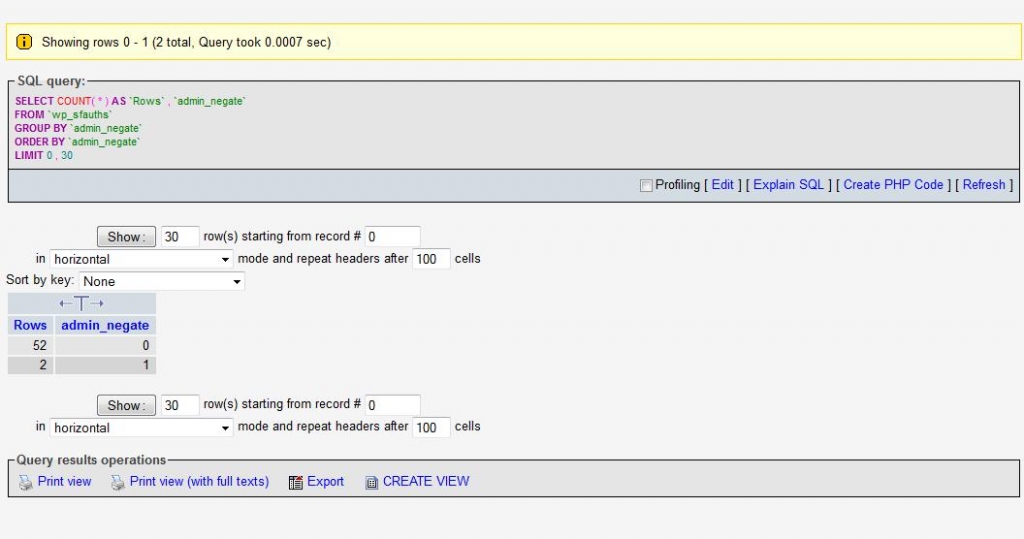
for this site, can you look at the db? in the sfauths table, look at the admin_negate column… how many have value of 1? are any not 0 or 1?

MP Mr Papa
Mr Papa
Member

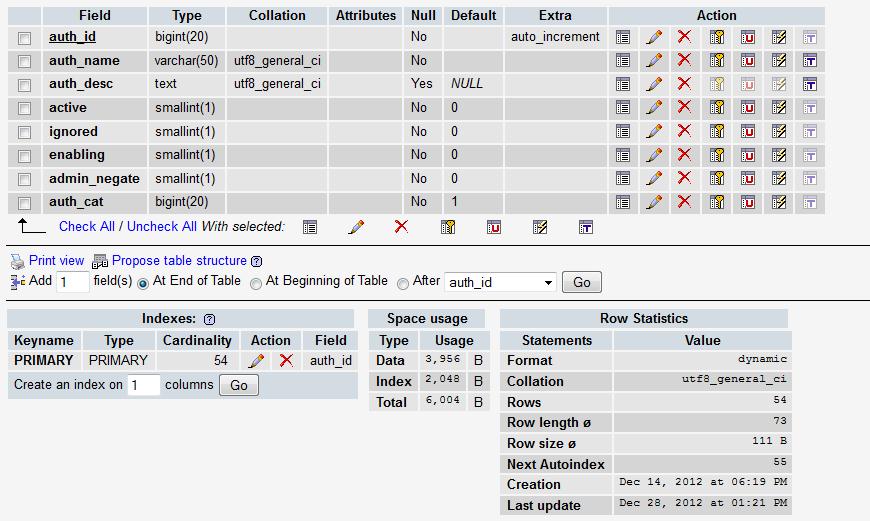
thats too limited a view… dont care about the structure – wanted the full data… all rows…

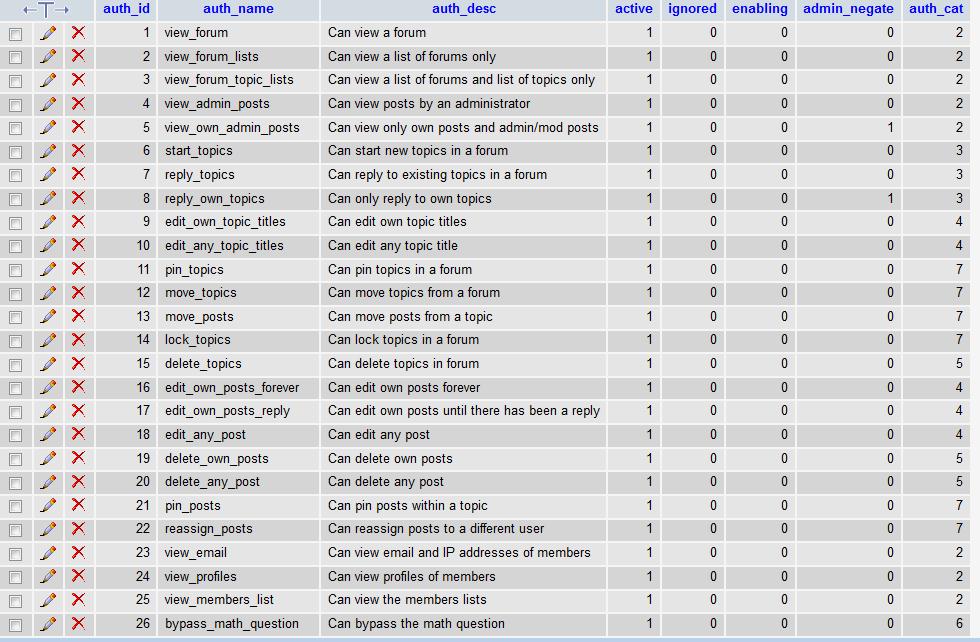
but to short circuit that… you should only have 3 rows that have admin negate set to 1:

Can only view topics by creator and admins
Can view only own posts and admin/mod posts
Can only reply to own topics

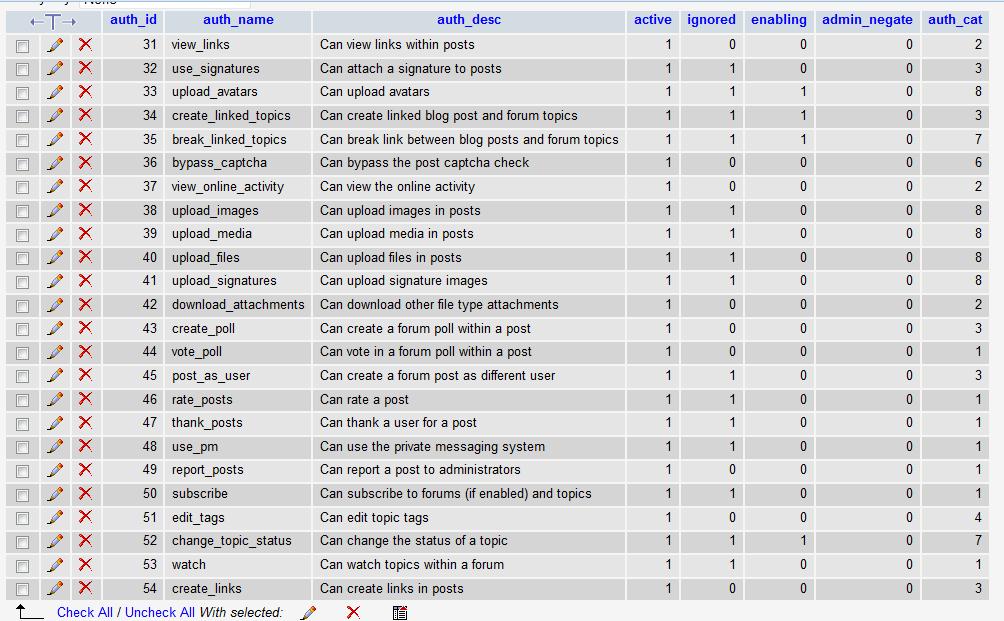
the rest should all be zero…  can you verify?

BI BigFeat
BigFeat
Member

Mr Papa said
thats too limited a view… dont care about the structure – wanted the full data… all rows…

but to short circuit that… you should only have 3 rows that have admin negate set to 1:

Can only view topics by creator and admins
Can view only own posts and admin/mod posts
Can only reply to own topics

the rest should all be zero…  can you verify?

I don’t see this line any where in the table – Can only view topics by creator and admins. With that said, only 2 of the 3 items you listed have admin negate set to 1.  

View complete table list. sfauths4b.jpgsfauths4.jpgsfauths3.jpg