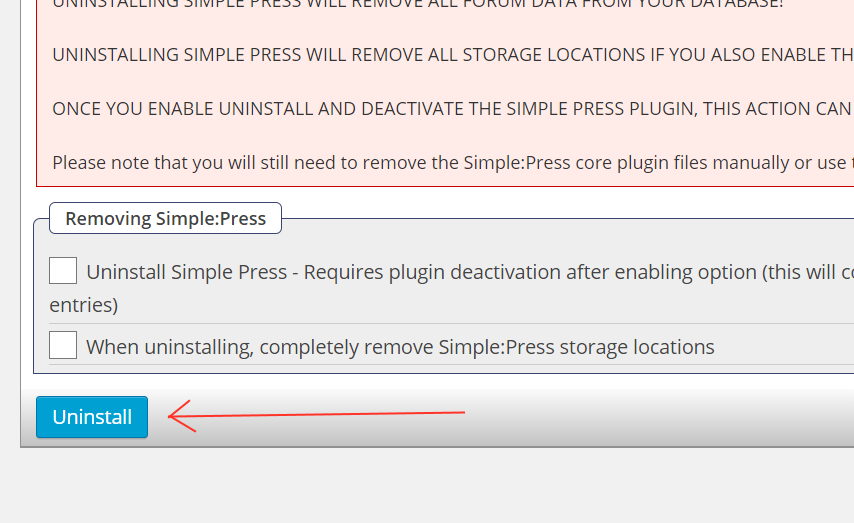
I am not totally sure quite what you are meaning here but if you are saying there is a message that says if you deactivate the plugin you will lose all the data then simply go to the forum admin > toolbox > Uninstall and uncheck the option to uninstall on deactivation.
Support Forum
“Simple:Press is READY TO BE REMOVED. When you deactivate it ALL DATA WILL BE DELETED”
Sometimes I do performance testing, and disable plugins for it. The message of the plugins section says that if SimplePress disable all data is erased, I need the plugin does not do that if I have to turn off. For example, rarely, but it happened, a plugin has been disabled by an error of WordPress, which in this case would be fateful.
I headed to the section you indicate, Tools, Uninstall – “Uninstall Simple Press – Requires plugin deactivation after enabling option (this will completely remove Simple:Press database entries)”, but I understand that menu will not save that option if I unmarked (puts down Uninstall) that box.
What I mean is that in the WordPress plugins menu, do not want the message “Simple:Press is READY TO BE REMOVED. When you deactivate it ALL DATA WILL BE DELETED”,because I uneasiness.
I headed to the section you indicate, Tools, Uninstall – “Uninstall Simple Press – Requires plugin deactivation after enabling option (this will completely remove Simple:Press database entries)”, but I understand that menu will not save that option if I unmarked (puts down Uninstall) that box.
Sorry – I appreciate this is a language thing.. Are you saying that when you uncheck the box you are unable to update that admin panel? if so then you have some sort of serious problem going on.
Ok, sorry, I get it. The text “Uninstall” in the button confused me. I think you should change it to “Save Uninstall Options” or something, it may seem that if you click in it, SP uninstalls basing on those options.
By far, all ok in this part. Now I have other problems, which I will write on another topic 😉