New topic, hit Upload Attachment, select file, a preview with empty image window appears, hit Start Upload …. nothing happens.
Thanks


New topic, hit Upload Attachment, select file, a preview with empty image window appears, hit Start Upload …. nothing happens.
Thanks

any errors reported in the browser console? likely a js conflict… do you have link to site?
so something, like the wp theme, is using the bootstrap js library which conflicts with the jquery ui library that wp uses…
some options for workaround do exist… mainly, need to get jquery ui to load after bootstrap… could require minor adjustment to the wp theme…
first thing to try is going to forum – integration – page and permalink and try loading the forum js in the footer… that may do the trick, but since bootstrap is loaded in the footer, it may still get loaded first…
unfortunately, I can see on your page that jquery ui is indeed still loaded before boostrap… so the conflict will remain…
next thing I would try is a temp switch to the default wp theme.. and see if it starts functioning… would let us know for sure its the wp theme using bootstrap…
then we can help you make a minor adjustment to the wp theme…
Yep, that worked, thanks. Added a bit of code to my post though – is it supposed to do that?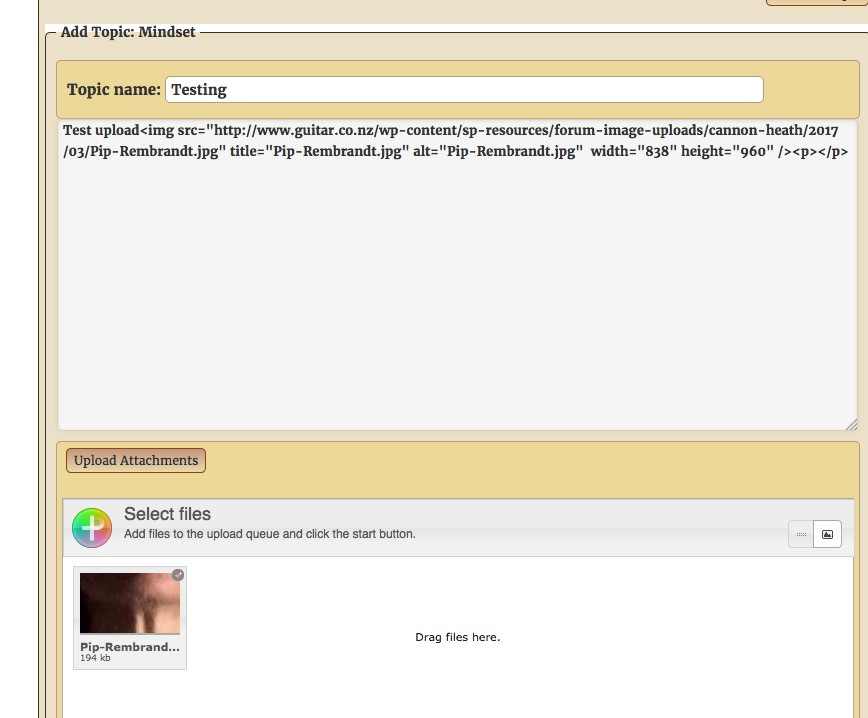
Cheers

you mean the markup? sure… you are just using the plain textarea editor… so it will show all html markup… when you save, you will get the expected display… if you dont want the markup, you should try one of our other editors… we use the tinymce editor here…
so are you fine using the default wp theme or do you want to go back and adjust your other theme?? if so, you need to find where its loading (or enqueueing) the bootstrap.js file…
Thanks Mr Papa, I need to use the ‘other’ theme. How do I get the information you mention? Cheers.
hard to say.. varies by theme… search through the theme files for bootstrap.js… maybe in header.php or some other file… look in the .php file.s..
Does this tell you anything Mr Papa?
<?php
/*
WARNING! DO NOT EDIT THEME FILES IF YOU PLAN ON UPDATING!
Theme files will be overwritten and your changes will be lost
when updating. Instead, add custom code in the admin under
Appearance > Theme Settings > Code or create a child theme.
*/
// Defines
define( ‘FL_THEME_VERSION’, ‘1.5.4’ );
define( ‘FL_THEME_DIR’, get_template_directory() );
define( ‘FL_THEME_URL’, get_template_directory_uri() );
// Classes
require_once ‘classes/class-fl-color.php’;
require_once ‘classes/class-fl-customizer.php’;
require_once ‘classes/class-fl-fonts.php’;
require_once ‘classes/class-fl-theme.php’;
require_once ‘classes/class-fl-theme-update.php’;
// Theme Actions
add_action( ‘after_switch_theme’, ‘FLCustomizer::refresh_css’ );
add_action( ‘after_setup_theme’, ‘FLTheme::setup’ );
add_action( ‘init’, ‘FLTheme::init_woocommerce’ );
add_action( ‘wp_enqueue_scripts’, ‘FLTheme::enqueue_scripts’, 999 );
add_action( ‘widgets_init’, ‘FLTheme::widgets_init’ );
add_action( ‘wp_footer’, ‘FLTheme::go_to_top’ );
// Theme Filters
add_filter( ‘body_class’, ‘FLTheme::body_class’ );
add_filter( ‘excerpt_more’, ‘FLTheme::excerpt_more’ );
// Theme Updates
add_action( ‘init’, ‘FLThemeUpdate::init’ );
// Admin Actions
add_action( ‘admin_head’, ‘FLTheme::favicon’ );
// Customizer
add_action( ‘customize_preview_init’, ‘FLCustomizer::preview_init’ );
add_action( ‘customize_controls_enqueue_scripts’, ‘FLCustomizer::controls_enqueue_scripts’ );
add_action( ‘customize_controls_print_footer_scripts’, ‘FLCustomizer::controls_print_footer_scripts’ );
add_action( ‘customize_register’, ‘FLCustomizer::register’ );
add_action( ‘customize_save_after’, ‘FLCustomizer::save’ );
not really – well maybe… one of the files in the theme should define a class FLTtheme.. and there should be a function in there call enqueue_scripts… that is the one we should look at…
might be in that file theme.php… but no way to tell…
so in there, is this line:
wp_enqueue_script('bootstrap', FL_THEME_URL . '/js/bootstrap.min.js', array(), FL_THEME_VERSION, true);
what happens if you change it to</>
wp_enqueue_script('bootstrap', FL_THEME_URL . '/js/bootstrap.min.js', array(), FL_THEME_VERSION, false);
that will loadstrap in header which will before jquery ui… however, might be problematic since they dont use dependencies like one should (unless there is none in which case it should work)…
Cheers Mr Papa, that looks to have worked, I will get my client to give it a good test. Meanwhile I have another question but I will open a new topic. Thanks for your help.