Support Forum

User ID Location

EC Emily Carlin
Emily Carlin
Member

Where would I find the User ID location?  User ID is required to reassign a post (which is a well loved function!).  I used to be able to hover on their username and it would show up in the lower left (URL)…now javascript:void(null) pops up, of course.  I don’t find it in their profile.


Thank you!

4 Answers

New Answer

MP Mr Papa
Mr Papa
Member

you can get the user id from the wp users admin panel or from our forum – users – member information panel…  if in the front end, looking at a post, the forum tools – view properties will also give it to you…

its still there when you hover over a user too, just not in the link… you can inspect the element or view the source and see the user id in the js args…

EC Emily Carlin
Emily Carlin
Member

I would rather stay in the front end instead of having to go into the backend.

I was able to find it by Inspecting Element.

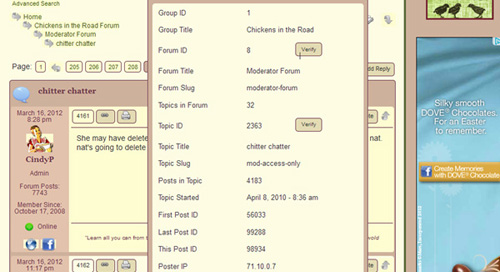
Should it show up in View Properties of the post?  This is my screen print.

viewproperties.jpg


And this is the screen print of hovering over Username, where I don’t see it either.

hoverprofilename.jpg
EC Emily Carlin
Emily Carlin
Member

Can some code be added to spProfilePopupShow.php to show the UserId?

Maybe below sp_ProfileShowDisplayName(”, __sp(‘Username’));

MP Mr Papa
Mr Papa
Member

well, looks like I was wrong… it is not in the view properties… and that is where I would think the best place to put it is…  we dont really want to ‘out’ it in the display itself…

but nothing to stop you from doing that… just echo it out where you want it…

echo $spThisPost->user_id

assuming its in the post row of topic view…

but I will get it added to the properties…