Support Forum

Users can upload an avatar, but it won't display

RC Ryan Collins
Ryan Collins
Member

Hello everyone,

Simple Press is a great so thanks in advance for any insight. This small issue has been bugging me for a few months and I would love to get to the bottom of it. Any help is much appreciated! 

So users on my website http://myfishingcapecod.com can choose an avatar and click upload, yet the avatar never appears. I’ve checked my permissions and enabled avatar uploading yet it seems like simple press thinks I have not enabled avatar uploading.

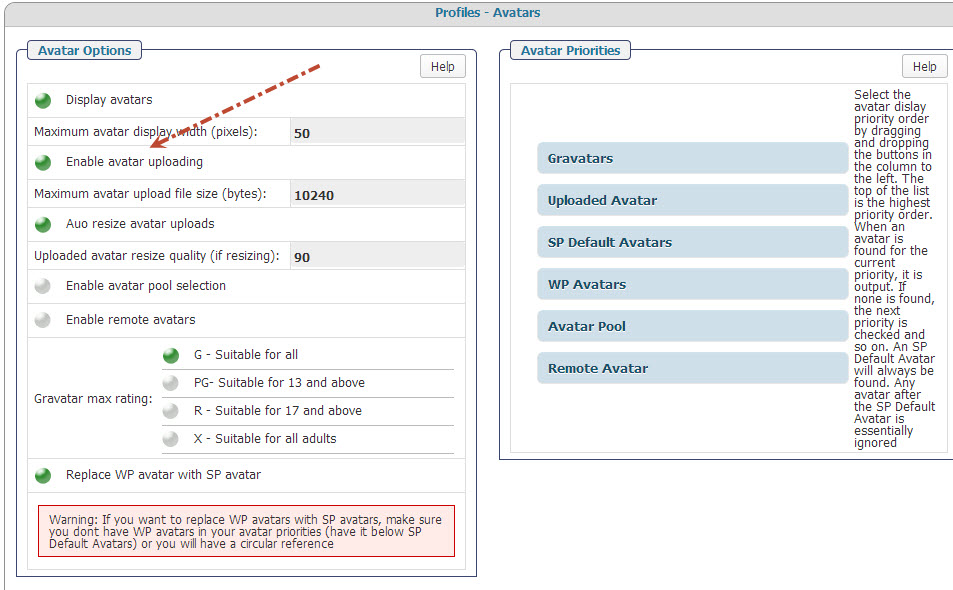
You’ll see in attached image #1 that I have enabled uploading (I think)

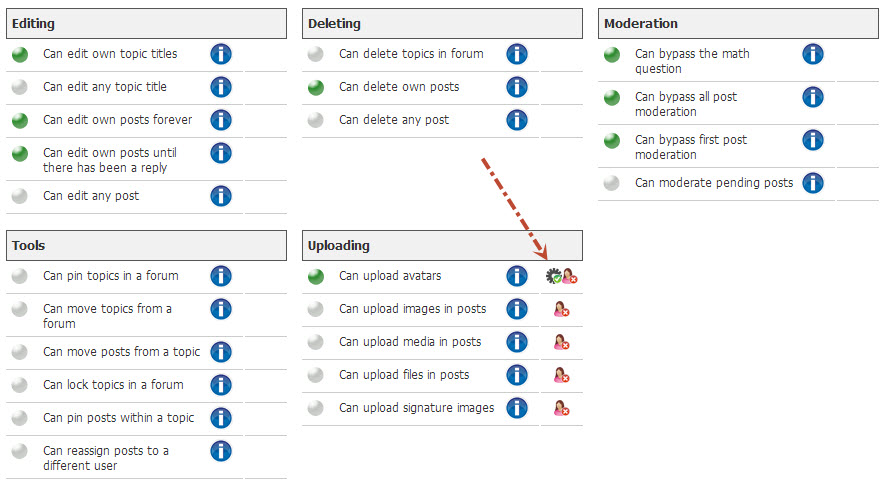
Yet in image #2 the gear icon says that I need to enable avatar uploading

Any ideas? 

Thanks so much for your time and a great plugin,

Ryan


2.jpg1.jpg


17 Answers

New Answer

MP Mr Papa
Mr Papa
Member

not sure how the link helps since its a private membership forum…

so what shows instead?   an avatar or no image?  if the latter, your permissions might not make the avatar folder accessible… look on forum – integration – storage locations and see if you have an issues with avatar storage…

you have prioritized gravatars over uploaded avatars so if a user has a gravatar it will show instead…

BR Brandon
Brandon
Member

The little gear icon is basically a reminder that you need to enable it. Far as I know it doesn’t actually check to see if enabled. I would put the upload avatars above the Gravatars.

Also check your forum admin Storage locations and make sure the folder is found ans is writable.


RC Ryan Collins
Ryan Collins
Member

Thanks for the prompt replies, I really appreciate it.

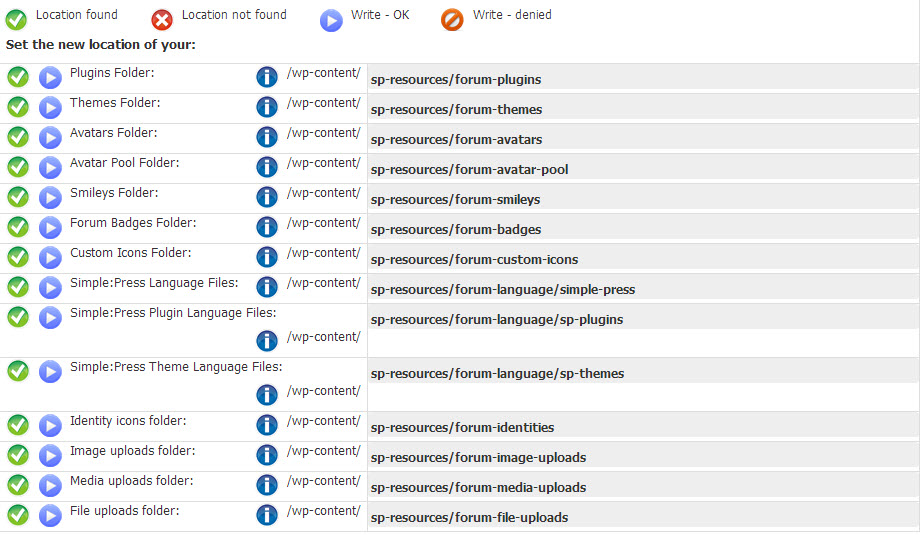
I checked my storage locations and everything appears to be functioning properly. I’ve attached a screen shot.

I also tried putting the “upload avatars” above the “gravatars” but I am encountering the same issue.

Basically what is occurring is I choose an avatar to upload, click upload, my browser tries uploading the image but then it just stops and nothing occurs. I’ve tried different browsers too and same issue.

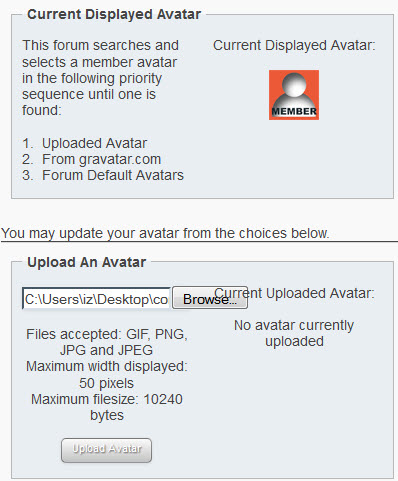
I am currently seeing the default Simple Press avatar image, which you can also check out in the second attached screen shot.

Obviously any additional insight is much appreciated. My forum is really growing which is awesome – if I can get this squared away I will be golden.

Thanks and take care,

Ryan


storage-locations.jpgdefault-avatar.jpg

MP Mr Papa
Mr Papa
Member

for one of the uploaded avatars, can you open the url in your browser directly?  might be a file ownership issue on the sp-resources (and sub dirs) directory…  you could compare the file ownerships (uid/gid) to wp-content…  in some server setups, due to permissions, the files end up getting owned by wrong user…

RC Ryan Collins
Ryan Collins
Member

Thanks again Mr Papa for the response.

I spent some time today deactivating stuff on my blog, and was able to get the uploader working. Seems like it could be a specific problem/conflict with something on my site.

So for now the issue is resolved!

Thanks so much for the insight. Great to know you guys provide solid customer support!

MP Mr Papa
Mr Papa
Member

excellent news. thanks for the update – and the kind words!

RC Ryan Collins
Ryan Collins
Member

Hello again Mr Papa.

Just wondering if there are any known conflicts with Simple Press and W3Total Cache. 

I’m having trouble again with the avatars, and I know W3 is notorious for causing conflicts with other plugins I use. Just curious.

Thanks!

MP Mr Papa
Mr Papa
Member

conflicts? no, but of course, you cannot cache the forum page – its dynamic in nature… but remind folks of that every chance we get…

so if you are using w3tc, you need to tell it to ignore the wp page the forum is on for all types of caching you are using…

RC Ryan Collins
Ryan Collins
Member

Thanks Mr. Papa

Would you or someone on your staff be willing to log into my site, and try uploading an avatar? Maybe that will help diagnose the issue here?

I can’t get this figured out for the life of me…

Thanks, I appreciate any insight and help I can get. My forum is really taking off and I’d love to get everyone using their own avatars instead of the defaults.


YS Yellow Swordfish
Yellow Swordfish
Member

Please PM credentials to both myself and to ‘Mr Papa‘. Please include in the PM a link to your site, a link to this thread and brief reminder of the problem. And one of us will take a look for you.

RC Ryan Collins
Ryan Collins
Member

Thanks so much guys, I really appreciate it.

PM has been sent. Please feel free to keep me posted with anything that comes up.

Take care,

Ryan

MP Mr Papa
Mr Papa
Member

I think the biggest problem is that you are serving cached forum pages.. so things wont work…  you cannot cache the wp page the forum is on since its dynamic in nature (all the content appears on that single wp page)…

for each type of caching you are using, you need to tell it to ignore the wp page the forum is on…  basically in rejected strings add /forum/

RC Ryan Collins
Ryan Collins
Member

Thanks Mr. Papa

I have prevented the forum page from being cached but am still experiencing the same issue.

I also tried deactivating W3 Total Cache completely, but that still doesn’t solve the problem. 

Any other ideas or avenues you think are worth me investigating based on your expertise? I have been trying to get this issue figured out for over a year now. I’m not sure where to turn next! lol

Thanks for any additional insight,

Ryan

RC Ryan Collins
Ryan Collins
Member

Eureka! Just got it to work.

The issue was the file size limit. I had the limit set at 10,240 and simply needed to bump it up a bit.

I think my problem is that I was not receiving any notification that the file size was too large. Said another way, I tried uploading the “too big” photo and never received an error message or notification that the file size was too large.

Either way it seems to be working OK now. Thanks for all the help AND patience.

Take care,

Ryan