It might just be that I am tired and not thinking clearly but I am struggling to visualise just what you are asking for. Is there a chance you could knock up a diagram or visual and attach it?
Support Forum
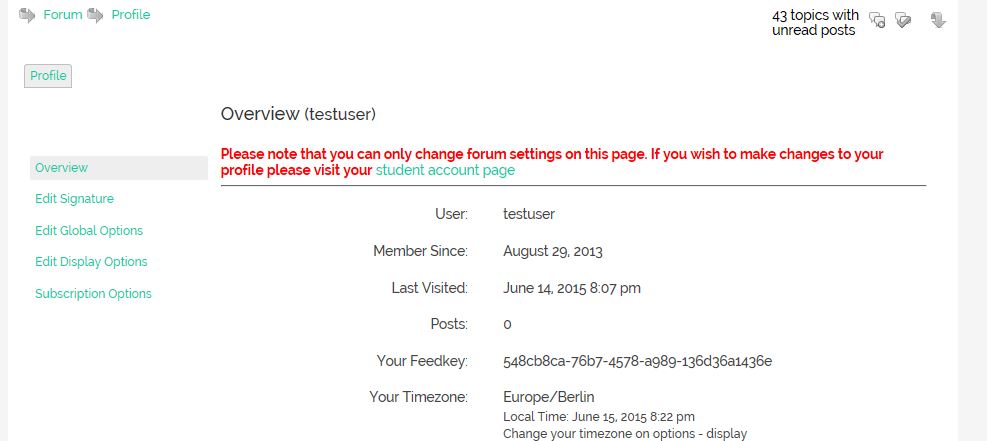
I struggled too trying to explain what exactly I’m looking for because I haven’t fully visualized it myself. But here’s what I am doing right now:
So I stripped the SP profile down to just the bare essentials for our students and added a (hopefully) highly visible note with a link to the “actual” profile editing page where they edit their display name, email address, social links, blog URL, etc.
In Summary, I like to keep the forum options accessible through the forum itself while the profile part resides on another page and ideally there is some kind of custom button or tab or such to link to that page. Because right now under Forum > Profile > Profile Entry Form Mode I can only redirect the entire profile page, not just a portion of it (e.g. only the profile part but not the forum options part)
Does that make it any clearer?
So – to put it simply – you just want to add a button to the SP profile panel that is essentially a link to another WordPress page. Is that about it? And – if so – does that also mean you need to pass any data with the link or does the page in question handle current user loading. And if so – what is the difference between this and the link you shown in your screenshot?
Yes to the first question, no to the second (yes to “the page in question handle current user loading”). The difference would be better visibility. My experience shows that users tend to overlook anything at the top of a page but notice it in the middle and bottom. So if there was a button akin to the “List Topics You Have Posted To” it would be obvious where to go to edit the actual profile (as compared to just forum options).
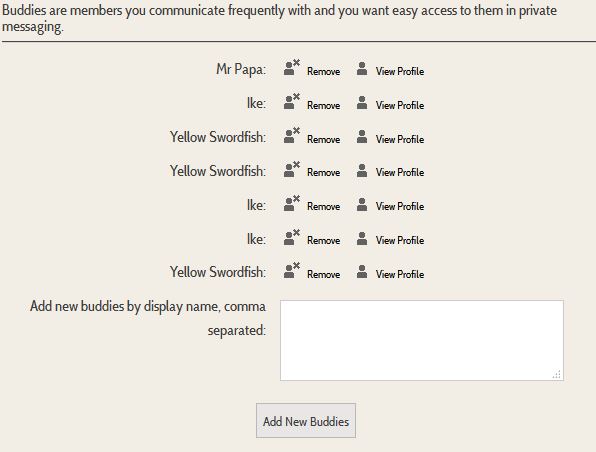
Quick note on the side: I just looked at my profile here on the SP forum and under “Buddies and Adversaries” I see you and Ike listed three times. Looks like a single user can be added multiple times? Also “Permissions” > “Show Permissions” bleeds into the forum statics under my profile (at least int he latest Firefox).
add users multiple? really? wow, didnt do that last time it was tested so maybe something has gotten knocked… will open a ticket for research…
can you tell me how you added users multiple times? I am unable to replicate this on the profile – buddies and adversaries – manage buddies page… duplicates are not added…
Unfortunately I do not know. I simply had just noticed it looking through my profile. Here’s a screenshot:
I know I had sent some PMs to all of you recently and had clicked “Add ALL Recipients To Buddy List” but giving this a quick try now doesn’t replicate the issue.
We can not replicate either! maybe this is a manifestation of an earlier issue now resolved… let;s go back to the main subject.
All of the profile forms are populated with standard WordPress style filter hooks which means it is pretty easy to add components like your button. It might be best if you can tell me where you want to display this exactly – on which panel for example. Although there is a filter that would allow it to be shown at the bottom of all panels.
Then I can give you more detailed advice on what to do.
I’d like to add it to the bottom of the overview, I think that makes the most sense. Thank you very much for all the assistance.
Well – of course – I don’t have an understanding of your own HTML and PHP skills but we can get you started.
First off – if you are using the latest version of Simple:Press (actually 5.5.7 or 5.5.8) then create a new php file in the wp-content folder and name it ‘sp-user-functions.php‘. By placing this file there it ensures it is never over-written by us or any standard WP update.
If your version of SP is older then you will need to use the SP theme’s ‘spFunctions.php‘ file in the theme /templates folder. This will require you to create a child theme to save losing the code – unless you have already made one of course.
Add the following code:
add_filter('sph_ProfileFormBottom', 'myProfileButton', 999);
function myProfileButton($out) {
$out.= '--- YOUR CODE HERE ---';
return $out;
}
You can, of course, name this function whatever you prefer!
What this does is pass in the current HTML of the profile form. This then lets you append something – some HTML – and then pass it back to the form for display.
The tricky and unknown part to me, of course, is the content you want to display. If you use an anchor (a) tag with an href then if you give it a class of ‘spButton’ then it should format it as a button. I believe!

Thank you. It is indeed just an anchor tag. Unfortunately following your instructions of creating sp-user-functions.php and placing it in wp-content leads to:
Warning: Cannot modify header information – headers already sent by (output started at /xxxx/public_html/wp-content/sp-user-functions.php:5) in /xxxx/public_html/wp-includes/pluggable.php on line 1196. Here’s the code:
function myProfileButton($out) {
$out.= '<a href="/account/" class="spButton">Edit Your Profile</a>';
return $out;
}
add_filter('sph_ProfileFormBottom', 'myProfileButton', 999);
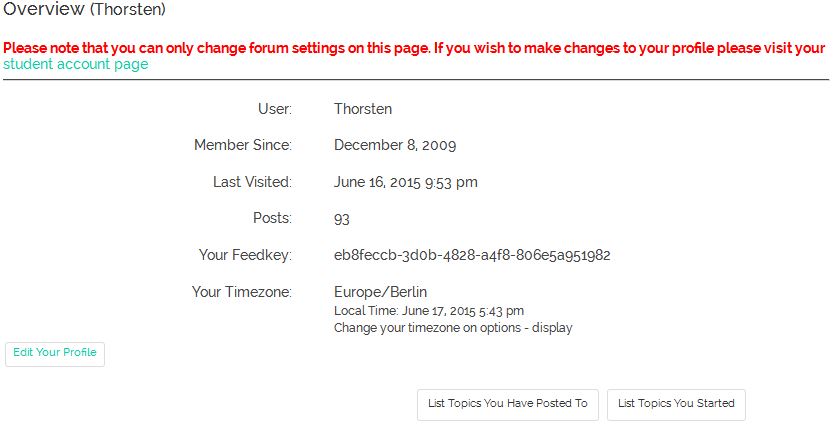
So I placed the code in my (child) theme’s functions.php. That works but the button is a little off to the side:
Ideally I’d like it next to the other two buttons (to the left).
I reckon you did not create a proper php file with the opening and closing php tags on the very first and very last lines of the file…
I don’t believe you will be able to positon it alongside those two buttons exactly but I will check. Along with the spButton class also use spRight. See what that does.
Ah, the closing tag, I am used to editing functions.php, which has no closing tag.
Not sure if anyone would be interested in the final code but here it is:
// ==================================================================
// Add Profile Edit Button to Forum Profile Overview
// ==================================================================
function myProfileButton($out) {
$out.= '<div class="spColumnSection spProfileLeftCol"></div><div class="spColumnSection spProfileSpacerCol"></div><div class="spColumnSection spProfileRightCol"></br></br><a href="/account/" class="spButton spRight">Edit Your Profile Details</a></br></br></br></div>';
return $out;
}
add_filter('sph_ProfileFormBottom', 'myProfileButton', 999);
A bit of CSS to get it properly placed and hopefully visible enough:
#spMainContainer .spProfileOverview .spButton {
font-size: 15px;
margin-left: 82px;
font-weight: bold;
}
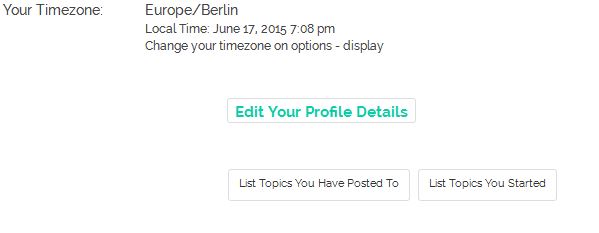
The result looks like this:
Thanks again for pointing me in the right direction.