Support Forum

View edit history text & breadcrumbs "home"

FO foxy7
foxy7
Member

Can you check why the text in the “View edit history” box not is showing correctly?

http://s150.photobucket.com/user/Shadowzzzzzz/media/edit.png.html

Also, “Home” in the breadcrumbs does not appear for some reason..Hope you can assist with that too. Will send a private message with login details to you Andy, just in case you guys would need it.

12 Answers

New Answer

MP Mr Papa
Mr Papa
Member

cant tell anything from that picture…  there appears to be some sort of date or words, but kind of hidden… perhaps a css issue… but would have to see it to know better…

as to the breadcrumbs, can you show us the template tag you are using to display the breadcrumbs?  perhaps its removing the home link?  it would be in your spHead.php template file of your sp theme…

FO foxy7
foxy7
Member

Will send a private message with details to you also.

Here is the template for the breadcrumbs:

# Start the ‘breadCrumbs’ section
# ———————————————————————-
sp_SectionStart(‘tagClass=spPlainSection spLeft’, ‘breadCrumbs’);
sp_BreadCrumbs(‘tagClass=spLeft spBreadCrumbs&tree=0’, __sp(‘Home’));
sp_SectionEnd(”, ‘breadCrumbs’);

MP Mr Papa
Mr Papa
Member

what about the link to site?  would like to see what is shown for breadcrumbs…

FO foxy7
foxy7
Member

I’m sure it’s in the private message I sent earlier.? :)

MP Mr Papa
Mr Papa
Member

No, didnt have it before… when we resolve an issue, we delete the PMs so that we dont retain site credentials…  have them now with the new pm…

the edit history text is there and being hidden by your twenty twelve child wp theme… this line:

body {
    line-height: 0;
}

is causing the very small height so not readable…

easiest fix is to update your sp theme… find this

.ui-dialog .ui-dialog-content,
.ui-dialog .ui-dialog-content p

and add the following rule:

line-height: 16px;

or whatever value you like…

MP Mr Papa
Mr Papa
Member

as to the home link, not sure I can answer that… 

are you using any translation files?  doesnt seem so, but checking…  either in wp-config.php or in sp…

and on forum – options – general display settings, what do you have for skip group view on single forum sites option set to?

FO foxy7
foxy7
Member

Perfect, that fixed the edit history text.

Not using any translation files and the “Skip group view on single forum sites” function is deactivated. Hmm..really don’t remember ever seeing the home link at all.

MP Mr Papa
Mr Papa
Member

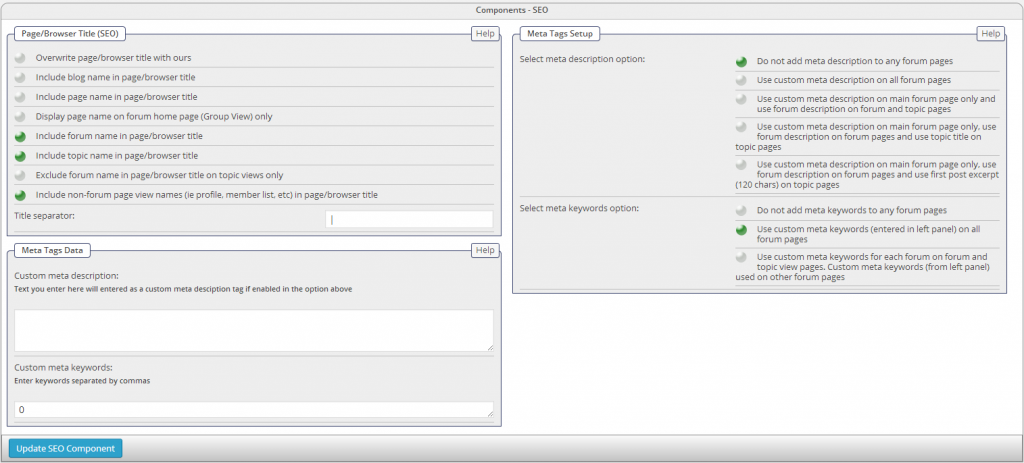
can you take a screenshot of you forum – components – seo admin panel?  just thinking out loud…  and reaching a bit… 

barring something from this, might need access to the code to insert some debug (via ftp)…

MP Mr Papa
Mr Papa
Member

are you by chance showing the forum page as you wp site front page?

looks like we try to not show the home link in that case because it would be duplicative with the forum page… but in  your case, neither is showing…

if you can confirm that, it would be helpful…  busy morning, but will try to do some research…

FO foxy7
foxy7
Member

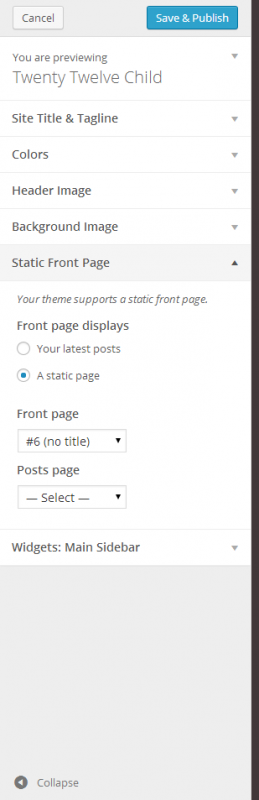
Yes, the forum page is set up as my wp front page:

front-page.PNG

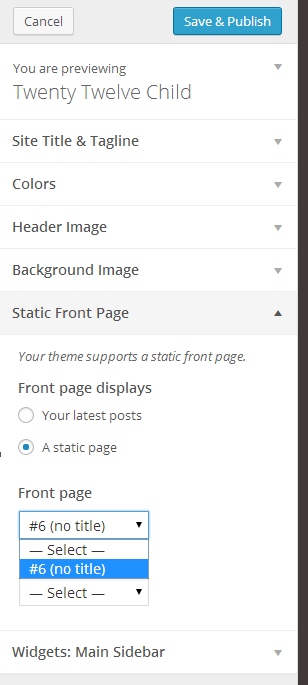
The forum is the only thing on the website, so I assumed this would be the way to do it. I don’t have other options:

front-page2.PNG

If I choose “Your latest posts”, everything just disappears. 

MP Mr Papa
Mr Papa
Member

no problem with showing as home page…

Why no  page title though?  that’s why its blank…  its not trying to put out a ‘Home’ link since those are pointless when the forum page is the main page… it wants the page title (ie support forum here)…  so blank page title means blank link…

give your page a title and you will get some text there…