Support Forum

Web browser issue with "most recent topics with unread posts"

ME Meztli
Meztli
Member

Hi guys,

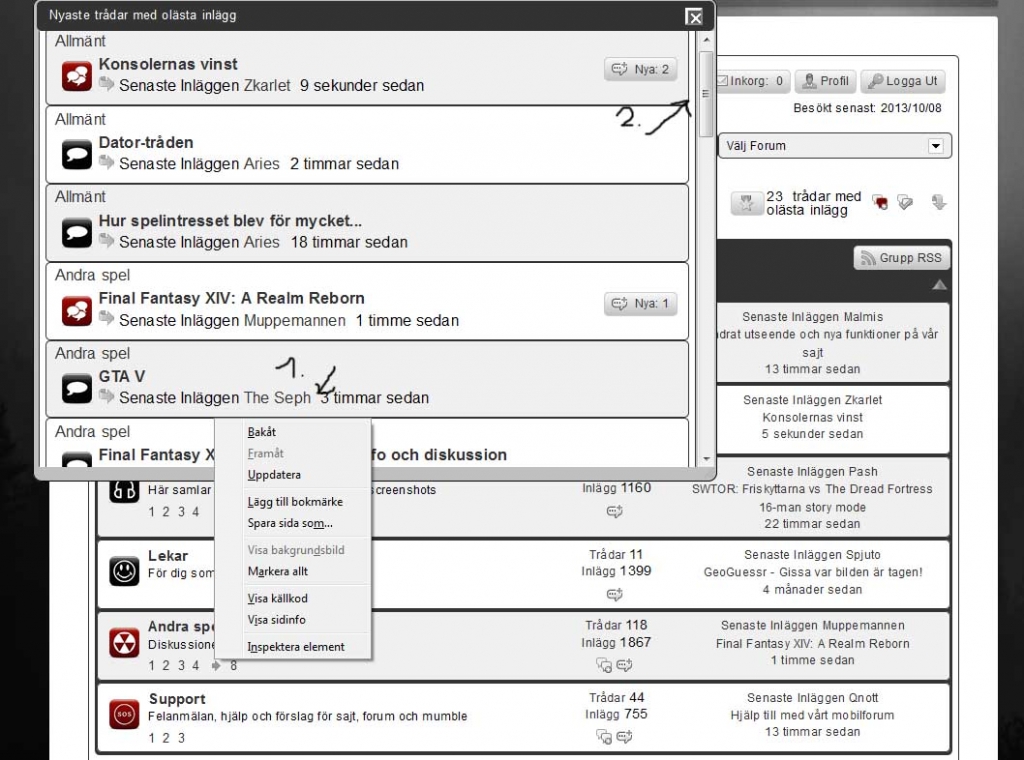
My forum members found a web browser issue related to the “most recent topics with unread posts” pop up window. When a member have many unread posts, the normal procedur before was to scroll down to the bottom of the list and right click the topic to open up and save it in a new browser window (image 1).

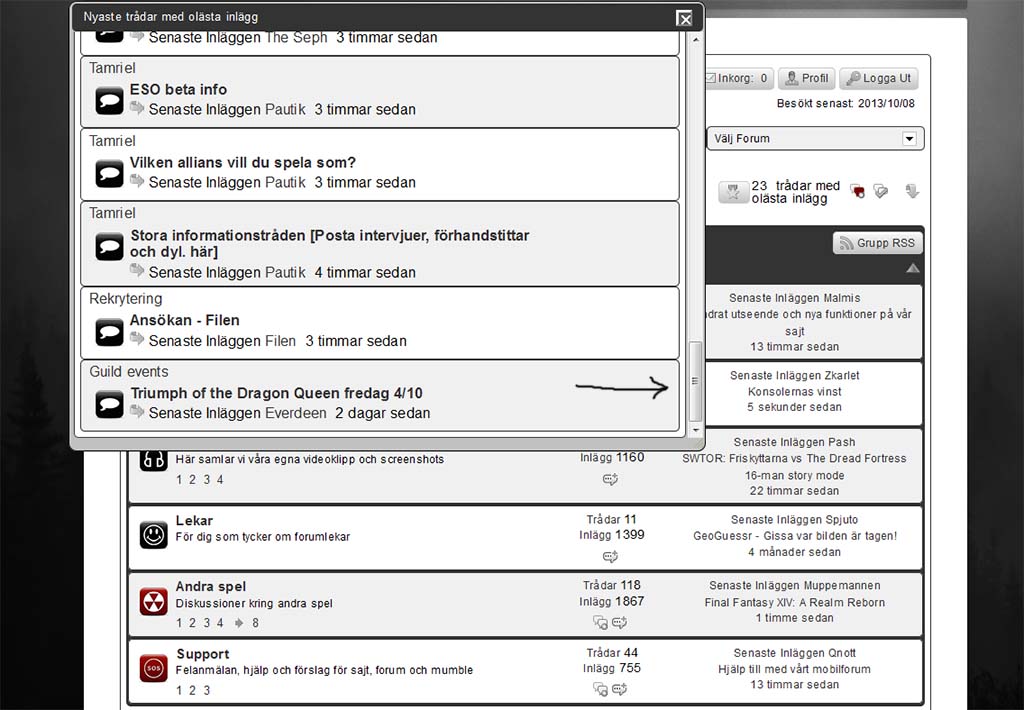
If you do that today, the “most recent topics with unread posts” window resets and no browser window is open up (image 2).

This happens with the latest versions of Chrome as well as Firefox.
Forum1.jpgForum2.jpg

50 Answers

New Answer

MP Mr Papa
Mr Papa
Member

sorry, window resets?

did you apply the jquery ui dialog css changes from http://codex.simple-press.com/codex/installation/changes/theme-and-templates-5-3-0/

we had one other user with similar experience if I am guessing at what you are trying to say…  and it still seemed related to the wp jquery ui changes, with the css applied…

ME Meztli
Meztli
Member

What i mean is happening, is that instead of opening a new browser window, the “scroll bar” (dont know the correct name in english) within the popup window, jumps up back to the first post in the list.

No, did not try the fix. Will do tonight!

ME Meztli
Meztli
Member

Just want to add, that the same thing actually happens at this forum.

  1. Click the smal icon with “most recent topics with unread post”
  2. Scroll down to the bottom of  the list
  3. Try to right click the post title and se what happens

P.S.

If the list have to few topics (it has to be a topic you cant click without scrolling down) the issue never occur.

MP Mr Papa
Mr Papa
Member

so, it doesnt happen for me here (with FF, chrome, IE, safari or opera)…  and yes, I have plenty of topics to see when trying it here (sometimes, the max 50 and everything between)…  which is not surprising since for the two or three users that see this, its entirely random, so to speak…  We could log into their forum with their account and it wouldnt happen like it does for them…

so its more than wp/forum related… something to do with user’s browsers too…

ME Meztli
Meztli
Member

Hi Steve,

This happens to quite a few members at my forum and with different browsers. It did not happen with previous SP versions. So you dont think it´s possible to solve it?

About the jquery ui dialog css fix. Is it only for older custom themes?

I did scrap my old costum theme and are now using a copy of the latest default theme as my custom theme (with a few minor changes only).

MP Mr Papa
Mr Papa
Member

Well, the 2 or 3 users that had it happen to them, did provide us with their login credentials and it wouldnt happen…  we could be skyping and it would happen to them logged in, but not to us logged in with same account…

so its really hard to troubleshoot when we cannot get at the data…  In another thread, you were going to provide some credentials for a site… is this the same site?

Both of those users I mentioned, ended up switching the unread posts popup to be a fixed page instead…  then users could still do the right click, open in new tab trick from there…  in fact, both ended up liking the new page better than the popup…

ME Meztli
Meztli
Member

Mr Papa said
Well, the 2 or 3 users that had it happen to them, did provide us with their login credentials and it wouldnt happen…  we could be skyping and it would happen to them logged in, but not to us logged in with same account…

so its really hard to troubleshoot when we cannot get at the data…  In another thread, you were going to provide some credentials for a site… is this the same site?

Both of those users I mentioned, ended up switching the unread posts popup to be a fixed page instead…  then users could still do the right click, open in new tab trick from there…  in fact, both ended up liking the new page better than the popup…

Hi Steve,

Yes that´s the same site. It´s my main site for quite some years now.

Is there a thread about how they did manage to switch to a fixed page instead of the popup?

Cheers


MP Mr Papa
Mr Papa
Member

see:  http://codex.simple-press.com/codex/api/template-functions-and-the-api/display-template-functions/common-view/sp_unreadpostsinfo/

you just want to add/change the argument:  popup=0

similarly, the subscriptions and watches (and most other popups) have such an option…

ME Meztli
Meztli
Member

Mr Papa said
see:  http://codex.simple-press.com/codex/api/template-functions-and-the-api/display-template-functions/common-view/sp_unreadpostsinfo/

you just want to add/change the argument:  popup=0

similarly, the subscriptions and watches (and most other popups) have such an option…

Hi Steve,

I can not read the link. Once again i get the message that my membership expired when i want to enter the codex.


MP Mr Papa
Mr Papa
Member

What do you keep doing to your accounts? ;)   lol, jk…  sorry for the issue, I have manually reset your codex account and you should have access now…

ME Meztli
Meztli
Member

Hi Steve,

Your suggested change of the argument: popup=0

was liked by the forum members, thanks!

However the page title is now in english “Most recent topics with unread posts” and i cant seem to correct it with the language file.

If not there, where can i change it?

MP Mr Papa
Mr Papa
Member

Ah, darn…  looks like the string is not translated properly…  its in your sp theme, the spNewPostsView.php template file..  its missing the localization around the string…  you can change it yourself there and I will get it fixed in next version..