Support Forum

Website Loads Inside SP Admin

JI jim
jim
Member

Well, this is rather interesting…

A user reported all her subscriptions had “disappeared” so I attempt to check the SP Admin -> Users -> Subscriptions (by User) tab, and the pane takes longer than normal to load.

When the pane content finally populated, the website home page loaded inside the SP dashboard, or it tried to, with styles clearly broken. Still, homepage content populated the Subscriptions pane, instead of the expected SP administrative tools.

FYI: The other Subscriptions panes load fine, by Forum by Topic, by Digest – those all load within the pane as expected. Attempting to load Subscriptions (by User), however results in the website loading inside the pane instead…

I reset the SP CSS and Script cache, cleared browser cache, and issue persists in both firefox and chrome.

Perhaps unrelated, but I noticed one error in the SP Error log* pertaining to blog post linking from the day before. So I deactivated that SP plugin, and issue persists. After reactivating Blog Linking, the most recent error appeared in the log. But this business may warrant a separate topic, as I m primarily concerned about addressing the Subscriptions pane issue…see screenshot for example of this madness.
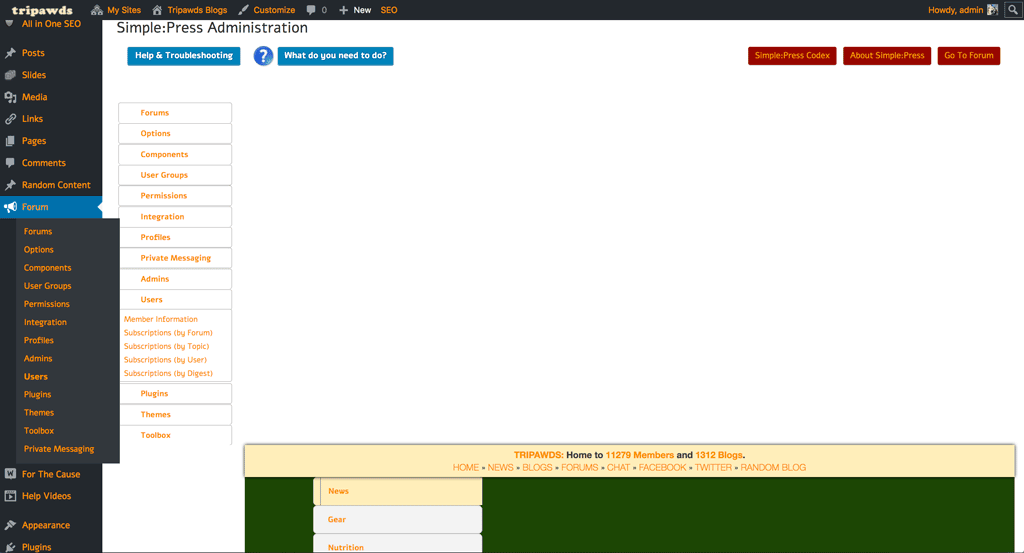
sp-subscriptions.png


*SP Error Log Entries:

20 March 2018 4:09 pm | spaErrError | 2 | databasefile: /home/tripawds/public_html/wp-content/sp-resources/forum-plugins/blog-linking/sp-linking-plugin.php
line: 265
function: sp_linking_do_install
error: Duplicate key name ‘post_idx’

ALTER TABLE wp_1_sflinks ADD KEY post_idx (post_id), ADD KEY forum_idx (forum_id), ADD KEY topic_idx (topic_id);

19 March 2018 9:49 pm | spaErrError | 1 | databasefile: /home/tripawds/public_html/wp-content/sp-resources/forum-plugins/blog-linking/sp-linking-plugin.php
line: 154
function: sp_update_blog_link
error: You have an error in your SQL syntax; check the manual that corresponds to your MySQL server version for the right syntax to use near ‘AND post_index=1’ at line 1

UPDATE wp_1_sfposts SET post_content=’The internet is filled with chatter about the Canine Osteosarcoma Vaccine…

15 Answers

New Answer

JI jim
jim
Member

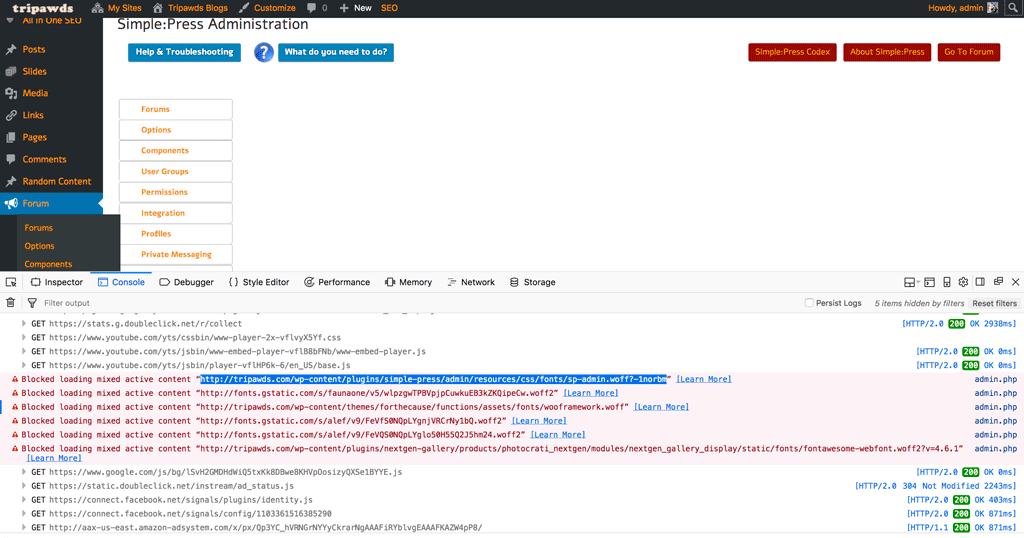
When the pane loads, FF web console reports:

Blocked loading mixed active content “../wp-content/plugins/simple-press/admin/resources/css/fonts/sp-admin.woff?-1norbm”   …   admin.php

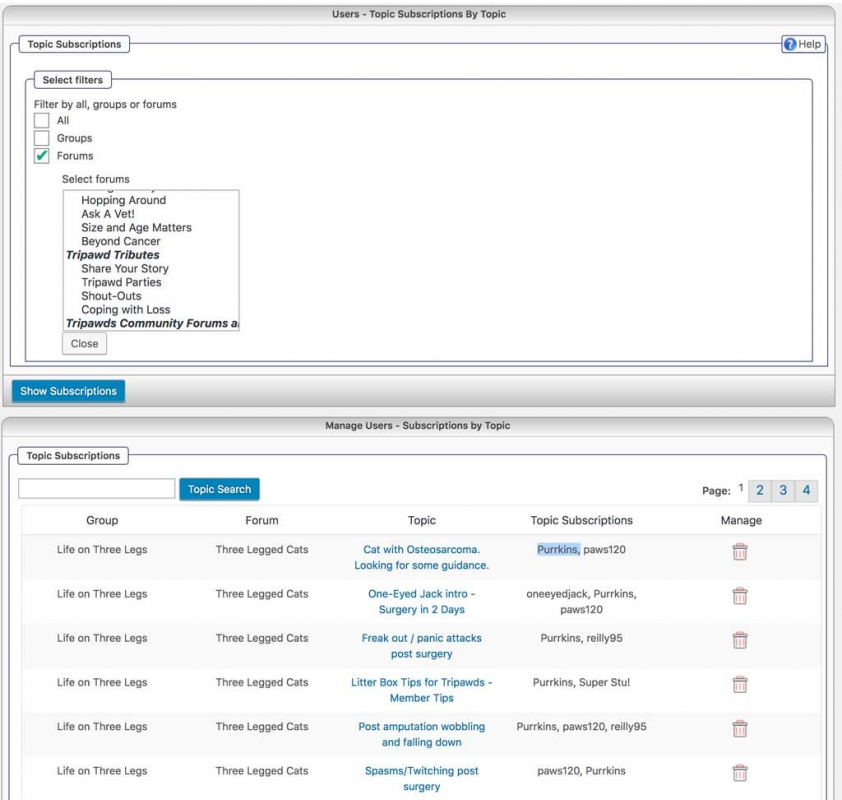
sp-subs-console.png
YS Yellow Swordfish
Yellow Swordfish
Member

I am unable to replicate but I feel more concerned about the users claim that her subs had vanished.

have you performed a database optimisation run recently and also checked for any errors in the DB tables? One ir two may need a repair…

JI jim
jim
Member

Yellow Swordfish said
I feel more concerned about the users claim that her subs had vanished.

I chalk that up to them accidentally hitting the delete all subscriptions button, which does not display any warning when doing so. The user said she “may have done that”…

Reviewing subscriptions by Topic or Forum reveals that many subscriptions do still exist, including some for this user (though she shared a screenshot of her empty subscriptions pop-up).

have you performed a database optimisation run recently and also checked for any errors in the DB tables? One ir two may need a repair…

I converted the db engine to innoDB a while back, which does not support table repair or optimize. What other type of optimization might you recommend.

I do see that our wp_1_sfmembers table includes 11,323 rows weighing in at 46± MB, and I presume the query to Show subscriptions (by User) is wrangling that beast, if that is worth noting.

JI jim
jim
Member

Also…I am seeing a number of errors like this in the server logs, though it sheds no light on what query.

[21-Mar-2018 04:27:39 UTC] PHP Warning: Error while sending QUERY packet. PID=25162 in /home/tripawds/public_html/wp-includes/wp-db.php on line 1924

YS Yellow Swordfish
Yellow Swordfish
Member

Unsure  about the error there without further info… This is what I would call a fairly complex query so it might be worth trying to take a look at the SQL being constructed to see if anything stands out.

I can offer you a small edit to make that will expose the query so that it could then be copied and pasted into phpMyAdmin to see if it produces an error. Do you fancy trying that?

JI jim
jim
Member

Yellow Swordfish said
Do you fancy trying that?

Sure! Thanks.

Odd issues like this always leave me wondering what’s going on…

YS Yellow Swordfish
Yellow Swordfish
Member

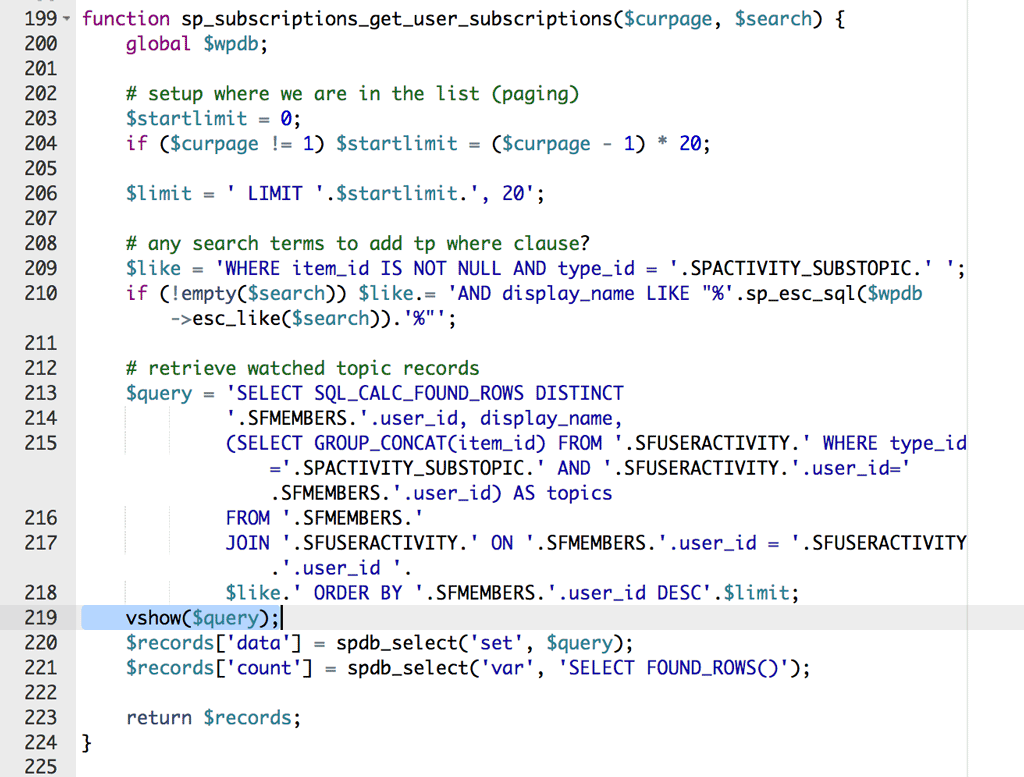
OK – you need the file in the subscriptions plugin at /library/sp-subscriptions-database.php

Find the function named sp_subscriptions_get_user_subscriptions

Before the line near the end of that function that is:

$records['data'] = spdb_select('set', $query);

type in:

vshow($query);

and save. Then in the admin reload the users section iof the fiorum and select the subscriptions by users. All being well there will be a dump of the query. Might not be pretty but should be there before any other display. Copy it and save somewhere. We will need it later…

JI jim
jim
Member

Yellow Swordfish said
All being well there will be a dump of the query. 

Hmm…no query displayed on screen, just the same result of home page loading inside the admin pane.

Am I missing something here?

To make matters more confusing, I cannot replicate the issue on our staging site, using the same theme and active plugins… confused

function-vshow.png
YS Yellow Swordfish
Yellow Swordfish
Member

Yes – I can not replicate either…

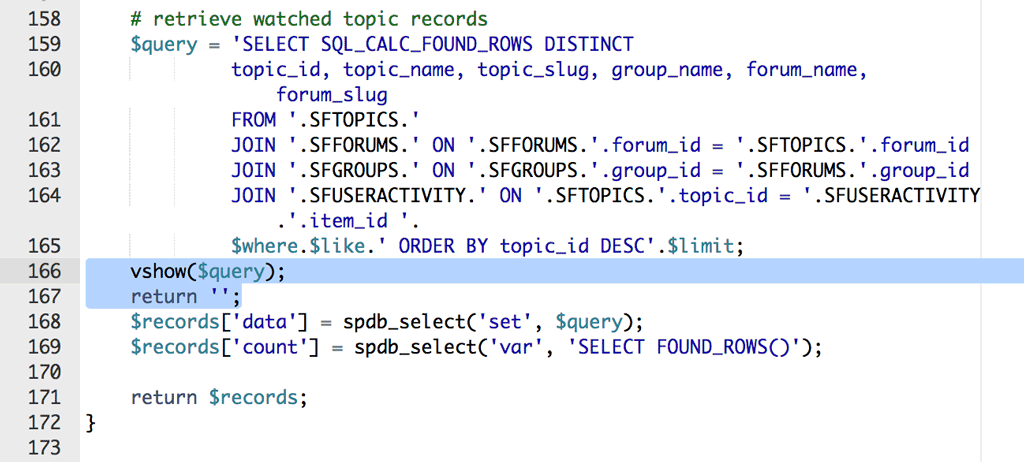
Perhaps you could try adding a second line as

return '';

– That is two single quotes NOT a double quote.

JI jim
jim
Member

Yellow Swordfish said
Perhaps you could try adding a second line… 

The query still does not display.

Am I doing something wrong here?

Any other way to generate the query, that I might be able to plug into phpMyAdmin to see what errors it might throw there?

vshow-return.png
JI jim
jim
Member

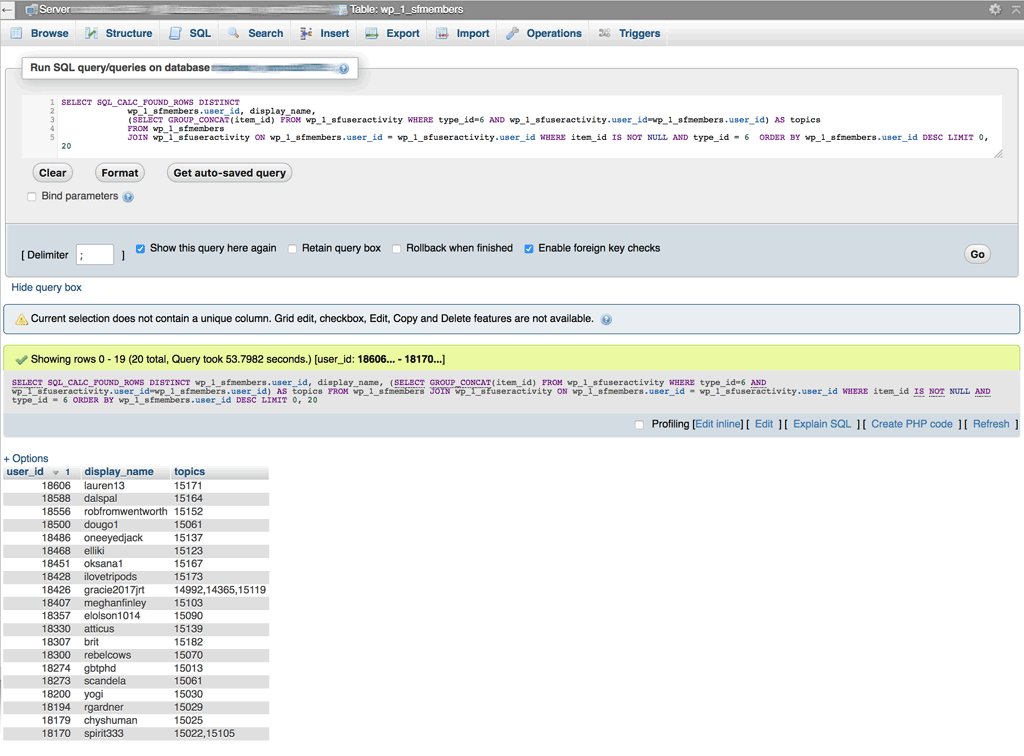
Okay…I used PROCESSLIST to capture the query, and ran it in phpMyAdmin with no errors. Though I’m not certain about that “unique column” warning.


SELECT SQL_CALC_FOUND_ROWS DISTINCT
 wp_1_sfmembers.user_id, display_name,
 (SELECT GROUP_CONCAT(item_id) FROM wp_1_sfuseractivity WHERE type_id=6 AND wp_1_sfuseractivity.user_id=wp_1_sfmembers.user_id) AS topics
 FROM wp_1_sfmembers
 JOIN wp_1_sfuseractivity ON wp_1_sfmembers.user_id = wp_1_sfuseractivity.user_id WHERE item_id IS NOT NULL AND type_id = 6 ORDER BY wp_1_sfmembers.user_id DESC LIMIT 0, 20

I also presume it’s only returning 20 results, since that is the number of entries listed on the admin page. We surely have many more users who have subscribed to topics.

This shed any light on my mystery?

phpmyadmin-usersub-query2.png
MP Mr Papa
Mr Papa
Member

not sure why you are getting the unique column warning…  nothing looking odd there…

you get 20 records because of the query, in particular, the part at the end that limits the number of records…   Limit 0, 20…  so you could get more if you wanted…

its possible you are not seeing the output because its output in the page header or elsewhere before the html display… you could look at the page source and see if you see it in there…

are you just looking for one specific user?  you could change this in the php code

WHERE item_id IS NOT NULL AND

to

WHERE wp_1_sfmembers.user_id = xxx AND item_id IS NOT NULL AND ….

changing xxx to the user_id you want to see subscriptions for…

or perhaps more simply, in phpmyadmin, just query this

select * from wp_1_sfuseractivity where user_id = xxx AND type_id = 6 

and it will list any subscriptions this user has…

JI jim
jim
Member

Thanks for this @mr-papa .

That will come in handy if/when I actually need to review user subs.

At this point I’m much more concerned about what may be causing the site to load inside the admin pane, and what other havoc that may be causing.

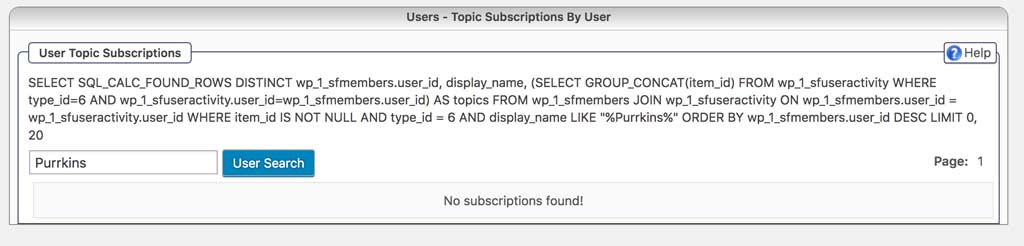
For whatever reason, I am now seeing the query, and the form loads properly when I add this:

vshow($query);
 return '';

The query, however, returns no results when searching for a username that has known subscriptions as shown of the Topic Subscriptions tab.

My guess is something odd still going on with that query. Any thoughts on how I might troubleshoot that are appreciated. Web console revealed nothing.

purrkins-user.jpgpurrkins-topic.jpg