Support Forum

Where to Report Warnings And Notices

23 Answers

New Answer

MP Mr Papa
Mr Papa
Member

regarding the notices, we have made a change and that option will suppress all forum notices in the next update…

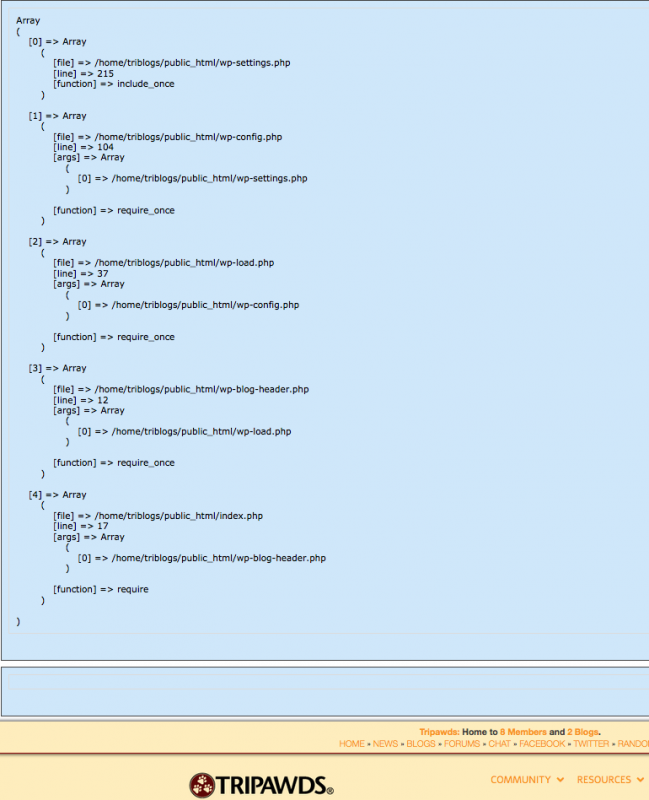
I would still prefer more data before deciding what to do…  some debug data…  maybe right before the line throwing the error, add

ashow(debug_backtrace());
ashow($wp_query);

and lets see where this is coming from…  then on page load, look for a blue box with extra data in it…

JI jim
jim
Member

Mr Papa said
ashow(debug_backtrace());
ashow($wp_query);

Are these results shown to all users and visitors, or just the admin account?

Assuming the former, I added the debug function on our dev install, and it looks like it does display to everybody, on every page. It also appears to break a couple pages, and the second box ($wp_query) always appears to be blank.

I temporarily disabled the Maintenance Mode plugin we have on our test site, so you can see this in action… http://tripawds.net/forums

After adding the code to sp_control I also get this error, with the number of occurrences increasing much more rapidly…

June 29, 2015 12:13 pm | spaErrNotice | 116 | php


file: /simple-press/sp-control.php
line: 98
function: include_once
Notice | Undefined variable: wp_query


Screen-shot-2015-06-29-at-11.59.15-AM.png
MP Mr Papa
Mr Papa
Member

that looks odd, almost an alternate way of loading wp (non standard)…  perhaps by plugin or theme to get access to some wp data the wrong way…   the call sequence does not really make sense at first glance…  and would explain why wp_query is empty (since wp was loaded improperly)…

JI jim
jim
Member

Mr Papa said
…the call sequence does not really make sense at first glance…

And it is totally Greek to me. Considering nothing is breaking, I’m not spending too much effort to fix it. Notices in the SP error log I can deal with. Hours of troubleshooting, not so much right now.

Unless y’all see any serious cause for alarm, I’m gonna have to table this one for a while. Thanks for all your thoughts on the matter!

YS Yellow Swordfish
Yellow Swordfish
Member

I reckon we would both like to know what is doing that though if only to satisfy our curiosity… 🙂

JI jim
jim
Member

Yellow Swordfish said
I reckon we would both like to know what is doing that though…

Agreed! I guess I was just saying I have the liberty of time, since there doesn’t seem to be any major sense of urgency, just a nuisance.

Any suggestions other than standard WP troubleshooting protocol of ruling out theme and plugin conflicts? The debug code added to sp_control breaks the dashboard so that becomes a rather arduous task when deactivating and reactivating plugins.

Thanks again.

JI jim
jim
Member

OK, for fun, I turned on the WP debug mode too and found the following upon (any) page load interesting…

Notice: Undefined variable: wp_query in /problem-with-post-edit-buttonome/triblogs/public_html/wp-content/plugins/simple-press/sp-control.php on line 98


NOTE: sp-control.php:96-100 includes the code I added:

# debug error
ashow(debug_backtrace());
ashow($wp_query); 
# end debug
function sp_is_forum_page() {

Back to troubleshooting plugin conflicts…just wanted to make sure I added the suggested debugging code correctly.

question
JI jim
jim
Member

OK, wp_debug also indicates the following…

Warning: session_start(): Cannot send session cache limiter – headers already sent (output started at /problem-with-post-edit-buttonome/triblogs/public_html/wp-content/plugins/simple-press/sp-startup/sp-load-debug.php:34) in /problem-with-post-edit-buttonome/triblogs/public_html/wp-content/plugins/pro-sites/pro-sites-files/lib/ProSites/Helper/Session.php on line 29

FYI: Pro Sites is the paid/premium blog platform for our multisite network, so we can’t live without it on our live site. Deactivating Pro Sites did not address the empty wp_query in sp debug box that displays upon page load.

../plugins/pro-sites/pro-sites-files/lib/ProSites/Helper/Session.php:27-30:

            // Make sure session is started
            if ( ! session_id() ) {
                session_start();
            }

and…

Notice: Undefined variable: output in /problem-with-post-edit-buttonome/triblogs/public_html/wp-content/themes/forthecause/includes/theme-actions.php on line 649

../themes/forthecause/includes/theme-actions.php:646-650:

        if ( $settings['home_blog_img'] != '' ) {
            $blog_image = $settings['home_blog_img'];
            if ( is_ssl() ) { $blog_image = str_replace( 'http://', 'https://', $blog_image ); }
            $output .= '#blog-posts { background-image: url( ' . esc_url( $blog_image ) . ' ) !important; }' . "
";
        }

I suppose the latter suggests I should see what happens with another theme activated. But before I do that and start opening tickets with the other plugin/theme developers, I’d love to get a better understanding about what I’m looking at, or looking for…

Anything here suggest something interesting?

YS Yellow Swordfish
Yellow Swordfish
Member

Sorry =- in a rush so this is not a long answer to everything. A quickie instead. The headers already sent error you are seeing is because of the debug code – the ashow() – you put in place. You will need to remove that and use the wp_debug setting aftyer that…