Support Forum

White Page After Posting New Blog Entry when SP Plugin is Activated

24 Answers

New Answer

MP Mr Papa
Mr Papa
Member

its called mysqli…and its just another module…its actually php that is doing away with mysql_connect in favor of the mysqli variant…

dont know why the debug would take the site down and show white page… it doesnt do anything differently than display errors… could you have mistyped the command?

also, the deprecated warning wont stop things from running…

JC Joe Champion
Joe Champion
Member

I can install that module using EasyApache.


Here is the segment of the config file that I modified in bold:

/**
* For developers: WordPress debugging mode.
*
* Change this to true to enable the display of notices during development.
* It is strongly recommended that plugin and theme developers use WP_DEBUG
* in their development environments.
*
* For information on other constants that can be used for debugging,
* visit the Codex.
*
* @link https://codex.wordpress.org/Debugging_in_WordPress
*/
define(‘WP_DEBUG’, true);

/* That’s all, stop editing! Happy blogging. */

/** Absolute path to the WordPress directory. */
if ( !defined(‘ABSPATH’) )
define(‘ABSPATH’, dirname(__FILE__) . ‘/’);

/** Sets up WordPress vars and included files. */
require_once(ABSPATH . ‘wp-settings.php’);

YS Yellow Swordfish
Yellow Swordfish
Member

@mr-papa – I am guessing that the debug put up the message but whatever is actually causing the error then stopped with a fatal error and then the white page. Although the mysqli error would then stop display with a headers sent condition.

This is going to need the error log I think.

JC Joe Champion
Joe Champion
Member

I am still running into these error issues. I created a phpinfo file and I can’t seem to locate any missing add-ons that would be prompting these errors.

Could you guys please take a look and confirm my findings?

http://inceptionradionetwork/phpinfo.php

YS Yellow Swordfish
Yellow Swordfish
Member

Off-hand I can see two libraries that your php does not contain,. One is the mysqli library and the other is mbstring. Both WordPress and Simple:Press use both of these libs. WordPress does appear to check for the existence of mysqli and it use to check for mbstring as well but is starting not to now as it seems rare not to have it included.

Are you able to get you php recompiled with these two libs?

JC Joe Champion
Joe Champion
Member

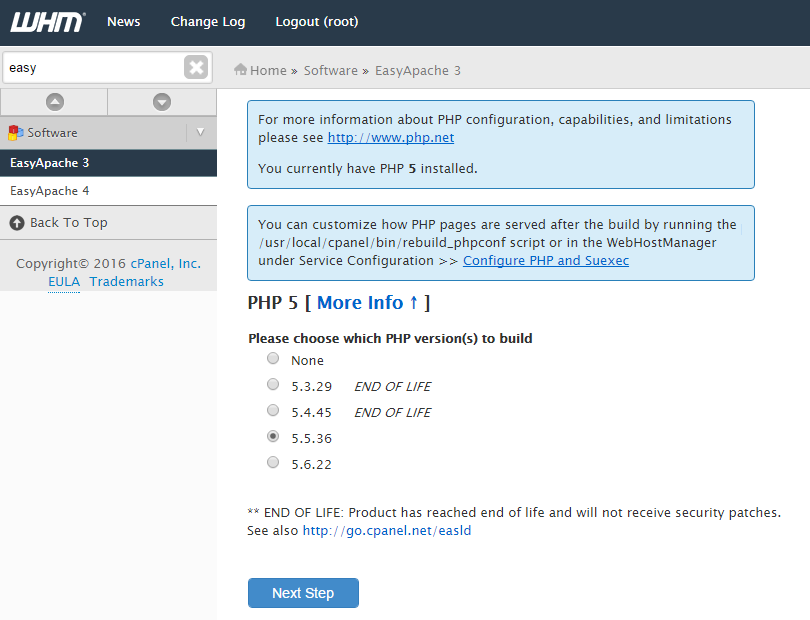
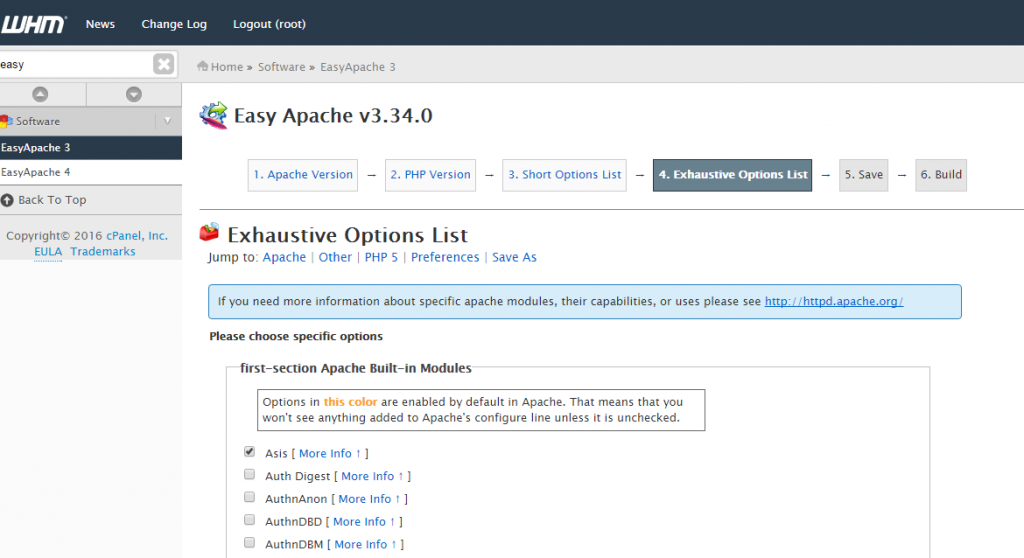
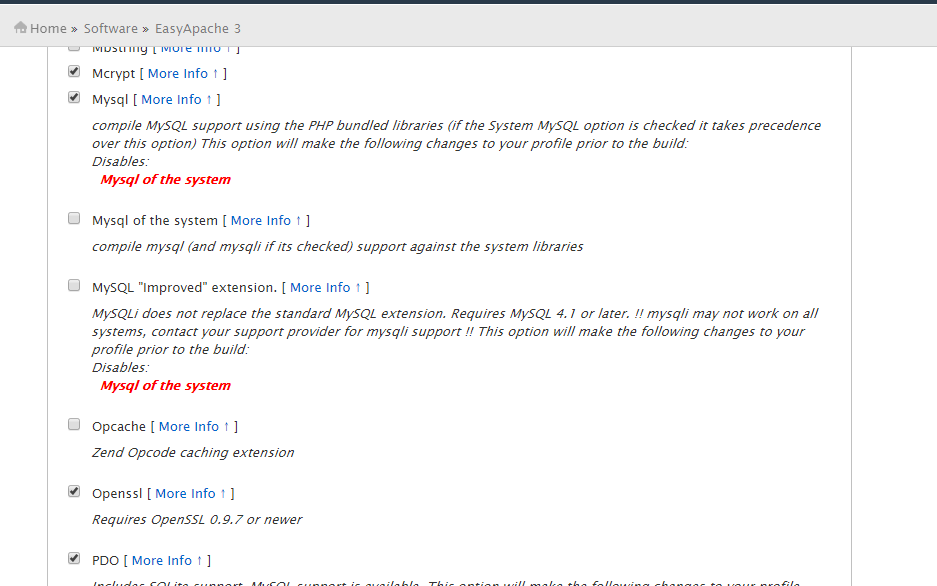
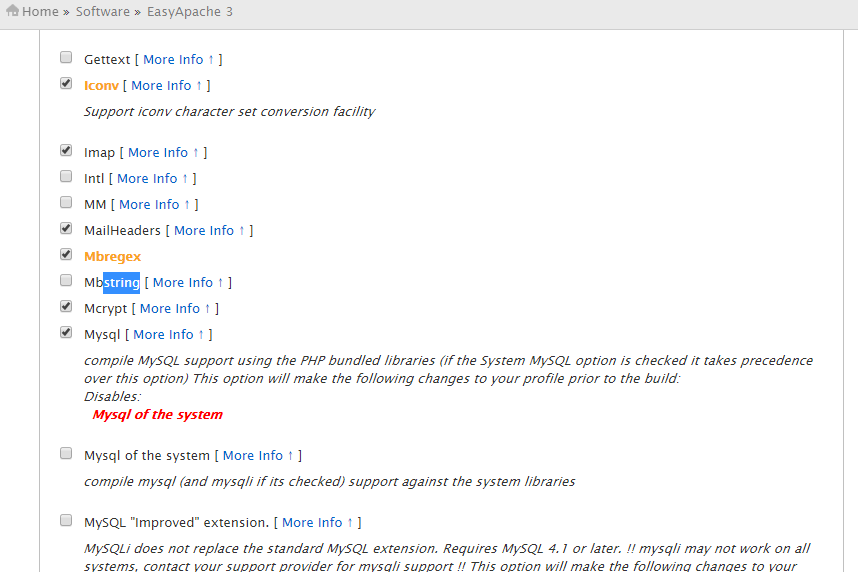
I am guessing that I can rebuild the PHP via WHM? Here are some screenshots of my server’s interface when I use EasyApache’s wizard. It appears that those two libraries exists in the exhaustive library. I am not too sure which of the MySQL options I would need to choose to get MySQLi and whether the wrong selection could damage our site.

Nonetheless, the screenshots should provide some info in terms of rebuilding it on our VPS server.

apache1.pngapache2.pngapache3.pngapache4.png

YS Yellow Swordfish
Yellow Swordfish
Member

This is a bit out of my own personal comfort zone but of that is how you do it then I would think the answer should be yes. I can tel you that we have both the standard ‘mysql’ AND the ‘mysqli’ libs in our own php. There seems to be a suggestion on your screenshot that mysqli needs mysql as well which I can neither confirm or deny. And I see you highlighted the mbstring lib as well.

It would, of course, be nice if these additions fix the initial problem and I am still somewhat confused by your wpdb error – but at least it will close that hole down and allow us to see what happens… And these libs are required now. The mysqli one is a better mysql handler and, as @mr-papa said above – php do intend removing the base mysql lib at some point – probably php 7 which is now available.

MP Mr Papa
Mr Papa
Member

yes, you can rebuild selecting new modules in whm using easy apache…

thought I would also link to the wp 4.5 ‘before you start’ post in their support forums… note the 7th reply about mysql.. deals with outdates mysql…  https://wordpress.org/support/topic/read-this-first-wordpress-45-master-list?replies=7

JC Joe Champion
Joe Champion
Member

Thank you for the link.

Could you provide some clarification on the empty boxes (reference screenshots) that I would need to select? In particular, the modules I would need for SQLi. I am not clear because of the override MySQL warning.  Any help on the checks I need to make would be appreciated. 

MP Mr Papa
Mr Papa
Member

Personally, I would use php 5.6.22… then the mysql improved extension (mysqli) for the php…