Support Forum

Whole Forum HTTPS – Please help

23 Answers

New Answer

MP Mr Papa
Mr Papa
Member

okay, so 4.0 is in beta 2 (or is it 3 now?)… should be released in 2-3 weeks…  we of course, run the 4.0 version here for compatibility checking…  would be interested if any change when it releases…

so what are you entering into the wp config file?

did you try removing the login form as you talked about?

KE Kenn
Kenn
Member

No I haven’t tried removing the log in form, I will take a look at this.

Other than the usual and some edits to allow the WPMU membership plugin to work network wide instead of site-wide I just added the two lines:


/* Enable Admin SSL  */
define(‘FORCE_SSL_LOGIN’, true);
define(‘FORCE_SSL_ADMIN’, true);


However I think from reading more on the links you provided I should remove the log in line as it isn’t needed if the admin line is used?

MP Mr Papa
Mr Papa
Member

depends if you want logins to be ssl…  not sure the admin covers both…  but believe the answer is yes…

to remove the login, edit your spHead.php template file in the sp theme you are using…  remove the two template tags for log in and out button and the login form (sorry, on road and dont have easy access to actual functions)…

is there a problem with the entire forum being https?  should work fine and not hurt anything…

MP Mr Papa
Mr Papa
Member

should add, if you edit the theme, please be sure to create a child theme or make your own theme to keep from losing changes to our themes on updates…

KE Kenn
Kenn
Member

Thanks, yes using a child theme thanks for pointing me in the right direction. There isn’t a particular issue with the running of the forum in https just the switching between the http and https as the rest of the site is http. Also any old links into the forum that bring a visitor in are http but when they click on any link they are redirected https which just slows down the user experience a little.

MP Mr Papa
Mr Papa
Member

okay… interested in what happens if you do remove, or just change the login button to be the standard wp login page, but suspect it will be https too… unless you change the config option… :)

KE Kenn
Kenn
Member

After a bit of testing, it’s not the lines in the config file as I have taken these out and cleared all caches.

After reading this post http://wordpress.org/support/topic/why-do-all-my-dynamic-links-begin-with-https

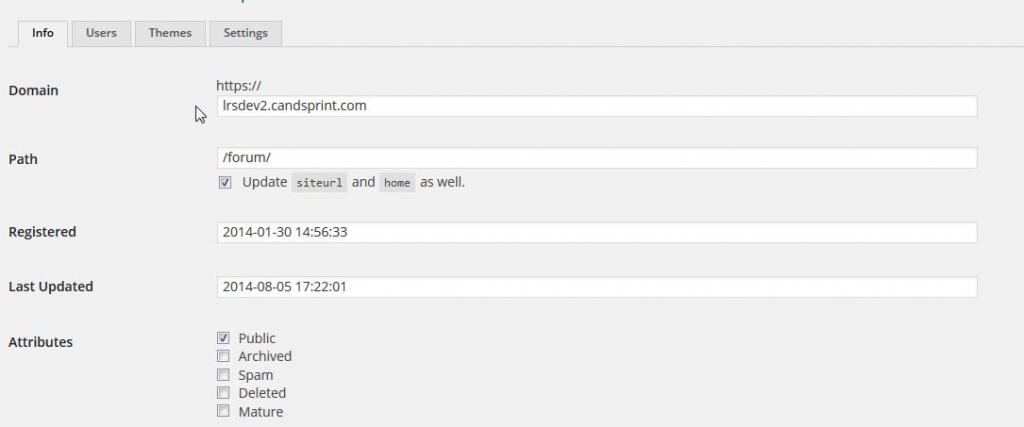
info.jpg

I have gone to settings in my Network and could see it was adding the https prefix (with all the wp-config SSL settings off). I Logged out and in again turned the wordpress https plugin (that was already off) on and then off again and this has for some reason cleared the https prefix. However the forum links are still https and I’m not sure where it’s pulling this from. I have removed the login form as guided above and not sure what else to do.

If you want to see the links in the forum, the testing site is here:

http://lrsdev2.candsprint.com/forum/

Any ideas where else I can look?

Thanks

KE Kenn
Kenn
Member

Fixed, not sure why but turning SimplePress plugin off and on again has refreshed all the links and returned them to http. I will test this on the live site to see if it works.

MP Mr Papa
Mr Papa
Member

you probably still had the old forum permalink setup with the https in it…  if you change things externally like that, you can update the forum permalink on forum – integration – page and permalink…  if you update it via the wp api (ie update permalink), it will auto update it..