Support Forum

WordPress Child Themes Custom Javascript

KE Kenn
Kenn
Member

Good evening all,

My customer has just upgraded their theme for two sites on their multisite installation the main site and the subsite for the forum sitename.com/forum

I have identified an issue with the forum toolset not opening due to a conflict with some Javascript that comes with the theme. On this subsite they aren’t using the features that this script activates, however they are on the mainsite.

When you make a wordpress child theme can you have a custom js folder that it will call instead of the default/parent so I can comment out the two offending scripts without breaking the features on the main site.

I hope this makes sense I’m not sure how else to explain it.

Thanks

6 Answers

New Answer

IK Ike
Ike
Member

I’m 99% sure that child themes only cater for stylesheet, templates and overlays I’m afraid.

Perhaps Mr Papa can clarify this when he is online later, but as far as I’m aware it’s down to where the core plugin looks for theme files. It will start by loading the parent theme, then specifically look for these child elements and load them over the top.

Sorry, but like I said, if there is any way of doing it I’m sure we will find out!

KE Kenn
Kenn
Member

Hi Ike,

Thanks for the reply. I have an idea can you offer your opinion as to if this might work.

If I comment out the offending javascript in the theme file it will work on the subsite /forum

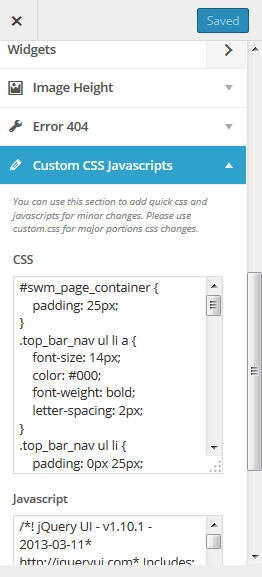
The theme comes with one of those ‘Customizer’ menu items where you can change the heading background colours, fonts etc. At the bottom of the customizer are two boxes one for custom css and one for custom javascript.

If I then paste in the commented out script into this box on the main site it will allow these features again and allow the toolsets to work again on the forum subsite and I’ll ahve another happy customer?

IK Ike
Ike
Member

No I wouldn’t have thought so. I’m not really a Javascript guy so I can’t say for sure, but if the code is already present, it will need to be that code that is commented out. Adding something commented out will just be ignored and the original code would be unaffected.

Again, I can’t be positive, but say if it were PHP that is how it would work.

MP Mr Papa
Mr Papa
Member

you can make your child theme load different js, but it may take modification or use of many parent theme files in the child…  depends on how the parent loads it… if directly from functions.php then you just need a new one in the child…  if the theme has a deep hierarchical structure, you may have to copy over many files just to get to the location where you can change it..

KE Kenn
Kenn
Member

Hi both,

Thanks for the replies but I think I’ve got it. I basically commented out the js script from the themes js folder and then loaded it within the theme customizer on the main site only so it’s activated on a site basis but not a network basis.


customizer.png
MP Mr Papa
Mr Papa
Member

sounds like a good way to go… thanks for the update…