
Support Forum

Wrong site address in welcome email

PC Paul Carmen Carmen
Paul Carmen Carmen
Member

Hi all –

We have installed Simple:Press on a development site, tested it and all is OK.

We have now made that dev site the live one.

In the welcome email when a user registers, the email looks like this:
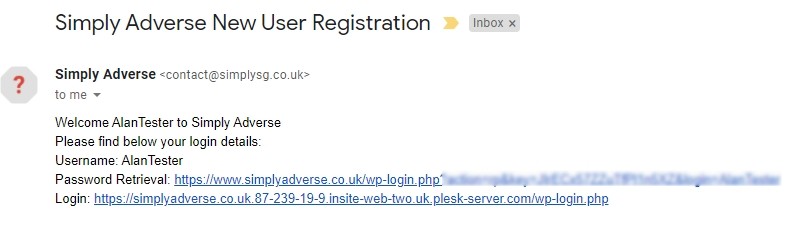
Image-forum.jpg

The Login address is that of the old dev site. Help!

Thanks for any help.

1 Answer

New Answer

SP Simple Press
Simple Press
Admin

Hi:

Here are a couple of things to try:

1. Go to WordPress’ SETTINGS->PERMALINKS and just save the data on that screen.  That will reset the URLs for some things.

2. Go to FORUM->INTEGRATION and click the UPDATE FORUM PERMALINK button there.

Hopefully these actions will help.

Thanks.