Support Forum

Adding SP Polls causes the error "There are no topics in this forum"

FB Frederic Buonincontri
Frederic Buonincontri
Member

Hello again I think you only hear from any of us when there a problem, sorry to say I’m guilty of that too. Well the forum on our site has been working fine, I figured out and fixed any issues and plugin incompatibilities using your helpful forum information thank you :) Well now we also have a duplicate test site along with the main membership site so I tried it on the test site first because that’s why we have a test site :) I’m happy to have a test area can you tell? Okay, getting to the point and trying to describe this as clearly as I can, the forum shows the main list of topics when “Polls” is activated. BUT when I click on any forum I get a “There are no topics in this forum” error and if I click on a “Last Post” link in the main forum list I get a “Access denied – you do not have permission to view this page” error. Then, when when I deactivate “Polls” the forum works normally again. To me it seems like it’s acting as if activating “Polls” causes a permissions issue. I tried the toolbox reset for auths, css and script caches to no avail. Also tried anything else I could think of within the SimplePress admin short of turning off any WP plugins.

I quickly activated “Polls” on our live membership site to try and replicate and the same result occurred so I quickly deactivated it and it’s working fine. 

Active SP plugins:

Admin Bar

Blog Post Linking

Editor TinyMCE Rich Text

Subscriptions

Template Tags and Widgets


I would like for SP Polls to work, what should I try next?

13 Answers

New Answer

BR Brandon
Brandon
Member

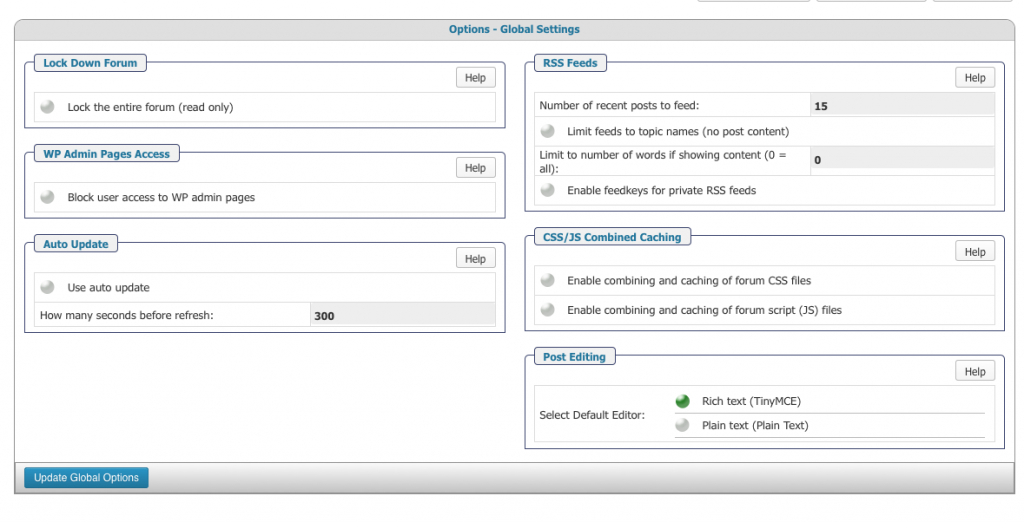
It could be an issue with JavaScript. Did you try disabling combined CSS & JS? If not give that a try. If it still doesn’t work is there any error info in the SP error log (under Tool Box) that mention Polls?

FB Frederic Buonincontri
Frederic Buonincontri
Member

Sorry for the late reply.

Checking now and combined CSS & JS are UN-checked and they haven’t been changed since I tested. Any other things I can try?Screen-shot-2013-03-25-at-6.21.44-PM.png


FB Frederic Buonincontri
Frederic Buonincontri
Member

OH! checking the error log and YES on polls being mentioned:


databasefile: /var/www/pivotcompression.com/wp-content/plugins/simple-press/forum/content/classes/sp-topic-view-class.php
line: 228
function: select
error: Unknown column ‘polls’ in ‘field list’

SELECT wp_sftopics.topic_id, wp_sftopics.forum_id, topic_name, topic_slug, topic_status, topic_icon, topic_opened, wp_sftopics.post_count, forum_slug, forum_status, forum_rss_private, wp_sfposts.post_id, post_date, wp_sfposts.user_id, guest_name, guest_email, post_status, post_pinned, post_index, post_edit, poster_ip, source, post_content, NULL AS new_post, blog_post_id, polls, poll, topic_subs FROM wp_sftopics JOIN wp_sfposts ON wp_sftopics.topic_id=wp_sfposts.topic_id JOIN wp_sfforums ON wp_sftopics.forum_id=wp_sfforums.forum_id WHERE wp_sftopics.topic_id=338 ORDER BY post_pinned DESC, wp_sfposts.post_id ASC LIMIT 20, 20

YS Yellow Swordfish
Yellow Swordfish
Member

Looks like it has failed to create the database column(s) it needed when first activated. A rare and unusual problem.

I assume you have not managed to create any polls because of this so – could you please go to the forum admin > plugins and uninstall the polls plugin. An actual uninstall should clean up anything it created. When the page reloads and that is finished could you then try activating it again to see if that resolves the problem.

If it does not…. then can I ask if you have activated any other SP plugins and if so – which ones?

FB Frederic Buonincontri
Frederic Buonincontri
Member

So far:

Tried the uninstall and got this in the error log:

databasefile: /var/www/pivotcompression.com/wp-content/sp-resources/forum-plugins/polls/sp-polls-plugin.php
line: 110
function: sp_polls_do_uninstall
error: Can’t DROP ‘polls’; check that column/key exists

ALTER TABLE wp_sfforums DROP polls

BUT uninstalling partially fixed it as I didn’t get the “Access denied – you do not have permission to view this page” error for the one forum where I activated polls. No poll button shows when creating a topic so still not working but the above error from the log must be a clue.


Also

From original post above in regards to your question about the active SP plugins, they are the same:

Active SP plugins:

Admin Bar

Blog Post Linking

Editor TinyMCE Rich Text

Subscriptions

Template Tags and Widgets

YS Yellow Swordfish
Yellow Swordfish
Member

Well the error on uninstall was expected. if the column did not get created created during the original install then the attempt to remove it again would cause a corresponding error.

What we need to know is what happened after you re-installed (activated) it?

FB Frederic Buonincontri
Frederic Buonincontri
Member

Sorry I wasn’t as descriptive as I should have been, I do apologize, and I’ll try my best to be more clear. I deal with this in a similar fashion while doing support for our site so I can sympathize. I also understand how important clear information is and the challenge that can be.

So, adding to what I said above hoping it will help:

BUT uninstalling partially fixed it (I should have added here: because on re-activation) I didn’t get the “Access denied – you do not have permission to view this page” error for the one forum where I activated polls. No poll button shows when creating a topic so still not working but the above error from the log must be a clue.


To answer your question another way:

Basically when I re-activated polls I didn’t get the two error messages in the forum that I activated polls in, but it also doesn’t show the add polls button. So it (uninstalling and reactivating) seems to have solved one issue but not the entire problem. Would it work to add the missing column into the database?

YS Yellow Swordfish
Yellow Swordfish
Member

Well don’t forget that the complete uninstall would have removed the check box from the forum you wanted the poll on so you will need to go back to that forum and re-establish the desire to enable polls for it. Could it just be that simple?

FB Frederic Buonincontri
Frederic Buonincontri
Member

First thing I did when I re-activated polls was to check “Enable polls on this forum”. Wish it was that simple too!

YS Yellow Swordfish
Yellow Swordfish
Member

Well – actually – good for you. I would have been disappointed if it had not been the case :)

So could you make me a screenshot and post it here? Go to the forum in question – click on Add Topic and when the editor opens perhaps take a small screenshot of the area underneath the editor. Let;s see what you DO get showing up…

Or – set up an account for me so I can take a look. If you prefer to go that way then Please PM credentials to both myself and to ‘Mr Papa’. Please include in the PM a link to your site, a link to this thread and brief reminder of the problem. And one of us will take a look for you. Of course – the user set up would have to be able to create polls!

FB Frederic Buonincontri
Frederic Buonincontri
Member

Crazy, okay, now when I check it the polls button IS showing AND seems to be working. Will fully test soon. Possibly the database hadn’t updated the first time I tried it?!?

I can set you both up with accounts on the test site that I’m working on no problem at all. The polls does suddenly seem to be working though! Like I said all I can think is that it possibly took the database a little while to update because the first time after the uninstall and reactivation because the polls button was NOT showing.

YS Yellow Swordfish
Yellow Swordfish
Member

Are you using any sort of cache plugin? If so you will need to exclude the forum from it…

FB Frederic Buonincontri
Frederic Buonincontri
Member

There is a cache plugin and the forum IS excluded, also the cache plugin has been off, and still is off, so there is no way that could be the issue. I’ll need to speak with our server guy. He may have it set to update/refresh at a slower rate than what I’m expecting.