Support Forum

Blog Post Linking shows the same on every post

FB Frederic Buonincontri
Frederic Buonincontri
Member

Hello, I’ll try my best to explain this. When I create a new post and link it to the forum it creates the forum topic correctly but the regular non-forum post shows comments from a different post instead of the forum it should be linked to and it’s always the same post comments (or seems to be for is for as far back as I’ve looked). Also when I try to break the forum link and and uncheck ” Update forum topic with subsequent edits” it doesn’t save either of the changes. We are not using a cache plugin. Need help.

WordPress 4.7, PHP 5.5.9, Simple:Press 5.7.2, Blog Post Linking 1.3.2

24 Answers

New Answer

YS Yellow Swordfish
Yellow Swordfish
Member

always the same post comments

By this do you mean comments from the forum but wrong topic? Or the wrong comments as collected via the blog post?

Can you also go to the forum admin > toolbox > error log and clear out any entries (button at the bottom of the list). Then try changing the blog link settings as you describe and go back to the error log to see if anything is reported.

FB Frederic Buonincontri
Frederic Buonincontri
Member

By this do you mean comments from the forum but wrong topic? Or the wrong comments as collected via the blog post?

It appears to be from the forum but I’m working on tracking down the source to confirm.

———-

Some of the errors before clearing the log were (in case they are of any help, please disregard if they are not helpful):

Warning | Illegal string offset ‘topics’

file: /var/www/html/wp-content/sp-resources/forum-plugins/blog-linking/sp-linking-plugin.php
line: 148
function: sp_update_blog_link
error: You have an error in your SQL syntax; check the manual that corresponds to your MySQL server version for the right syntax to use near ‘AND post_index=1’ at line 1

User Warning | Linking – Permission: Access denied – you do not have permission

———-

Can you also go to the forum admin > toolbox > error log and clear out any entries (button at the bottom of the list). Then try changing the blog link settings as you describe and go back to the error log to see if anything is reported.

After clearing the log I received this in green:

file: /simple-press/sp-startup/admin/spa-admin-framework.php
line: 411
function: spa_check_warnings
Notice | Undefined index: active


also, when I tried to break the forum link again after clearing I noticed the Link to Forum shows the number 0. After updating the post it didn’t accept the break and shows it’s still linked.

MP Mr Papa
Mr Papa
Member

this is a standard wp post?  and not a custom post type?

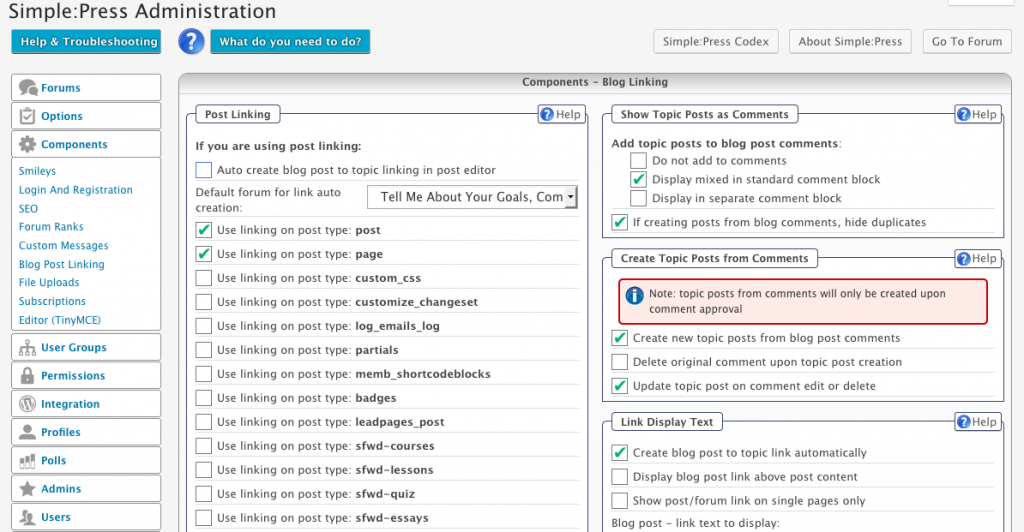
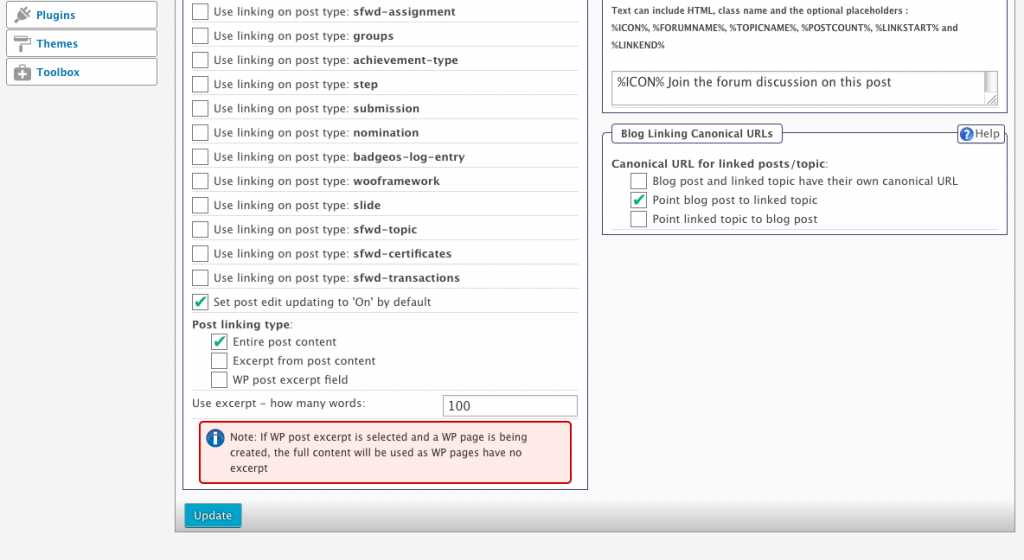
can you show a screenshot of your blog post linking options panel in the forum admin?

the latest notice is not important or a factor here (will log it though)…

FB Frederic Buonincontri
Frederic Buonincontri
Member

Standard wp post yes.

screenshots:

BPL-1.pngBPL-2.png

Let me know if you’d like admin access.

MP Mr Papa
Mr Papa
Member

do you have link to site and example of the problem (2 posts if both show same comments) so we can look?

I assume no caching plugins?

FB Frederic Buonincontri
Frederic Buonincontri
Member

No caching plugins.


All of our content is protected. I set up an account for you. PM-ing login credentials shortly.


A few links where comments all show the same:

https://members.wayned.com/swing-analysis-julius-boros/

https://members.wayned.com/playing-for-money-josh-eure/

https://members.wayned.com/playing-for-money-derek-sherard-part-3/

MP Mr Papa
Mr Papa
Member

interesting…  not entirely sure what is going on there – or if directly related to the blog post linking…

if I take a look at posts that are not forum linked (only found a couple), they each have the same thing at bottom as blog linked one…  under the about author block is a tags list, then a link to the ‘next’ post… but they all link to the ‘The game as I see it’ post… and then show the 15 comments from that particular post…  even the ‘game as I see’ post itself…  

since you know the site better, can you look at other non forum linked posts and see if this is still true? 

do you know how any of the comments sections are being displayed in the wp single post template?  any other comment type plugins?  would really like to know how the wp theme is displaying comments…

in the blog linking options forum admin panel, what happens if you change the upper right option for displaying mixed in comments block to display in separate comment block?

FB Frederic Buonincontri
Frederic Buonincontri
Member

since you know the site better, can you look at other non forum linked posts and see if this is still true? 

Yes, found a few and it’s still true.

https://members.wayned.com/swing-analysis-jordan-spieth-and-jason-day-on-the-greens/

Maybe has nothing to do with Blog Post Linking?

do you know how any of the comments sections are being displayed in the wp single post template?  any other comment type plugins?  would really like to know how the wp theme is displaying comments…

(?1)No, I’ll need to look at that. (?2)No, no other comment type plugins. what’s the best place to look to see how the wp theme is displaying comments?

in the blog linking options forum admin panel, what happens if you change the upper right option for displaying mixed in comments block to display in separate comment block?

testing now and will reply soon.

FB Frederic Buonincontri
Frederic Buonincontri
Member

in the blog linking options forum admin panel, what happens if you change the upper right option for displaying mixed in comments block to display in separate comment block?

I don’t see any change after doing that 🙁

MP Mr Papa
Mr Papa
Member

didn t think it would change, but wanted to see… thanks…

so data indicates its a general issue with how the wp theme is doing comments…  we have no interaction in those not blog linked posts and they show the same comments…

what wp theme is this? is it up to date? and compatible with wp 4.7?  there have been multiple changes to wp comments in core that might make it outdated…

without knowing more about theme, its hard to know what to tell you to look for…  I guess if the account was a wp admin we could look around in the wp theme editor…

but first place to look would be in the wp theme itself and see if you have a single.php templat file… many ways to do this, so may not… and then in there, see what comments template tag is used…

FB Frederic Buonincontri
Frederic Buonincontri
Member

 what wp theme is this?

Woothemes Canvas

is it up to date?

no, will fix this, (running 2015.03.17 – version 5.9.3 and latest is 2016.10.21 – version 5.11.3) also checked their changelog and see nothing regarding comments but that doesn’t mean they were not affected.

see if you have a single.php templat file

There is a single.php template file yes. Although it appears they use a separate comments template: theme-comments.php

What comment tag should I look for?

YS Yellow Swordfish
Yellow Swordfish
Member

Wanted to say that I am not ignoring you but am curious where @mr-papa was taking this so would like him to chime in, That will be a little later on I am afraid.

FB Frederic Buonincontri
Frederic Buonincontri
Member

I’m grateful for the help and also curious where this will lead. Hoping there will be a solution.

MP Mr Papa
Mr Papa
Member

i just want to know how they are outputting the comments… since every non blog linked wp post has the same comments shown, something seems afoul in the theme…