Support Forum

BlogLinking Link Display Text issue

AB Andy B
Andy B
Member

I have had bloglinking link display text enabled and working (so that a link to the forum topic appears beneath each blog-linked WP post)

I decided to see how an existing post would look if I unchecked the link display text. When I refreshed the blogpost i noticed it was still there! When I reenabled the blog linking display text now I see two links.

See the attachments

Also, link showing the problem is here: http://body-builderz.com/nutrition/snacks/banana-ice-cream-recipe


Two links displayed when only one is configured:bloglinking.png

 

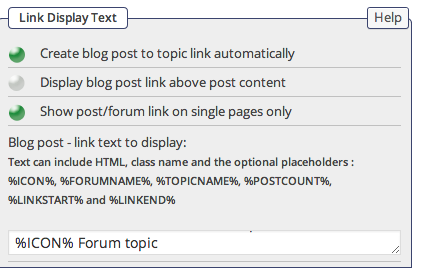
The options that I was adjusting:

linkdisplaytext.png


5 Answers

New Answer

YS Yellow Swordfish
Yellow Swordfish
Member

Is it possible that this post was an old post that was originally made with an earlier version of SP – version 4 at the newest? Or perhaps you could just tell me the date the post was made?

AB Andy B
Andy B
Member

It seems that all posts are affected, not just a single post. This includes posts made with the older sp version and the newer updated version.

I would bet if I tried deselecting the display-text-link buttons, saving, and then reenabling the buttons and saving, maybe I would get 3x links. I don’t want to try that just now though :)


YS Yellow Swordfish
Yellow Swordfish
Member

Needless to say I can not replicate any problems here. Nor should there be as the text is not saved with the post. But this was why i asked about old versions because a long, long time ago – when blog linking was first introduced – it did save the link in the actual post content in the database. It quickly became apparent that this was not a good idea so it was changed. But this was way, way back before version 5 of SP and quite probably before version 4 as well.

Since that time nothing has been saved and the link is simply output dynamically if required.

So – assuming you really are using an up to date version of SP and we are talking about linked posts made since the above change was made – then something else has to be in play.

Do you have any form of caching being applied to your posts?


AB Andy B
Andy B
Member

Issue resolved. Seems that its my mistake, sorry for the false alarm.

The link text display (input box in the settings menu) may have gone on to a different line out of view and I guess because it’s an expanding textbox the text was in my case not viewable.