Support Forum

Buddypress Integration Plugin greys out admin window

EB Emmet Brown
Emmet Brown
Member

So here is a weird thing. 

I just downloaded the Buddypress Integration plugin and activated.

The second it activated, it briefly looked like it worked and then one second later my wordpress admin display panel is completely grey – no errors in the console.  The black left side menu still present and populated. But the admin bar accross the top also blacked out, and then the main window is all grey.

I tried several times with deactivating buddypress, and enabling the plugin first, but as soon as both are enabled I get the greyed out admin window. 

Deleting the buddypress integration plugin directory saves the situation and gets me back to a normal state again.

Any ideas?

15 Answers

New Answer

YS Yellow Swordfish
Yellow Swordfish
Member

The only topic I can find in a search – and one I remember – was a user who had an almost similar experience because the BP ‘notifications module’ was turned off in BP.

But that was a long time ago and I feel sure that particular issue was plugged. But worth checking for,

After that I can not begin to think what might be going on. So… investigation time! Is there anything in the php error log? You could start with the SP error log in the toolbox. There might be a number of notices and warnings. You can ignore notices but warnings might be of interest. But actual errors are more likely to point at something useful. And one that might just be BuddyPress relevant… although please include any actual errors…

If nothing there then would you be able to look at your php server-side error log?

EB Emmet Brown
Emmet Brown
Member

So errlog just has this notice:

April 1, 2016 9:41 pm | spaErrNotice | 54 | php
file: /simple-press/sp-api/sp-api-auths.php
line: 29
function: sp_get_auth
Notice | Undefined index: use_pm


But the php log has this:

PHP Fatal error: Allowed memory size of 134217728 bytes exhausted (tried to allocate 523800 bytes) in /wp-includes/option.php on line 3746


Now I don’t know for certain these errors occurred during those moments, I’ll have to try again tomorrow to verify 100%.  Of note, in components>file uploads I set all the max sizes to 134217728 a while back because it seemed like a reasonable thing to do.

MP Mr Papa
Mr Papa
Member

the first one is odd… do you have the private messaging plugin active?  it seems to be looking for it but cant find it???  if so, perhaps try deactivating it and then reactivating it…  but its a notice and not going to cause you the issue you are having..

but the out of memory is likely to be…  what is your php memory setting?  it wont be related to the image size setting unless it only occurs when the uploading the image… is the memory error occurring all the time with our buddypress plugin active? first thing to determine… or was it a one time thing when uploading an image?

EB Emmet Brown
Emmet Brown
Member

Ok, I ran a test and confirmed that these errors are occuring as soon as the plugin is activated.  I also bumped up the memory limit from128 to 256.  I’m not using the private messaging plugin, and I’ve never installed it.

[02-Apr-2016 18:42:32 UTC] PHP Notice:  Undefined index: use_pm in /wp-content/plugins/simple-press/sp-api/sp-api-auths.php on line 29
[02-Apr-2016 18:42:32 UTC] PHP Notice:  Undefined index: subscribe in /wp-content/plugins/simple-press/sp-api/sp-api-auths.php on line 29

[02-Apr-2016 18:42:32 UTC] PHP Notice:  Undefined index: watch in /wp-content/plugins/simple-press/sp-api/sp-api-auths.php on line 29

[02-Apr-2016 18:42:34 UTC] PHP Fatal error:  Allowed memory size of 268435456 bytes exhausted (tried to allocate 523800 bytes) in /wp-includes/option.php on line 3746

[02-Apr-2016 18:42:37 UTC] PHP Notice:  Undefined index: use_pm in /wp-content/plugins/simple-press/sp-api/sp-api-auths.php on line 29

[02-Apr-2016 18:42:37 UTC] PHP Notice:  Undefined index: subscribe in /wp-content/plugins/simple-press/sp-api/sp-api-auths.php on line 29

[02-Apr-2016 18:42:37 UTC] PHP Notice:  Undefined index: watch in /wp-content/plugins/simple-press/sp-api/sp-api-auths.php on line 29

[02-Apr-2016 18:42:38 UTC] PHP Fatal error:  Allowed memory size of 268435456 bytes exhausted (tried to allocate 523800 bytes) in /wp-includes/option.php on line 3746

[02-Apr-2016 18:42:40 UTC] PHP Notice:  Undefined index: use_pm in /wp-content/plugins/simple-press/sp-api/sp-api-auths.php on line 29

[02-Apr-2016 18:42:40 UTC] PHP Notice:  Undefined index: subscribe in /wp-content/plugins/simple-press/sp-api/sp-api-auths.php on line 29

[02-Apr-2016 18:42:40 UTC] PHP Notice:  Undefined index: watch in /wp-content/plugins/simple-press/sp-api/sp-api-auths.php on line 29

[02-Apr-2016 18:42:58 UTC] PHP Notice:  Undefined index: use_pm in /wp-content/plugins/simple-press/sp-api/sp-api-auths.php on line 29

[02-Apr-2016 18:42:58 UTC] PHP Notice:  Undefined index: subscribe in /wp-content/plugins/simple-press/sp-api/sp-api-auths.php on line 29

[02-Apr-2016 18:42:58 UTC] PHP Notice:  Undefined index: watch in /wp-content/plugins/simple-press/sp-api/sp-api-auths.php on line 29

EB Emmet Brown
Emmet Brown
Member

Weird detail: changing the limit to 512mb had the same result as above.  Including the line “Allowed memory size of 268435456”  Which is odd.  Changing from 128 to 256 changed that number, but changing to 512 and the number remained 268435456.  My host says their set limit is 512, so I feel like it should have changed. 

MP Mr Papa
Mr Papa
Member

okay, forget those notices for now…  not related…

so are you running any other buddypress add on plugins?

try deactivating buddypress and then reactivating it…  of course, leave the sp buddypress plugin active…

EB Emmet Brown
Emmet Brown
Member

Deactivated buddypress then reactivated.  Got the normal welcome screen.  Then tried the sp-buddypress plugin and same result.  Here is a list of all active plugins:


LayerSlider WP   by Kreatura Media – 5.6.2
Admin Menu Editor   by Janis Elsts – 1.5
Brilliant Easy Exclude Posts (BEEP)   by bGentry – 1.0
BuddyPress   by The BuddyPress Community – 2.5.2
Content Protector   by K. Tough – 2.9.0.1
Disqus Conditional Load   by Joel James – 10.1.8
Disqus Recent Comments Widget   by Deus Machine LLC – 1.2
Fancier Author Box   by ThematoSoup – 1.4
Fusion Core   by ThemeFusion – 1.8.3
Google Analytics by Yoast   by Team Yoast – 5.4.6
Insert Headers and Footers   by WPBeginner – 1.3.3
Instagram Feed   by Smash Balloon – 1.3.11
Peter’s Login Redirect   by Peter Keung – 2.9.0
PHP Code Widget   by Otto – 2.3
Slider Revolution   by ThemePunch – 5.1.6
Simple:Press   by Andy Staines & Steve Klasen – 5.6.4
Super Socializer   by Team Heateor – 7.5.5
TablePress Extension: Responsive Tables   by Tobias Bäthge – 1.3
TablePress   by Tobias Bäthge – 1.7
UpdraftPlus – Backup/Restore   by UpdraftPlus.com, DavidAnderson – 1.12.2
User Role Editor   by Vladimir Garagulya – 4.25
User Role Widget Areas   by Rob Smelik – 1.4
Vimeography Pro   by Dave Kiss – 1.0.1
Vimeography Upload   by Dave Kiss – 1.0
Vimeography   by Dave Kiss – 1.3.2
WordPress Popular Posts   by Hector Cabrera – 3.3.3
WP Instagram Widget   by Scott Evans – 1.9.5
WP Register Profile   by avimegladon – 3.1.1
WP Smush   by WPMU DEV – 2.1.5
WPSSO Pro Update Manager (WPSSO UM)   by JS Morisset – 1.4.0-1
WordPress Social Sharing Optimization (WPSSO) Pro   by JS Morisset – 3.28.5-1
EB Emmet Brown
Emmet Brown
Member

Oh wait, you wanted me to leave the sp-buddypress plugin active while deactivating then reactivating the buddypress plugin?  I don’t know if I can do that..  the minute they are both active I lose access to the admin screen.  Um.. I could deactivate buddypress, install the sp-buddypress and activate it, and then activate buddypress afterward?  I’ll try that.

EB Emmet Brown
Emmet Brown
Member

Ok tried that order, same result.  As soon as buddypress tried to activate, I lose the admin screen.

EB Emmet Brown
Emmet Brown
Member

So this other thread solved my problem:

https://simple-press.com/support-forum/sp5-plugin-topics/sp-buddypress-plugin-freeze-overload-my-web-server/page-2

After that i’ve noticed this  setting enabled: “

Now since my users has their own avatar uploaded with buddypress, i’ve switched it on “

So here’s how I did it:

1. deactivate buddypress.

2. Install sp-buddypress plugin and activate.

3. Change setting in sp-buddypress from “use simple:press avatars for both” to “use buddypress avatars for both”

4. activate buddypress.

5. enjoy.

smile
YS Yellow Swordfish
Yellow Swordfish
Member

Curious, We will need to try and replicate that. Thanks for the information and good to hear you are back on track,

EB Emmet Brown
Emmet Brown
Member

I have buddypress running already, and users registered with supersocializer so their twitter profile pictures were uploaded as avatars in buddypress.  Similar to the other person’s issue, his users already had buddypress avatars?  Not sure.  All I know is that without a doubt, that setting change solved my problem.

MP Mr Papa
Mr Papa
Member

didnt understand it back then either! 😉 I can set it either way and it works fine…

speculated then and asked you here, if any other buddypress plugins running besides just the core plugin…  still wondering if interaction with another buddypress plugin…

EB Emmet Brown
Emmet Brown
Member

I listed all my plugins on the previous page, I don’t think any are specifically buddypress.

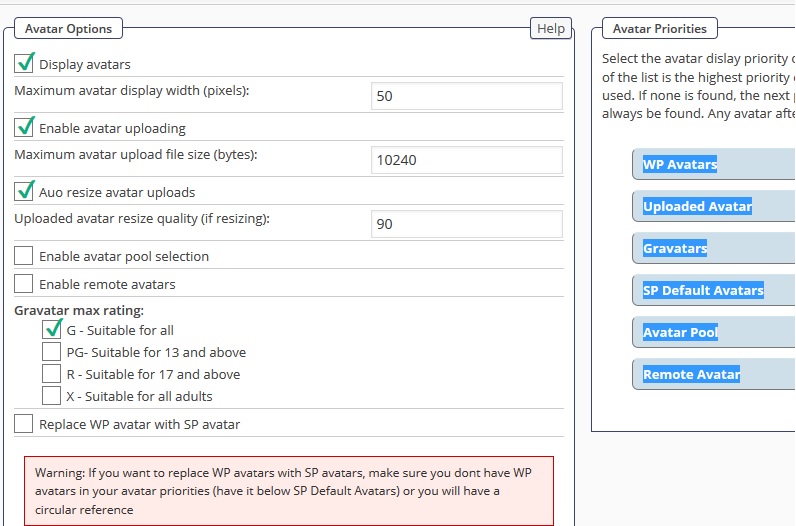
One other note is that prior to this I had rearranged the order of my avatars to this:

settings.jpg