I wish I could help more Mr Papa. All I can say is he is having the same problem I was and my problem was in the database. If you can, check his database tables and make sure there are no duplicates. Only wordpress, buddypress and plugin tables.
got it running locally… no issue with memory usage, it activates and runs fine… occasionally, I was getting an max nesting exceeded error for the avatar. Looking at you settings, I am not sure what you were trying to accomplish.
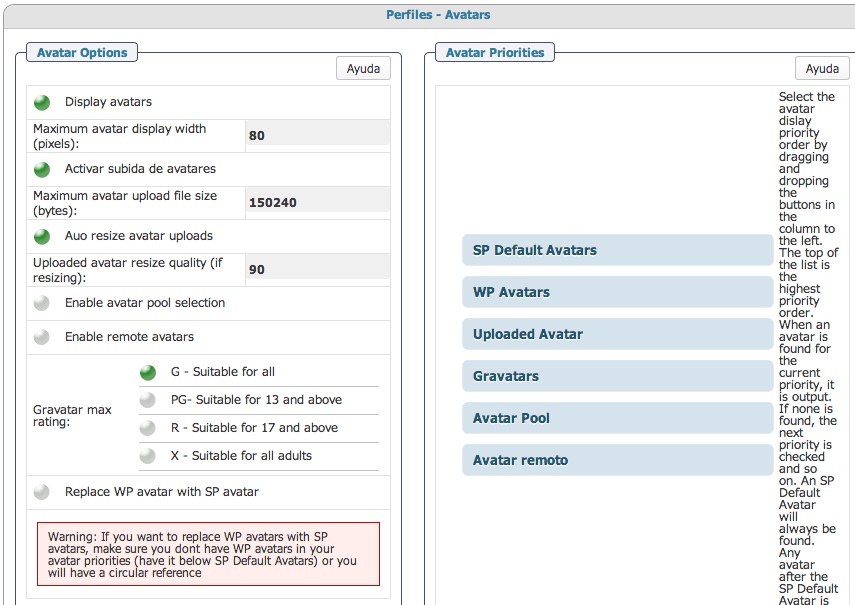
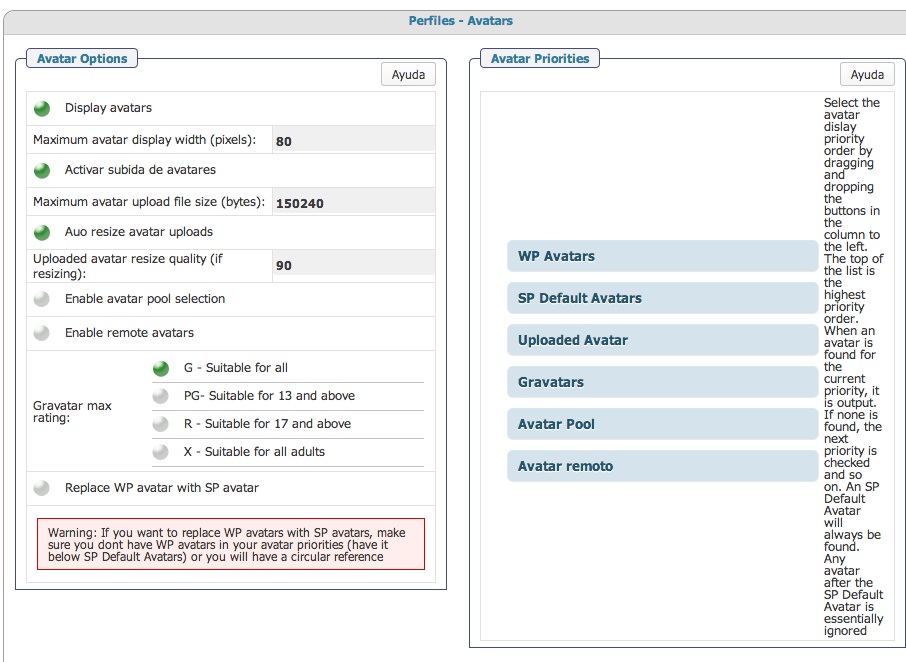
You have use wp avatar as the second priority for the sp avatar. you also have set to use sp avatar everywhere. since bp replaces the wp avatar function there may be something there. but why do you have the wp avatar in the priority list at all??? Near as I can tell, you do not have anything else doing avatars which means it does gravatars… so with you telling sp to replace bp and use wp, but bp is trying to replace wp, its confusing…
so as I say, unless you have another plugin doing wp avatars, you shouldnt have it in your priorities… would suggest uploaded, gravatars, then sp defaults…
that gets rid of the bp loop and the sometimes nesting issue… worth seeing if it helps your memory issue too…
Testing….. I love buddypress and simple:press forum, but i want group have their forum, now Buddypress 1.7.2 using bbpress forum, if i want group have forum i must install bbpress plugin
So maybe the problem that some users are having is this one… that the plugin doesnt works if you are using the WP avatar, to work it should be used with the SP avatar…
dam nguyen said
Testing….. I love buddypress and simple:press forum, but i want group have their forum, now Buddypress 1.7.2 using bbpress forum, if i want group have forum i must install bbpress plugin
Sorry for my bad EN
Hi!
I wil try to help,
If I understand what you want to do is tu use a GROUP FORUM, you can use it on SimplePress to create new “forums” and add the ability to the users to join a group where the users can join that forum…
Just create the new forum an take it as a group forum and then create users group… no problem with this…
Simplepress is a real and complete forum… just need to work a bit more on the buddypress integration…. but is almost done!
Thank @Carlos, May be I will remove bbpress and I hope this plugin will have forum tab on profile, and inclue owner topics, Rich text – TinyMCE editor for signature
Carlos said
Mr Papa, i got the Buddypress running now,
I changed the avatar preferences to this way:
And activated the plugin, so it works…
But if i change the preferences to:
The site crashes
So maybe the problem that some users are having is this one… that the plugin doesnt works if you are using the WP avatar, to work it should be used with the SP avatar…
We are on the way!
Hi, now when i upload an avatar from the SP profile page it doesn´t show… either i put as first option “show uploaded avatar” or “show SP default avatar”
The only way it works is changing it fron the Buddypress profile
the second image makes no sense from a settings perspective on your site that I could see… you have bp trying to replace wp and sp trying to replace bp, but allowing wp… you get a viscous circular loop…
and what are you really doing for a wp avatar??? I didnt see anything that had a wp avatar??? only wp avatar being used that I saw was gravatar which is not wp… so in that case, just pull gravatars up where you wp avatar..
the ONLY time WP avatars should be used is if you have another plugin that is adding new avatars and api to wp… I guess is you were using wavatar or the monster ones, that would be a case too.. but you had gravatar selected…
as mentioned before, I would make your avatar priority be
uploaded
gravatars
sp defaults
and it seems you want to use sp avatars (or at least that was your setting), which is fine… so yes, users would have to upload avatars from the sp profile… but if you are saying to use only bp or only sp avatars, you would upload through whichever one you selected… or you can keep them separate…
To provide the best experiences, we use technologies like cookies to store and/or access device information. Consenting to these technologies will allow us to process data such as browsing behavior or unique IDs on this site. Not consenting or withdrawing consent, may adversely affect certain features and functions.
Functional
Always active
The technical storage or access is strictly necessary for the legitimate purpose of enabling the use of a specific service explicitly requested by the subscriber or user, or for the sole purpose of carrying out the transmission of a communication over an electronic communications network.
Preferences
The technical storage or access is necessary for the legitimate purpose of storing preferences that are not requested by the subscriber or user.
Statistics
The technical storage or access that is used exclusively for statistical purposes.The technical storage or access that is used exclusively for anonymous statistical purposes. Without a subpoena, voluntary compliance on the part of your Internet Service Provider, or additional records from a third party, information stored or retrieved for this purpose alone cannot usually be used to identify you.
Marketing
The technical storage or access is required to create user profiles to send advertising, or to track the user on a website or across several websites for similar marketing purposes.




 so if possible put the language files on the codex