Support Forum

Cannot update plug-ins or themes

SC Steven Chisnell
Steven Chisnell
Member

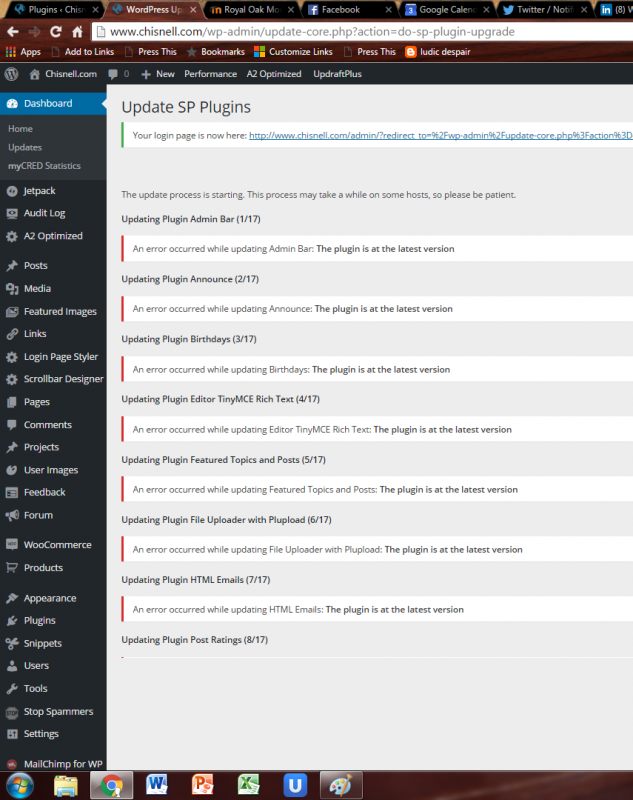
I keep receiving the response to all plugins and themes during auto-update:  “The theme is at the latest version”   

But they’re clearly in need of updates.  A subdomain running SP updates fine (so far), but my main site does not and has not for over two months.  

SP and WP are fully current.  I’ve updated SP 2-3 times since the error began, thinking it might be a known bug that would be corrected in a future version, but … 

Read a thread by Stefano in 2015 that looked similar but could not tell from thread how it was resolved. 

Ideas. anyone?  Thanks in advance.

13 Answers

New Answer

YS Yellow Swordfish
Yellow Swordfish
Member

To be frank – off the cuff I’ve no ideas at all…
Perhaps we could start by you telling us which theme and plugins you have and their version numbers (you can get the list of plugins and versions from the toolbox > Environment but it doesn’t list the SP theme at the moment)

SC Steven Chisnell
Steven Chisnell
Member

Sorry.  I have SP 5.6.5; WP 4.5.1

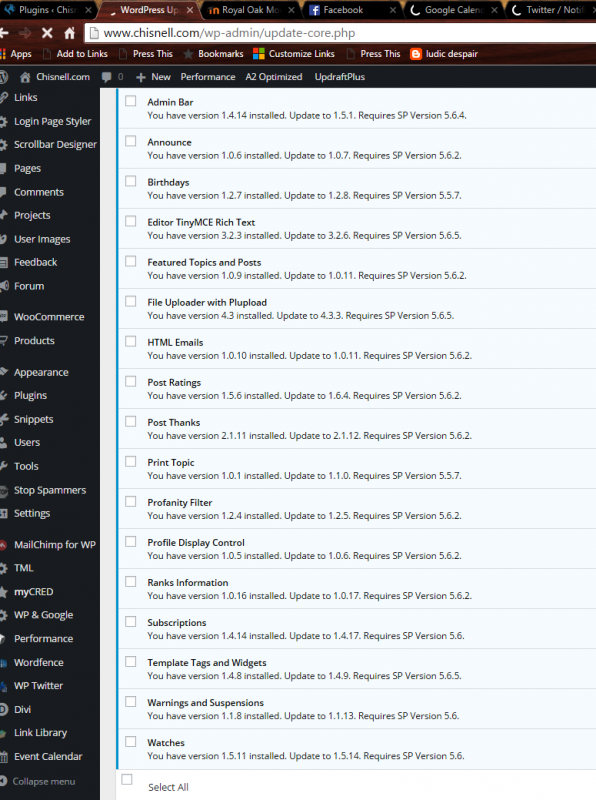
Here are the plugins (most of them) and the resulting error:

I am using the CSS Only theme, but neither that nor the Default theme updates, either.  Both are 1.2.18 and both show updates to 1.2.21.  Same error.

YS Yellow Swordfish
Yellow Swordfish
Member

Oh I see… it really IS showing as an error.

Is there anything in your php error log do you know? At this point in the process SP is really handing off all the grunt work to WordPress core which – I see – is a little unhelpful as far as its ‘error’ goes. So perhaps the log might tell us something useful…

YS Yellow Swordfish
Yellow Swordfish
Member

Or — it might also be worth asking your hosting support if they have in some way disallowed access to our server? Although if you are able to update SP itself that doesn’t sound likely.

But does raise the question – how come SP core can be updated successfully… so back to the error log question first…

SC Steven Chisnell
Steven Chisnell
Member

Oddly, the Error Log is completely empty.

Also uninstalled one of the plugins, got a fresh download from SP and reinstalled.  Same error.

SC Steven Chisnell
Steven Chisnell
Member

Also, to your other point, I have a subdomain of this site also running SP and it appears to be updating fine on the same server. . . . 

YS Yellow Swordfish
Yellow Swordfish
Member

I don’t really understand the sentence – ‘Also uninstalled one of the plugins, got a fresh download from SP and reinstalled.  Same error.’ Uninstalled? Does that mean you downloaded and then copied it to your server? How can you get an error doing that?

Anyway – this is probably a red herring but if you have access to your database and are comfortable making changes can you find the table named _sfcache and – if there is  row with a cache_id of ‘xml*xml’ can you delete it? See if that dislodges anything…

SC Steven Chisnell
Steven Chisnell
Member

No, I mean that I thought if the plugins were corrupted in some way I might repair them by installing the newest version.

I deleted the SP plugin “profanity filter” on my site.  Then I downloaded the same plugin from your site.  Then I uploaded it to my site/server and activated it.  Interestingly, it said a new version was available (why that might be, I don’t know.).  I then attempted to update it.  I received the same error as before.  

Might not be a red herring, after all, if you have the most up-to-date plugins on your site.  Why did I get an earlier version?  

Profanity Filter
You have version 1.2.4 installed. Update to 1.2.5. Requires SP Version 5.6.2.

I downloaded 1.2.4 from your site.

As for making changes to the database, I can have a friend of mine do that.  I’m not comfortable with coding myself, but I’ll see what happens.  Thanks for your help so far!

MP Mr Papa
Mr Papa
Member

odd… just dumb luck on profanity filter?  for some reason, the version for download does seem out of sync the the version to update to…  it says 1.2.5 but you do get 1.2.4… we will have to research that…  

but its not a general issue as I checked several others on your list too and all were fine…

before trying again, can you go to forum – toolbox – housekeeping and clear the xml cache…

also, something might be interfering with the upgrade process (it uses the wp update functionality)… or some sort of caching?  might be nice the the xmlhttp response when trying to update…

SC Steven Chisnell
Steven Chisnell
Member

… And Birthdays, too.

But Featured Posts?  That worked!  I now have the most recent version.  It will be interesting to see if it updates next time or not.  I can go through an update each manually this way, but that may not solve the issue. . . .

Cleared the xml cache but saw no difference in ability to update. 

Not sure I understand this:  “might be nice the the xmlhttp response when trying to update…”

YS Yellow Swordfish
Yellow Swordfish
Member

Cleared the xml cache

This housekeeping task is the same as asking you to delete the row in the database – I just forgot that there IS a task defined for it.

might be nice the the xmlhttp response when trying to update

Steve is referring to the process (xmlhttp) that is used by the WP update engine to get the data needed from our website. It is as I said above – they state that there is an error but do not inform us what that error is. So – not helpful.

It might be worth trying an update and having the web console open to see if any errors are reported. I generally find that Firefox is the better browser for this but I believe al the major browsers now have the capability. See this codex page (https://simple-press.com/documentation/codex/faq/how-to/how-to-use-your-web-browser-console/) for the simple instructions.

MP Mr Papa
Mr Papa
Member

you see the same on featured posts and birthdays?  I get the proper version…

working to do an audit this weekend…  and likely release a lot of plugin updates to fix an incorrect url issue (very minor issue but might as well correct)…