I’m new to Simple Press but I can’t see where the file upload button is for adding an image to posts. I have installed and activated the Pluploader plugin and been through the settings. What am I missing here?
Cheers,
John


I’m new to Simple Press but I can’t see where the file upload button is for adding an image to posts. I have installed and activated the Pluploader plugin and been through the settings. What am I missing here?
Cheers,
John


Might seem like a bit of an obvious one, but have you checked permissions to make sure you can actually upload media, and that the forum has the right permissions enabled?
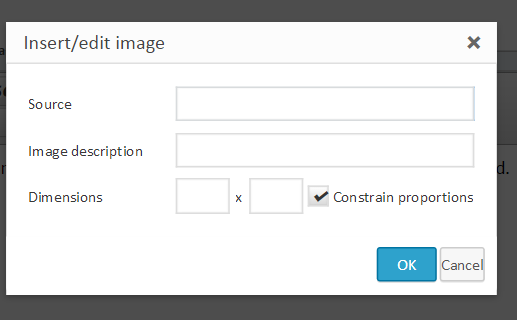
I’ve added the TinyMCE and can see the image upload button now. The dialogue box asks for Source, so does this need a URL or can they be uploaded directly from the computer. I sthis the right place to add images? I don’t have the Attachments button & dialogue like the one here. Please pardon the basic questions!

Well the insert / edit image is just through the editor, not through the upload plugin.
Are you getting any errors on the page? or if you’re not sure can you provide a link to the forum?
I’m getting the insert/edit image dialogue box, but don’t know what to put in “source”. Why don’t I have the Attachments button as shown below this box here on your support forum? It would be so easy if my forum members could just drag and drop.
My forum is for registered members (free), so you could register and login at http://teachsuzukiviolin.com/ – or I could set you up a with a temporary membership?
OK maybe I didn’t go in to detail on what you have got. The insert / edit image is for adding images via URL. So you would put the URL in the ‘source’ box. Pretty useful if you are adding images from other websites.
As to why you don’t have the attachments button, that’s what we’re trying to figure out right?
If you could set up a temporary account and PM the login details to myself and ‘Mr Papa’ so we can take a look and see if there are any problems on the page.

didnt see above in quick search, but do have our file uploader plugin? Thats what you need if you want to upload images or files… the popup you have and Ike is explaining is for links to images stored on a server somewhere…
I’ve solved it thanks. Just needed to update Uploading permissions – as Ike said earlier. Many thanks!