Support Forum

Deleting Topic Redirects

SD Stan Dahl
Stan Dahl
Member

Hi guys.  Can you tell me how I can go about deleting Topic Redirects?

I put up a couple of test topic redirects and I’d like to remove them, but I can’t find where I do that.

There’s no option on the toolbox.  Is it possible to delete those?

Thanks,

Pete

9 Answers

New Answer

MP Mr Papa
Mr Papa
Member

delete the topic itself… there is not content to the topic, only the redirect which is effectively the content…  and there is not replies for it either, so deleting it simply deletes the redirect…

SD Stan Dahl
Stan Dahl
Member

How do I delete the topic itself?  What do I click on to do that?  With a normal topic/post, I would click on the title, open it up and that would reveal the ‘X Delete’ button which deletes the topic for me. 

If I click on the topic redirect, it sends me to the link/new page… no ‘X Delete’ button anywhere to be found. And deleting is not an option in the Forum Toolset.  I apologize if I’m missing something simple, but I’ve looked at this 20 times and can’t figure it out!?

Pete

YS Yellow Swordfish
Yellow Swordfish
Member

With the forum tools popup menu:
https://simple-press.com/documentation/codex/faq/how-to/how-to-delete-a-topic-or-post-and-other-tools/

SD Stan Dahl
Stan Dahl
Member

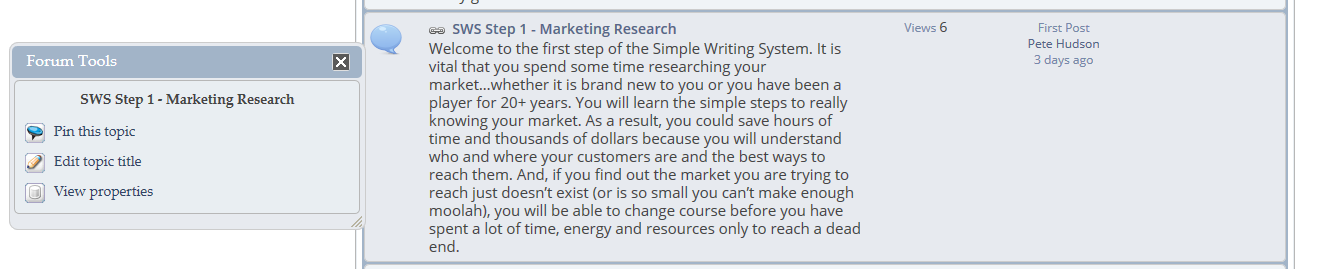
Attached is a screenshot of the forum tools pop up box.

Can you tell me what I click on to delete the topic?

Pete

IK Ike
Ike
Member

Seems to work for me. Are you viewing this as a moderator or an admin?

YS Yellow Swordfish
Yellow Swordfish
Member

What sort of user are you logged in as? Are you a forum Admin (regardless of your WordPress Administrator status)?

[Whoops. Sorry Ike. We posted at the same time]

SD Stan Dahl
Stan Dahl
Member

That was the problem.  I didn’t have Admin capabilities in the forum.

Thanks for the help… we appreciate it.

Pete

IK Ike
Ike
Member

Glad we could help! You can assign permissions to delete topics for the moderator to use, although the permission doesn’t differentiate between topics and topic redirects.