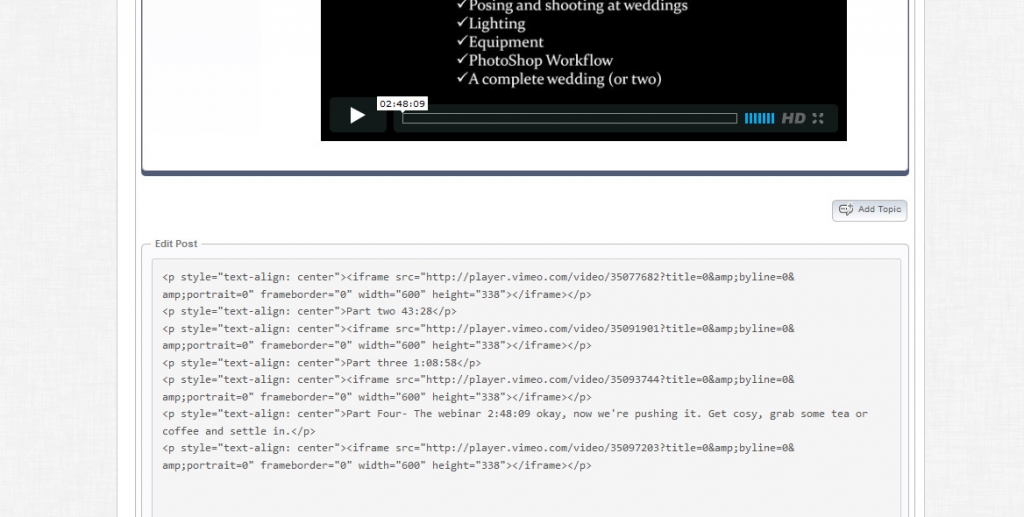
see attached screen shot….


see attached screen shot….


sorry, not sure what you are saying? when you edit a post, you dont get the right editor? what about when you create a topic or post?
do you have the tinymce editor plugin installed?
yes, when I go to edit, all I have is what you see in the screen shot….no visual editor anymore….had at one time, all gone…I did update WP i think…could that have done it?
still confused… you keep saying edit… that means to modify an existing post… is that the only time you lose the editor? or do you not have it when creating a post too??
from what wp version to which wp version? try clearing your browser cache… and also go to forum – toolbox – housekeeping and try clearing the combined js cache (since wp dependencies might have changed)…
a link wouldnt hurt either to look for js conflicts… another plugin might not be compatible with the new wp version…
sorry…when I go to edit a post…
never thought to try adding topic or reply, only went into edit. so, to check it out, I just did, tried reply and add new topic, and like nothing’s working. can’t do either….what did I do??
also, to complicate things tonight, if you can help, a side issue. in a page, protected using wishlisht, added links for my videos so members can download as option, install links. save. then, no links…I have aliens….I have links in other similar pages (I freaked, thought I lost em all) and they’re all good. just this one page. Any ideas on that?
I am WordPress 3.5.
thanks Rob

well, one needs to login first…it’s a closed forum..if anyone can help, id be willing to pay a fee…mr.papa did u not help me back a few months ago??? my site….http://www.wizardoflight.com/forum
Are you by any chance using the WishList Tags plugin as that will kill the editor…
not using that, not in the wishlist plugins….but in the SimplePress list of plugins there is SP Tags. I tried deActivating it and still, only have HTML view, not visual editor capabilities…..hheeellpppp???
I will need to get into the forum proper to take a look with debug tools.
Can you please PM credentials to both myself and to ‘Mr Papa’. Please include in the PM a link to your site, a link to this thread and brief reminder of the problem. And one of us will take a look for you.
Well you have updated the tinyMCE Editor to the very latest version but your Simple:Press core is way back at 5.1.4.
WP can not handle dependencies in the upgrade routines automatically but it did say on the updates page that the editor plugin required 5.2.0 as minimum. So my hunch would be when you upgrade SP you will get the editor back. At least I should hope so.
thanks….i did just that….and it’s FIXED…..what would I do without you guys…..R