Hey there again.. Since the last update.. Emptying the admin postbag does not work. It refreshes the page, but the posts are all still there when I click to empty it..
Support Forum
Mmmm. I just tried it on your post here and it behaved ads expected. My guess is then that you have an Ajax problem – perhaps a small conflict with another component on your website.
Do you know how to use the web console in your browser? If so then please open it up, reload the page and then try the action again to see if you get any error messages (JUST errors!). And if so – please copy and paste them here.
This FAQ helps with the use of the console: https://simple-press.com/documentation/codex/faq/how-to/how-to-use-your-web-browser-console/
if you are using the combined js cache, might be worth trying to clear the cache too since lots of js changes… you can clear on forum – toolbox – housekeeping… we do flush on upgrades, but seems every once in blue moon, it doesnt happen…
Hello.. I am not using the combined js cache.
When using the web console on my browser and I click on View new posts/Open the admin postbag the console shows this.. ( I did recently add SSL)
Then when I click to clear the admin postbag, it goes back to this
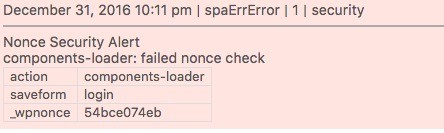
This also showed up in my toolbox error log tonight.. Not sure if it means anything in relation to this or not.
BTW, Happy New year to you guys!
False alarm! I finally realized that when I added SSL, I did not update the forum permalink. Once I did that the admin postbag works again. Thanks once again for being so quick and helpful. I really appreciate it.
Ah – excellent news. There s always something that gets missed!
Whatever the console message was (a bit fuzzy but looks like the script file was called ‘measureit’) it would be worth trying to track it down and correcting it. Talk to the author about it.
Have a great 2017…