Support Forum

File Upload – Start Upload not working

AC Anthony Cavella
Anthony Cavella
Member

Hey guys, I can’t for the life of me get the file uploader to work.  It seems I may have something conflicting between my theme and the plugin…Hopefully you can give me your thoughts.

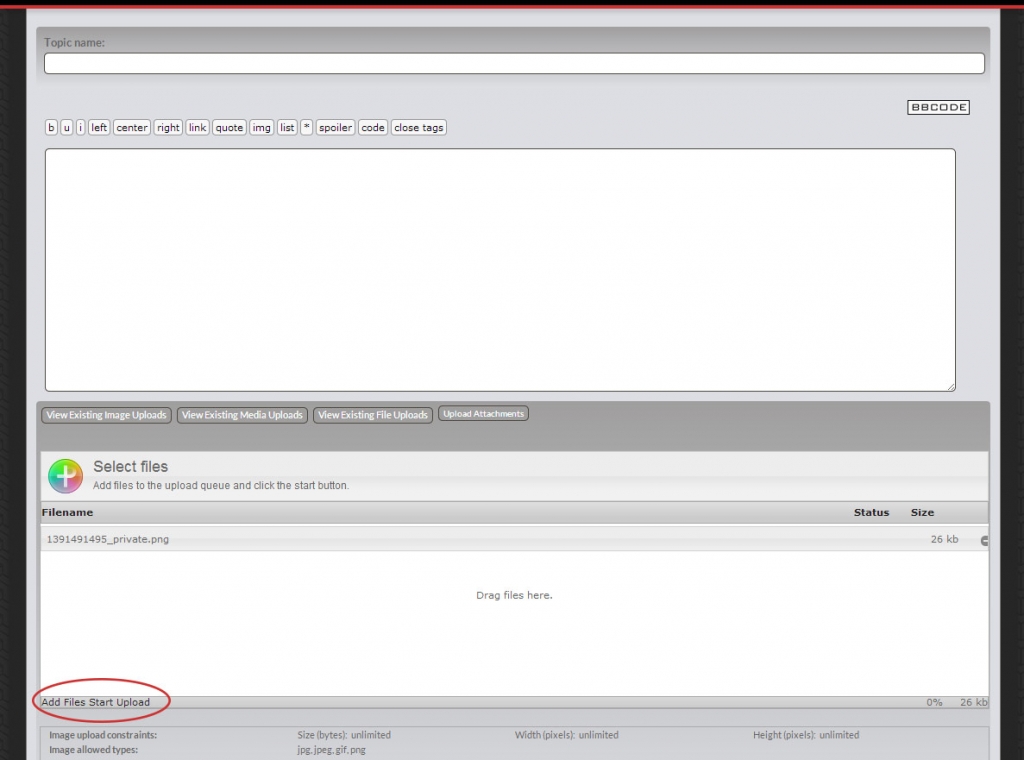
I can add a file to be uploaded, but when I hit start upload nothing happens.  It also seems I am missing the stop upload button.  file_upload_issue.jpg

15 Answers

New Answer

YS Yellow Swordfish
Yellow Swordfish
Member

I am sorry for the delay in responding.

This is going to come down to a javascript conflict with either your theme or anther plugin.

The one we have seen more often than most that causes this is if your WP theme is using the javascript library ‘bootstrap’. The problem with bootstrap is that it is not supported by WordPress and it walks all over libraries that are (jQuery UI).

So first task in tacking this down is to determine if Bootstrap is being loaded on your forum page. Load it up and then look at the source code (view source) and search for ‘bootstrap’. It can, usually, be fixed up to work.

If that is not the problem then you probably have a jQuery JavaScript conflict. This codex article explains what this means and what to look for:

http://codex.simple-press.com/codex/faq/troubleshooting/what-is-this-jquery-conflict/

But Bootstrap would be my first check to make.

AC Anthony Cavella
Anthony Cavella
Member

No worries on the delay, we all have things to do!  

As you suspected Bootstrap is being loaded on the forum page.  How would you proceed at this point.  

YS Yellow Swordfish
Yellow Swordfish
Member

OK – the important thing is to get Bootstrap to load before the jQuery-UI core library. There are one or two examples of code in threads on this forum but it might depend on whether we have encountered your particular WP theme before.

I would try a search for your theme name – or – ‘bootstrap’ (which should turn up 17 or 18 topics) some of which have proposed fixes.

To be blunt – depends on your php/WP knowledge. If you need hands-on help best start with which WP theme you have active and let us know so we can search to see if we have met it before.

AC Anthony Cavella
Anthony Cavella
Member

Sounds good, I appreciate the help.  I should be able to figure it out from here.  

YS Yellow Swordfish
Yellow Swordfish
Member

That’s great. We will be here if you get stuck.

AC Anthony Cavella
Anthony Cavella
Member

I appreciate the nudge in the right direction.  I was able to solve the problem by setting Javascript to load in the footer under the Integration options.

PC Philippe Combas
Philippe Combas
Member

Hi guys, I have the same problem on my forum. I think it’s too a “bootstrap” problem, but i’m not sure. I’m just a beginner.


So, i have the x2 wordpress theme, and for my forum i have “sky blue”. Any Idea?

Thank you for your help!

I found in my x2.php this line (Maybe Here?) :

### js

function enqueue_script() {
global $cap;

if( is_admin() )

return;

// on single blog post pages with comments open and threaded comments
if(defined(‘BP_VERSION’)){

if ( is_singular() && bp_is_blog_page() && get_option( ‘thread_comments’ ) ) {
// enqueue the javascript that performs in-link comment reply fanciness
wp_enqueue_script( ‘comment-reply’ );
}

} else {

if ( is_singular() && comments_open() && get_option( ‘thread_comments’ ) ) {
// enqueue the javascript that performs in-link comment reply fanciness
wp_enqueue_script( ‘comment-reply’ );
}

}

wp_deregister_script( ‘ep-jquery-css’ );

wp_enqueue_script( ‘jquery’ );
wp_enqueue_script( ‘jquery-ui’ );
wp_enqueue_script( ‘jquery-ui-tabs’ );

wp_enqueue_script(‘bootstrapjs’, get_template_directory_uri().’/core/includes/bootstrap/js/bootstrap.min.js’, array(‘jquery’) );

wp_enqueue_script(‘waypoints’, get_template_directory_uri().’/core/includes/waypoints/waypoints.min.js’, array(‘jquery’), ‘1.4.4’, true );
add_action(‘wp_footer’, ‘waypoints_js’, 1 );

}

MP Mr Papa
Mr Papa
Member

could very well be so…  you just need to edit the theme and make sure bootstrap is loaded before jquery ui…

see:  https://simple-press.com/support-forum/sp5-plugin-topics/start-upload-button-not-working/

for some examples… long thread, but look for posts with code changes… it can be different theme by theme…

hopefully one day theme authors will quit doing this or wp will just provide support for bootstrap…

BJ Brian Jungsaa
Brian Jungsaa
Member

Hi Guys. Same issue.

Im using Virtue Theme and have problems with the upload button as mentioned above.

Please help…. 

YS Yellow Swordfish
Yellow Swordfish
Member

is it using the Bootstrap JS library? Can you see it being loaded in the source?

BJ Brian Jungsaa
Brian Jungsaa
Member

Im seeing this when page is loaded:

<link rel=”stylesheet” href=”http://www.golfnorderne.dk/wp-content/themes/virtue/assets/css/bootstrap.css”>

This is all i see with “Bootstrap” on the page

Im a rookie at this, sorry.

MP Mr Papa
Mr Papa
Member

do you have a link to your site so we can look for obvious conflicts or bootstrap type issues?

BJ Brian Jungsaa
Brian Jungsaa
Member

Sorry for the late answer, but I solved it :-)