Support Forum

File Uploading Button Not Working

CC Carrie Carver
Carrie Carver
Member

Hello,

I just recently installed Simple Press (version 5.2.2, build 9610) on WordPress 3.5 and the Plupload plugin (v. 1.3) onto it and I’m having trouble uploading files.  The plugin installed just fine, the feature activates when creating a new post or editing an existing post.  After I click the “Add Files” Button and select my files, which appear in the dialogue box, I cannot click the “Start Upload” Button.  I notice the “Add Files” hover animation occurs, but doesn’t for “Start Upload”.  When I click it, nothing happens.  The mouse icon still changes to from an arrow to a hand, but there is no hover animation.

I’ve included a screenshot to show where the problem is.  You can’t see the mouse icon while it is hovering over “Add Files”.

What could be the issue?
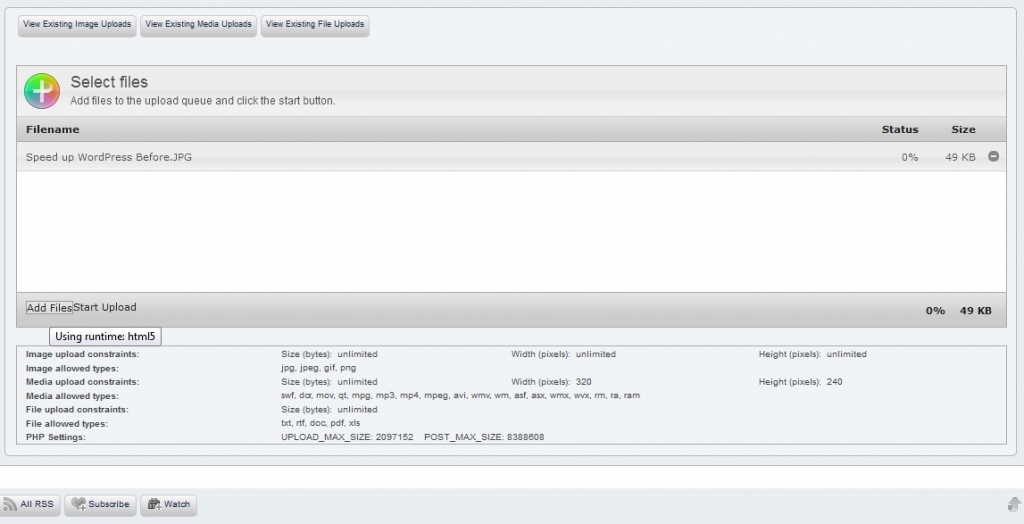
forum-uploader-problem.jpg

5 Answers

New Answer

MP Mr Papa
Mr Papa
Member

do you have a link so we can check for any obvious conflicts?  might reference: http://codex.simple-press.com/codex/faq/troubleshooting/what-is-this-jquery-conflict/

which browser is this with…  if you hover over the plupload icon in upper left, what runtime is shown?

CC Carrie Carver
Carrie Carver
Member

The browser is Firefox V.18.0.1.  It still says “Using runtime: html5” when hovering over the Plupload icon. 

I tried the forum in Internet Explorer 9.  The same issue is there, but it says “Using runtime: silverlight”.

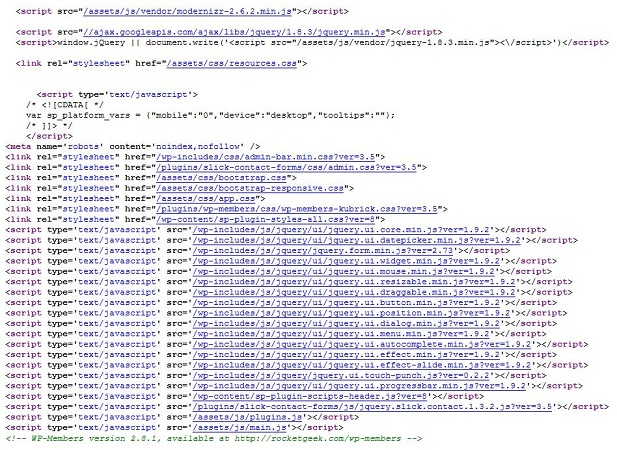
I read through the jquery conflict page.  I’m not sure if that’s the issue.  I’ve included another picture as a capture of the jquery code from the Top forum page, for reference.

website-jquery-html2.jpg


YS Yellow Swordfish
Yellow Swordfish
Member

You can see it quite clearly- second line of code in this screenshot. jQuery being loaded form the googleapis. CDN.

CC Carrie Carver
Carrie Carver
Member

Ok, I see it.  What change to do I make to correct the issue?  I read the Jquery Conflict page and I didn’t understand the instructions.

Do I change the theme, delete that line of code, or edit the code to read a specific library?

I am not using a paid-for theme on the forum at this time.

MP Mr Papa
Mr Papa
Member

more info in the codex link I gave in post #2…

first step is to find if its your wp theme or a plugin doing that… then find in the code where they output that string… then we can correct their problem…