Support Forum

How to display custom profile fields

PM pmac1965
pmac1965
Member

I am trying to figure out how to have custom profile fields displayed and I am unsure of how to go about it. Ideally, I would like the field displayed underneath a users avatar as well as in their profile underneath their bio.


From what I can gather from the codex, in order to have it display under the avatar, I would insert this tag in to a template file:

sp_CustomProfileFieldsDisplay($name, $spPostUser->ID);
 
And I wold change “name” to the name I gave the profile field.
 
My questions are:
 
1) Specifically which template file do I insert the tag, and where in the file would I insert it to render under a users avatar?
2) Is the “ID” automatically populated? If not, how do I get the user ID’s especially if there are thousands of members?
 
Thanks!


9 Answers

New Answer

MP Mr Papa
Mr Papa
Member

which users avatar???  the avatar is displayed in many locations…

again on the user id, it depends… if you do not supply the user id, it will auto fill the id of the current logged in user…  so if you just want the current user, that is fine…  but if you are displaying it somewhere that is not current logged in user based, you need to supply it…  and how you supply it depends on where  you are using the custom profile field since we normally have a user id setup, but it will vary from location to location…

so for example, if you want it to show in the topic view page, for each post, under the users avatar in the post info section, it would be something like:

sp_CustomProfileFieldsDisplay($name, $spThisPostUser->ID);

if you were showing it under the avatar in the users profile, it would be

sp_CustomProfileFieldsDisplay($name, $spProfileUser->ID);

of course, for both, you need to replace the $name with the field name…

so did I guess one of the avatar locations?  if not, please specify which one…


PM pmac1965
pmac1965
Member

You guessed both. :)

Ok, so I have tried and this and I am not getting the field to display. For the topic view I went to

spTopicView.php

and inserted the following

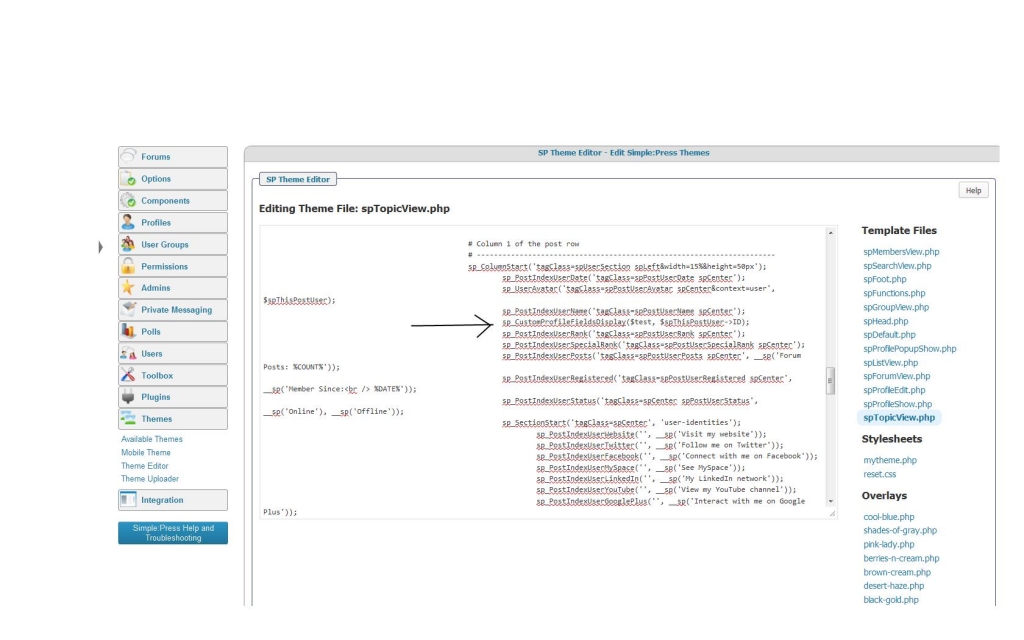
sp_CustomProfileFieldsDisplay($name, $spThisPostUser->ID); and I changed “name” to the corresponding field

I inserted that tag right after the following line:

sp_PostIndexUserName(‘tagClass=spPostUserName spCenter’);


After doing that, I see no changes. Obviously I am doing something wrong.


MP Mr Papa
Mr Papa
Member

can you please post exactly what you are entering here please… would like to check the syntax…

PM pmac1965
pmac1965
Member

It is exactly as posted above. I have included a screenshot so you can see exactly what I did.customDisplayField.jpg

YS Yellow Swordfish
Yellow Swordfish
Member

So what does the variable $test equal? Does it resolve to the item name needed? And why not just put that in quotes? Why use a variable?

PM pmac1965
pmac1965
Member

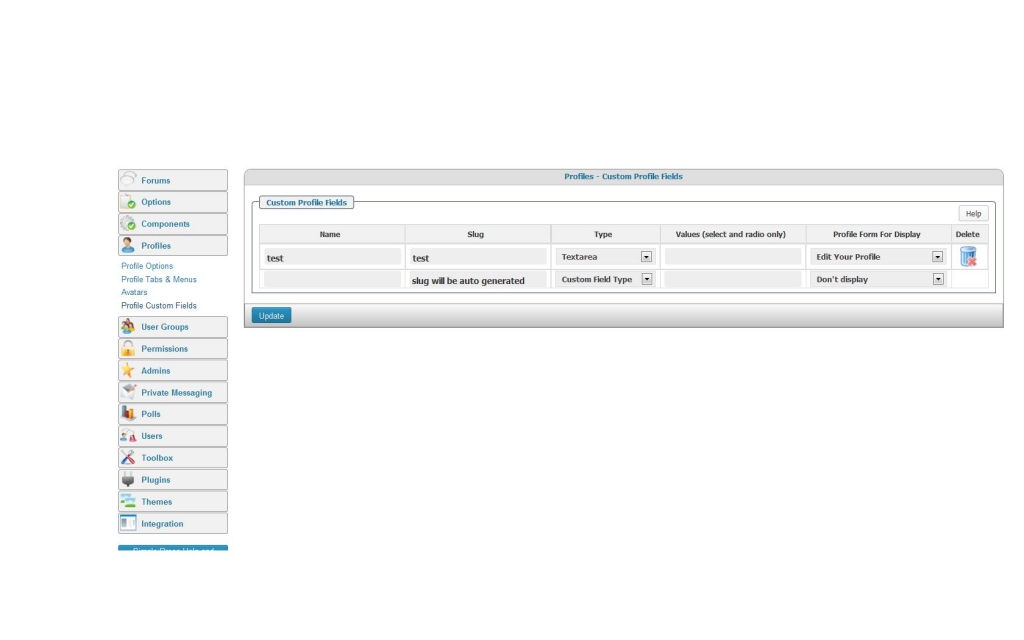
“test” is the name of the custom field when I created it.


>>>>>>Does it resolve to the item name needed? And why not just put that in quotes? Why use a variable?

I have no idea, I don’t code at all. I am just following the instructions from the codex.


See the attached screenshot. I created a textarea that is viewable when you edit your profile and added the word “test” to the text area. I addedtest.jpg the code exactly as you see in the above example in the hope that it would render under the avatar but no such luck.

YS Yellow Swordfish
Yellow Swordfish
Member

Well then there is no such varoable as $test and the routine is just getting no value.
Instead of using a variable name ($test) you should be using ‘test’ in quotes. The name of the new custom field.

PM pmac1965
pmac1965
Member

Thanks, i would never have never known that from the codex. The way it reads, it makes it sound as if its as simple as swapping out “name” for the new field name.

Glad I got that sorted. :)