Support Forum

image doesn't insert with internet explorer

41 Answers

New Answer

MP Mr Papa
Mr Papa
Member

sorry Andy, what do you want me to try??  been gone for few days and digging out from mass of posts and pms…

test on this users site or locally?  do we have credentials?

inserting an image with both the file uploader or the uploads viewer works plugins fine on IE – generally speaking… just tried it on a couple of test sites…  I dont see any 1px widths… 

PE Petra
Petra
Member

Still trying to solve the problem. Downloaded Firefox and firebug, last one goes over my head though. 

Did some simpe testing. Chrome and Firefox don’t have the problem. Only IE. Tried deactivating plugins and another theme. Still same problem.

In IE try to download new image, this is placed correct. Then place the new uploaded image with “View Existing…” plugin, still same result. Image is set to be placed with width/problem-with-post-edit-buttoneight 1px. 

Tried everything I could think of to resolve this irritating problem in IE, but am out of things I can think of or do. Suggestions on how to resolve this matter will be appreciated! Placed workaround on forum, but there a people that want just a simple solution with their ‘fav’ internet program. Can’t force everyone to use other program :( …. So finding the solution would be nice laugh

MP Mr Papa
Mr Papa
Member

well, as stated, its not a general problem with IE…  works on every site I have tried… which version of IE?  remember only IE 8 and 9 are currently supported…  and make sure the site is not running in a lower IE mode of emulation/force.

and you didnt answer the question if you have sent us credentials so I can try posting with my IE…

PE Petra
Petra
Member

sent credentials with pm today. 

lower IE mode, I think is solved with new theme. Otherwise I don’t see where I can solve that problem.

Thank you for your time

PE Petra
Petra
Member

Found that some plugins might force IE or browser, but all plugins are up to date. On the other hand, the problem should have been solved when I tried turning them of before and that’s not the case. So still searching for the needle…. :(

MP Mr Papa
Mr Papa
Member

a little befuddled here… the IE toolset is so poor its hard to do much debugging…

IE mode seems to be okay… but the theme is still doing some bad things…  its loading its own version of jquery instead of using the jquery that comes with wp…

<script type=’text/javascript’ src=’http://www.capelle-fotografeert.nl/wp-content/themes/capellefotografeert2012a/jquery.js?ver=3.4.2′></script>

so that is ripe for potential conflicts… its a different version than the wp version too…

is that the problem?  dont know.. but with my IE 9 on your site, I can duplicate it…

can you temp switch to the default wp theme and see if it persists?  just trying to narrow it down…

PE Petra
Petra
Member

Thanks, tried the standard wp theme. Took me some time to get IE ‘clean’ to the new theme. Deleted cashed items IE and still it showed me the theme that was active before :( . But when I finally had it running the standard WP theme it still placed 1px with View Existing….

I wonder if my actions with stopping the plugins did really do the trick. If it also kept the former settings when I was testing, but didn’t notice then the work was for nothing. Is there a fast an good way to clear IE, so I can do the test with the plugins again. Just to be sure that it’s not the plugins and the fine IE :(

MP Mr Papa
Mr Papa
Member

install the MS developer toolbar addon…

http://www.microsoft.com/en-us/download/details.aspx?id=18359

while not nearly as good as firebug for firefox, it does have a way to set the cache off… after installing and restarting IE, hit F12 to open the toolbar… under cache, select always refresh from server… this only works while the toolbar is open…

PE Petra
Petra
Member

Oh well, was wurth a try. No luck though :( . All plugins deactivated and tried, but IE still won’t budge…. Now the plupload shows the stuf to upload, but when you click the button, the screen with explorer doesn’t show up anymore :( . Half a mind of throwing in the towel……. out of options I can think of anyway.

MP Mr Papa
Mr Papa
Member

I havent given up yet…  but no fresh ideas at the moment…  just wish the IE debug tools were more competent…  would make things easier…

MP Mr Papa
Mr Papa
Member

one other thing you might try – though I couldnt duplicate  your issue, would be to turn on the image enlarger… and use thumbnails…  both on forum – options – content settings…  just to rule something out…

PE Petra
Petra
Member

Sorry that I didn’t react any sooner but I’ve been very busy with my dayjob :)

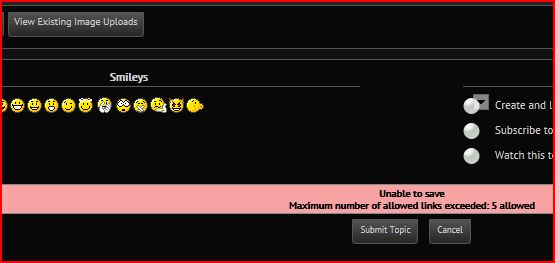
Followed your advise, in the sense that I’ve tried switching off those settings, because I already set then active before. During testing I bumped in to a message that maybe sheds some light on the problem (or not :) ). 

cf-uploadprobleemIE.JPG

All this time I’m looking at this problem from the side of images. But this message has something to do with links. So that would suggest the problem also could be found in another area. Or am I missing something else here. Haven’t found the solution yet though. So suggestions on another angle are still welcome….

MP Mr Papa
Mr Papa
Member

was there any links in this post?  and do you really have the option set to 5?

and can you upload now?  and get this when saving?

PE Petra
Petra
Member

Non other than the uploaded pictures via View Existing…

Yes it’s set to 5 (set it to 0 now but that didn’t help)

It’s possible to upload new images yes.

And yes I get this when try to save.

PE Petra
Petra
Member

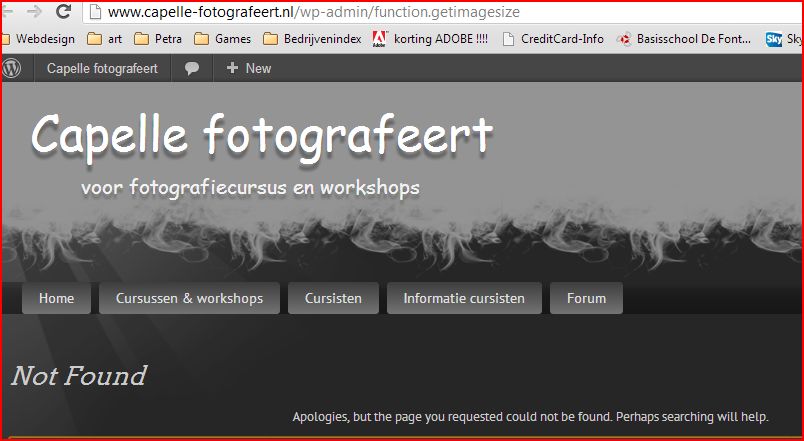
Maybe this has nothing to do with the problems at hand, but I found this in the error log and thought it would say more to you then it did to me :) .

cf-getimagesize.JPGcf-imagesize.JPGgetimagesize-vraag.JPG


I’ve been fiddiling around with some settings. Trial and error, when no use, then put settings back. Maybe this is nothing. But the dates are not from today, so I leave the judgement calls to you.